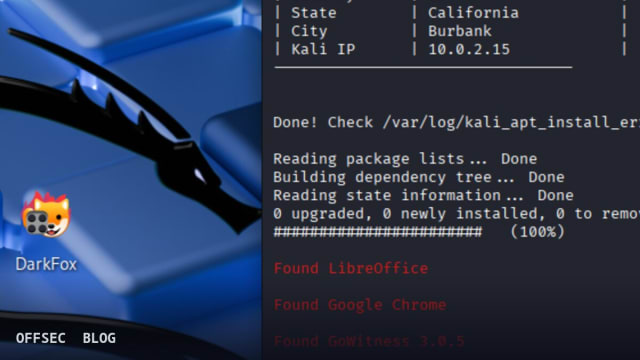
darkfox is a bash-driven investigation framework that automates .onion discovery, verification, and screenshot documentation through Tor for authorized CTI and OSINT analysts.
| Tool | aryanguenthner/darkfox — automated dark web CTI/OSINT investigation framework written in bash |
| Category | OSINT / Cyber Threat Intelligence automation |
| Primary Use | Automating .onion discovery via pyAhmia, site verification, and GoWitness screenshot capture, all routed through Tor via TorGhostNG |
| Safe Use | Explicitly intended for authorized security research, lawful CTI/OSINT investigations, law enforcement with proper authorization, academic research, and penetration testing with written permission |
| Telemetry Note | All traffic exits through the Tor network; artifacts are local only — results.onion.csv, gowitness.db, screenshots, and logs under /opt/darkfox/investigations and /opt/darkfox/logs |
darkfox positions itself as a dark web CTI and OSINT investigation framework, and unlike many tools that simply bolt a search wrapper onto Tor, it attempts to cover the full workflow an analyst would otherwise assemble by hand: discovery of .onion services, verification of live addresses, forensic documentation, and reporting. The project, written primarily in Shell under a GPL-3.0 license and carrying roughly 190 stars, targets Kali Linux as its reference platform. The README opens with an explicit legal disclaimer restricting use to authorized security research, cyber threat intelligence, and lawful OSINT, which sets the tone for the rest of the documentation — this is framed as an analyst utility, not an attack tool.
The core loop is straightforward and well-composed. You launch darkfox.sh interactively, enter a research topic, and the framework searches for .onion sites using pyAhmia, which queries the Ahmia search engine (version 0.7.3 is pinned in the components table). Discovered addresses are then validated by a custom onion_verifier.py script before GoWitness 3.0.5 captures screenshots. The clever part is the documentation philosophy: the README emphasizes that you can examine a dark web or deep web target without actually visiting it, relying on GoWitness captures served through a local gallery at http://127.0.0.1:7171. For CTI work this is genuinely valuable — it reduces analyst exposure to hostile .onion content while still producing reviewable evidence.
Network anonymity is delegated to TorGhostNG, which routes all tool traffic through the Tor network with country selection for exit nodes. The default configuration in darkfox.sh uses connect_tor_network "nl" for a Netherlands exit, with options including cz, de, us, ca, ru, br, gb, and fr. The script also performs network self-checks: the sample output shows a table comparing your public IP, country, and local IP before and after tunneling, giving the operator visible confirmation that routing actually switched. Disconnecting is documented as torghostng -x --dns. This verification step matters operationally, because silent Tor failures are one of the most common causes of accidental identity exposure in dark web research.
The output side is where darkfox shows its documentation bias. Findings land in a structured workspace under /opt/darkfox/investigations/[topic_name_timestamp]/, containing results.onion.csv with raw search output, onion_page_titles.csv with verified sites and titles, a screenshots/ directory, and the gowitness.db database. A LibreOffice Calc spreadsheet opens automatically for note-taking and tracking, which suggests the author's intended audience is analysts who live in worksheets rather than pipelines. Logs for Tor connections, verification, and screenshot capture are kept separately under /opt/darkfox/logs/, which is good practice for anyone who needs to reconstruct what an investigation actually did.
The dependency stack is heavier than the bash label suggests. Beyond Tor and TorGhostNG, the requirements list includes pyAhmia, GoWitness 3.0.5, LibreOffice Calc, Firefox ESR, Python 3 with dependencies managed in an isolated virtual environment under /opt/darkfox/venv, and root or sudo access on a Kali or Debian-based system with 4–16GB of RAM. Installation is a two-liner: sudo git clone https://github.com/aryanguenthner/darkfox /opt/darkfox followed by sudo bash darkfox.sh from that directory after chmod +x. The README states the installer automates dependency setup, which offsets some of the weight, but the VM recommendation in the security section should be taken seriously given how much third-party tooling is pulled in.
Security engineering inside the script gets unusual attention for a bash project. The README lists input sanitization to prevent command injection, proper permission management (explicitly avoiding 777), process cleanup handlers on exit, Tor connection verification, and the isolated Python venv. The version history notes a complete modular rewrite in v1.0 with these hardening changes, suggesting earlier iterations had the classic shell-script pitfalls. Operators should still audit darkfox.sh themselves before running it as root — a one-paragraph security claim is not a substitute for reading the orchestrator that will route all your traffic.
The threat model section is refreshingly honest. darkfox claims protection against IP exposure via Tor, command injection, and process leakage, while explicitly stating it does not protect against browser fingerprinting, advanced traffic analysis, malicious .onion sites, or social engineering. The best-practices guidance — dedicated VM, no personal accounts during investigations, a VPN layer before Tor, NoScript in Firefox, and regular updates — reads like advice from someone who has actually done dark web collection. The reminder that GoWitness screenshots of hostile sites are themselves untrusted artifacts is implicit in this framing, and analysts should treat captured content accordingly.
Advanced usage is minimal but practical. Screenshot throughput can be tuned by editing the --threads 10 parameter on the GoWitness invocation inside darkfox.sh, with the README cautioning against aggressive values. Troubleshooting covers the expected failure modes: Tor service checks via systemctl status tor and systemctl restart tor, manual GoWitness binary download from the pinned 3.0.5 release, ownership fixes on the investigations directory, and the about:config toggle network.dns.blockDotOnion set to false when Firefox ESR refuses to resolve .onion addresses. These are the exact friction points anyone combining these five tools manually would hit, which is the strongest evidence that the framework was built from real workflow pain.
Where darkfox fits in an authorized workflow is easiest to see against its stated alternatives — Spiderfoot for OSINT automation, Maltego for link analysis, OnionScan for .onion site analysis, and Shodan for internet-wide scanning. Those cover broad reconnaissance; darkfox narrows to the dark web collection phase and chains the pieces into one operator run. For a CTI team tracking ransomware gangs, leak sites, or criminal forums within the boundaries of authorized research, the value is the reduced interaction surface and the automatic evidence trail. It is not a link-analysis platform or a monitoring system — the roadmap hints at PDF, HTML, and JSON export formats and additional OSINT data sources as future contributions, confirming the current reporting ceiling is a spreadsheet and a screenshot database.
Overall, darkfox is a competent glue framework rather than a novel engine, and that is its strength: every component is a well-known, auditable tool, and the contribution is orchestration, safety defaults, and documentation. Run it in a dedicated VM, read darkfox.sh before giving it root, and verify the Tor indicator table on every run. Within those constraints it is a sensible addition to an authorized CTI toolkit.
aryanguenthner/darkfox.Educational analysis for authorized security professionals. Use only in controlled, authorized environments.
Related coverage


0 comentários:
Post a Comment
Note: Only a member of this blog may post a comment.