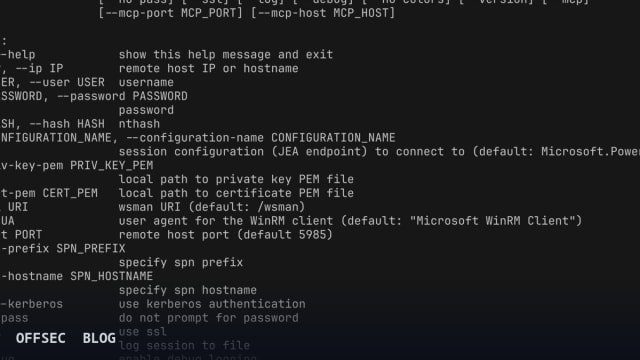
evil-winrm-py is a Python reimplementation of the classic evil-winrm Ruby shell, giving authorized pentesters an interactive WinRM console with transfers, Kerberos, and MCP integration.
| Tool | adityatelange/evil-winrm-py — Python-based interactive shell for remote Windows command execution over WinRM |
| Category | Remote administration / penetration testing shell (Python, MIT licensed, ~402 stars) |
| Primary Use | Interactive command execution and file transfer against Windows hosts during authorized assessments, supporting NTLM, Pass-the-Hash, Kerberos, certificate auth, and JEA endpoints |
| Safe Use | Strictly for authorized penetration tests, lab environments (e.g. HackTheBox-style ranges), and educational study of WinRM internals, as the README's own note requires explicit authorization |
| Telemetry Note | Generates WinRM/WSMan traffic on port 5985/5986, PowerShell operational logs (Event ID 4103/4104 script block logging), and 4624 logon events; a default Microsoft WinRM Client user agent is sent unless overridden with --ua |
evil-winrm-py is the Python-native answer to one of the longest-standing friction points in the original evil-winrm: its Ruby toolchain. The author's stated motivation in the README is straightforward — the original project's Ruby runtime is a hurdle for many operators, and a rewrite in Python lowers the entry barrier while tapping into Python's ecosystem. The result is a pip-installable, MIT-licensed interactive shell that speaks the WinRM protocol to remote Windows machines, currently sitting at roughly 402 stars on GitHub with active maintenance evident from versioned release assets.
Under the hood, the project leans on pypsrp, jborean93's PowerShell Remoting Protocol implementation for Python, rather than reinventing SOAP-over-HTTP transport. On top of that foundation, evil-winrm-py layers a polished operator experience built with prompt_toolkit and tqdm: tab-completion for local and remote paths (including paths with spaces), tab-completion of PowerShell cmdlets and helper functions, command history navigable with the arrow keys, and colorized output. These are quality-of-life features, but in practice they materially reduce typos and friction during long lab or engagement sessions.
The authentication surface is broad and clearly aimed at Active Directory assessment workflows. The README documents NTLM password auth, Pass-the-Hash via the -H/--hash flag accepting an nthash, certificate-based authentication using --priv-key-pem and --cert-pem, and full Kerberos support with customizable --spn-prefix and --spn-hostname options. SSL can be toggled with --ssl to wrap the session in TLS, and the WSMan URI defaults to /wsman but is overridable with --uri for non-standard endpoint deployments. Notably newer is the ability to connect to Just Enough Administration (JEA) session configurations through -c/--configuration-name, which defaults to Microsoft.PowerShell.
File handling is where the tool differentiates itself from a bare pypsrp script. The in-shell upload and download menu commands provide progress bars with speed and estimated-time reporting, and — more importantly — MD5 checksum verification on both ends, which the README highlights as part of its "stable and reliable" transfer design including large-file support. The README advises absolute paths for reliability, a practical tip that suggests the relative-path edge cases were real during development. For defenders, this means transfers over WinRM leave the usual WSMan HTTP traffic plus PowerShell-side artifacts.
The in-memory execution triad will be familiar to anyone who has used the original evil-winrm. The loadps command loads PowerShell functions from a local .ps1 into the interactive session, runps executes a local .ps1 on the remote host, loaddll loads a local .dll in memory as a PowerShell module, and runexe uploads and executes a local .exe in memory. From a defensive research perspective, these mechanics are exactly why PowerShell script block logging (Event ID 4104) and module logging remain high-value telemetry on any Windows estate — in-memory module loading is designed to avoid disk, not logging.
The most novel feature, and the one that marks this as a contemporary project, is the optional MCP server mode. With the mcp extra installed, evil-winrm-py --mcp starts a streamable HTTP MCP server — defaulting to 127.0.0.1:8000 — that exposes login, execute, and logout as tools for MCP-compatible AI clients, with multiple concurrent WinRM sessions managed via a session_id. The README carries an explicit warning here: because this mode enables remote command execution through MCP tools, it should only be exposed on trusted networks to trusted clients. That warning is well-placed; wiring an LLM agent to a Windows shell is a powerful automation pattern with an equally powerful blast radius.
Installation follows modern Python packaging conventions. The base install is a simple pip install evil-winrm-py, with optional extras via pip install evil-winrm-py[kerberos,mcp]. The Kerberos path on Linux requires system prerequisites — gcc, python3-dev, libkrb5-dev, and krb5-pkinit — because the gssapi and krb5 bindings compile from source, and the README candidly notes the build can take time. The project also recommends uv or pipx for isolated installs, and the tool has been packaged into several Unix distributions directly through their native package managers, a signal of genuine community adoption rather than a weekend experiment.
The CLI interface is compact and readable. Core connection flags are -i for host, -u/-p for credentials, defaulting to port 5985 for plain WinRM. The --ua flag allows changing the client user agent from the default Microsoft WinRM Client string — a legitimate option for blending with management tooling during authorized tests, and simultaneously a detail defenders should note when fingerprinting WinRM clients in their logs. --log records the session to file and --debug increases verbosity, both of which are useful for documentation and report-writing during engagements.
The in-shell menu also includes a services command that lists running services on the remote host, excluding system services — a quick situational-awareness primitive that fits the typical post-credential phase of an assessment where you're enumerating what's actually running before deciding what to examine next. Graceful Ctrl+C/Ctrl+D handling for terminating long-running commands rounds out the interactive experience, and the README credits the original Hackplayers/evil-winrm project openly alongside pypsrp, prompt_toolkit, and tqdm.
The README carries an unambiguous usage note: the tool is designed strictly for educational, ethical use and authorized penetration testing, and explicit authorization is required before touching any system. The topic tags — hackthebox, pentest-tool, active-directory, jea — position it squarely in the training-lab and professional-engagement niche rather than anything else. For blue teams, evil-winrm-py is a useful reference implementation for understanding what attacker-side WinRM interaction looks like: WSMan endpoint hits on 5985/5986, NTLM or Kerberos ticket logons (Event ID 4624 with 0x12 for NTLM-over-HTTP in this pattern), and PowerShell operational logs are the persistent residue regardless of which client is driving the session.
Documentation is notably complete for a project this size — a docs/ directory with dedicated installation and usage guides, a GitHub wiki, and a full help text embedded in the README. Combined with the Python 3.10+ baseline, the per-extras packaging, and the MCP integration, evil-winrm-py reads less like a toy clone and more like a deliberate modernization of a canonical tool by an author who explicitly frames the project as a learning exercise in WinRM internals — a framing that shows in the quality of the engineering.
adityatelange/evil-winrm-py.Educational analysis for authorized security professionals. Use only in controlled, authorized environments.
Related coverage


0 comentários:
Post a Comment
Note: Only a member of this blog may post a comment.