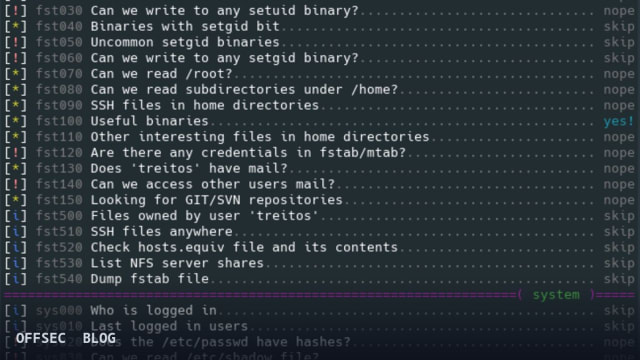
linux-smart-enumeration (lse) is a POSIX-compliant shell script that surfaces Linux security weaknesses in priority order, built for authorized pentests, CTFs, and OSCP-style labs.
| Tool | diego-treitos/linux-smart-enumeration — staged local Linux enumeration script for pentesting and CTFs |
| Category | Local enumeration / privilege escalation triage (Shell, GPL-3.0) |
| Primary Use | Running ./lse.sh on a lab box or authorized target to progressively discover privesc misconfigurations, from sudo rules to cron jobs |
| Safe Use | For authorized penetration tests, CTF and HackTheBox-style lab machines, OSCP practice, and defensive hardening audits of systems you own or are contracted to test |
| Telemetry Note | Pure shell execution that reads local files and process tables; leaves no persistent artifacts, but noisy full -l2 scans touching many paths are visible in audit logs and EDR process telemetry on hardened hosts |
linux-smart-enumeration, invoked as lse, occupies a specific niche in the local privilege-escalation toolkit: rather than dumping everything it can find about a Linux host in one undifferentiated flood, it stages its findings by importance. The project openly credits rebootuser/LinEnum as its inspiration and reuses many of that tool's tests, but the philosophical difference is deliberate. Where LinEnum front-loads raw output, lse tries to gradually expose information depending on its relevance from a privilege-escalation point of view, which changes how an operator actually works through a box during an authorized engagement or a CTF.
The core mechanic is the three-level verbosity system, selected with the -l flag. Level 0, the default, surfaces only highly important security flaws — the findings most likely to translate directly into a privilege-escalation path. Level 1, run as ./lse.sh -l1, adds interesting but less immediately actionable information. Level 2, ./lse.sh -l2, drops the triage entirely and dumps everything the script gathered. The README's guidance mirrors how a senior operator works anyway: run the default level first, look for green yes! markers indicating a likely quick win, and only widen the aperture if the high-value layer comes back empty. Piping level 2 through ./lse.sh -l2 | less -r keeps the firehose navigable.
Under the hood, the codebase is a single self-contained shell script, and since version 2.0 it is mostly POSIX compliant, validated with shellcheck and posh. That portability matters more than it sounds: post-exploitation footholds on lab machines frequently offer only a stripped /bin/sh with no bash and no Python interpreter, which kills many enumeration tools written in fancier languages. A POSIX-clean script runs wherever a minimal shell exists, which is exactly the constraint you face on embedded appliances, containers, and deliberately hardened CTF images.
One of the more thoughtful engineering touches is the built-in process monitor. lse watches for recurrent program executions while the rest of its tests are running, so the monitoring costs you no additional wall-clock time. Recurring tasks are a classic privilege-escalation surface — a cron job or systemd timer that runs a poorly-protected script is a textbook finding — and catching which processes actually re-execute, rather than guessing from configuration files alone, is a meaningful signal. The watch window defaults to 60 seconds and is tunable with the -p SECONDS parameter, or disabled entirely with -p 0. On a box with a five-minute cron cadence, cranking -p up before going for coffee is the right play.
Test selection is handled through the -s parameter, which accepts either whole sections or specific test IDs. The section taxonomy gives you a good map of the script's coverage: usr for user-related tests, sud for sudo configuration, fst for the filesystem, sys for system information, sec for security measures, ret for recurring tasks like cron jobs and timers, net for network configuration, srv for services, pro for processes, sof for installed software, ctn for container-specific checks covering Docker and LXC, and cve for CVE-related tests. The syntax is granular — ./lse.sh -l2 -s usr010,net,pro runs one named user test plus the entire network and process sections. This matters operationally when you already have a hypothesis, say a suspected sudo misconfiguration, and want sud results without waiting on a full filesystem walk.
That filesystem walk is the main time sink on large hosts, and the -e PATHS flag exists to manage it: a comma-separated list of paths to exclude, explicitly trading completeness for speed. Combined with -s, this gives you a tunable dial between a fast targeted pass and an exhaustive audit. The -i flag enables non-interactive mode, and -c disables color — worth knowing when your terminal is a raw reverse shell or when you're capturing output to a file for later diffing against a baseline. By default the script asks a few interactive questions, primarily the current user's password if known, which unlocks additional tests that require elevated or authenticated queries.
Version 2.10 added a feature that reflects real engagement workflow: the -S flag serves the script itself over HTTP from the host where it runs, so it can be retrieved from a remote machine. In lab topologies where you have a foothold on one box and want to pull the enumerator onto an adjacent host without re-establishing your transfer channel, this removes a step. Distribution-wise, the recommended path is fetching the latest release artifact directly — wget "https://github.com/diego-treitos/linux-smart-enumeration/releases/latest/download/lse.sh" -O lse.sh;chmod 700 lse.sh — or the curl equivalent with -Lo. Running from the release bundle rather than a git clone guarantees you're on a tagged, tested version.
With roughly 3,987 stars, a Shell codebase, and a GPL-3.0 license, lse sits comfortably in the standard kit for OSCP preparation and HackTheBox work — its own topic tags name oscp, ctfs, hackthebox, privesc, and privilege-escalation explicitly. The topics tell you who maintains it for: students and professionals working single-host privilege-escalation problems, not large-scale enterprise posture management. It is a tool you run as the user whose elevation you're investigating, on a machine within your lab or your engagement scope.
From a defensive perspective, the same tool is worth understanding even if you never run it offensively. Reading its test sections is effectively a hardening checklist: every query lse makes — sudo rules, writable paths, weak cron permissions, exposed credentials, container escape indicators — maps to a misconfiguration class you can audit and close on your own fleet. Its noise profile is also instructive; a full -l2 sweep touches a very broad set of files and walks large directory trees, exactly the kind of behavior that shows up in auditd rules and endpoint telemetry, while the default level-0 run is comparatively light. Blue teams who know what the tool looks like in logs are better positioned to catch unauthorized use on production systems.
The bottom line is that lse earns its place by respecting the operator's attention. The verbosity ladder, the parallel process monitor, granular -s selection, and POSIX portability all serve the same goal: get the highest-value privilege-escalation findings in front of you first, with an escape hatch to exhaustive output when triage comes up dry. For authorized assessments, certification labs, and CTF practice, it remains one of the cleaner answers to the question of what to run first after landing a low-privileged shell on Linux.
diego-treitos/linux-smart-enumeration.Educational analysis for authorized security professionals. Use only in controlled, authorized environments.
Related coverage


0 comentários:
Post a Comment
Note: Only a member of this blog may post a comment.