whatsapp-osint (now branded whatsapp-beacon) records when specified WhatsApp contacts come online and offline, storing every session in SQLite for authorized OSINT and research workflows.
| Tool | jasperan/whatsapp-osint — Selenium-based WhatsApp presence tracker with SQLite history, Excel/JSON export, and an HTML analytics dashboard |
| Category | OSINT / social media presence monitoring |
| Primary Use | Logging online/offline sessions and presence signals (last seen, typing…) for named contacts, then analyzing behavioral patterns via --analytics dashboards in authorized investigations |
| Safe Use | For authorized security research, law-enforcement investigations with proper legal basis, and educational study of WhatsApp's presence-leakage surface; the README itself carries a disclaimer against stalking and illegal use |
| Telemetry Note | From the target's side, persistent monitoring is largely invisible — which is precisely the privacy concern; on the operator's side, the tool drives a real Chrome session via WhatsApp Web, leaves a data/chrome_profile, log files in logs/whatsapp_beacon.log, and a local data/victims_logs.db, all of which document its use |
jasperan/whatsapp-osint, recently rebranded in its README as whatsapp-beacon, is a Python tool that answers a deceptively simple question: when is a given WhatsApp contact online? Around 1600 stars on GitHub and a polished PyPI release (pip install whatsapp-osint) signal that this is one of the more mature entries in the WhatsApp-presence-tracking niche. The original concept dates back to 2019, with a 2025 revamp for performance and usability, and the code ships under the MIT license for Python 3.10+ across Linux, macOS, and Windows. It is worth being blunt up front: this class of tool sits on an uncomfortable ethical boundary, because the capability it exposes — inferring a person's daily rhythm from online/offline metadata — is exactly the capability stalkers abuse. The README carries an explicit disclaimer restricting it to educational and research purposes, and any professional use should be grounded in an authorized investigative or research context.
Architecturally, whatsapp-beacon is a Selenium-driven automation layer over WhatsApp Web. It launches a real Chrome or Chromium browser, authenticates once via the standard QR-code pairing flow, and then reuses the saved browser profile at data/chrome_profile for subsequent runs. That single design decision — persisting the session rather than re-authenticating — is what makes long-running headless monitoring practical: after the first interactive login, the tool can run with --headless in the background indefinitely. If the session is not yet authenticated in headless mode, it captures the QR code to qrcode.png so the operator can scan it from a phone.
The tracking loop itself is presence scraping. While the target contact is open in the Web UI, the tool polls the status text WhatsApp renders — online, last seen today at 14:32, last seen yesterday at 21:05, typing… — and converts those signals into structured data. What the README calls presence intelligence is the most interesting recent addition: rather than only recording contiguous online blocks, it captures the full set of rich status strings between sessions, filling gaps in the timeline with what the README calls actionable evidence. Each observation is parsed into per-session online blocks and per-observation presence records with normalized last_seen timestamps.
Persistence is entirely local and refreshingly boring in an ops sense: every completed session lands in a SQLite database at data/victims_logs.db (the filename's phrasing is itself a hint about the author's threat-model framing). From there, the data flows outward through three export paths. --excel produces History_wp.xlsx with separate session and presence worksheets; --export-json dumps both datasets to a JSON file suitable for feeding into other pipeline tooling, with top-level keys sessions and presence; and notably, both the JSON export and the --last-seen query mode run entirely without launching a browser, reading straight from the local database. That last point matters for automation: retrieving the latest presence signal per contact (whatsapp-beacon -u "Maria" --last-seen, or --last-seen across all contacts) is a cheap, headless read-only operation.
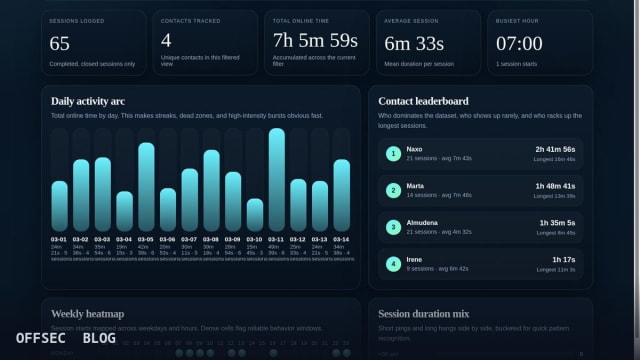
The analytics dashboard is where whatsapp-beacon separates itself from the many thin WhatsApp-tracker scripts on GitHub. Running whatsapp-beacon --analytics generates a static HTML report at analytics/index.html (overridable via --analytics-output) containing KPIs, a per-contact leaderboard with last-seen evidence, a schedule-regularity score on a 0-100 scale, daily online-time bar charts, a weekday/hour heatmap, session-duration distributions, recent and longest-session tables, a full presence trail, and live in-page filtering by contact. The regularity score is the analytically significant piece: it quantifies how predictable a contact's activity pattern is, which in an authorized investigative context (or in academic privacy research) is the exact metric for demonstrating how much behavioral signal WhatsApp leaks through presence metadata alone.
Installation is deliberately low-friction. Beyond the PyPI path, which registers two equivalent entry points (whatsapp-osint and whatsapp-beacon), the project ships a one-command install.sh bootstrap that clones the repo, creates a .venv, installs the package, verifies a browser binary is present, and — on Linux — will attempt sudo installs of missing Git, Python, or Chrome/Chromium dependencies. Driver management is delegated to Selenium Manager with automatic resolution, and the CLI exposes manual overrides via --chrome-driver-path and --chrome-binary-path for hosts with unusual browser locations. A third-party manager, OTinstaller from OSINTVerseHQ, is also documented but explicitly disclaimed as not maintained by this project.
Configuration lives in config.yaml by default, overridable with --config. The schema covers username, language (WhatsApp Web locale, relevant because the scraper must match localized status strings like en vs es), headless, excel, browser, log_level, data_dir, and chrome_binary_path. The language flag is a practical detail worth flagging to operators: presence parsing is inherently locale-sensitive, so a mismatch between the configured language and the Web UI will silently degrade signal collection. Logs land in logs/whatsapp_beacon.log, giving defenders or administrators a clear forensic artifact on the monitoring host.
For defenders and privacy researchers, this tool is more valuable as a documented case study than as anything to run against strangers. It concretely demonstrates that WhatsApp's presence surface — online status, last-seen timestamps, typing indicators — is machine-readable through an ordinary authenticated Web session with no API abuse, no protocol reverse engineering, and no client modification. That is the defensive takeaway: users who leave last-seen visibility enabled are exposing a high-resolution behavioral side channel, and the mitigation lives entirely in WhatsApp's privacy settings (restricting last-seen and online status to contacts or nobody), not in any tooling on the analyst side.
Operationally, know the constraints before you deploy it. Tracking requires the exact contact name as it appears in the operator's WhatsApp (-u "John Doe"), meaning the contact must already exist in your account — this is not a discovery tool, it is a longitudinal logger for known contacts. The --last-seen, --export-json, and --analytics modes all exit without browser interaction, so a sensible workflow is: run the Selenium tracker on a schedule, then query and visualize from the accumulated SQLite store independently. Expect the usual WhatsApp Web fragility — DOM changes in the Web client can break selectors, which is the historical failure mode of every tool in this category and one reason the 2025 revamp exists.
The bottom line for an authorized professional: whatsapp-beacon is well-engineered, actively maintained, cleanly packaged, and honest about its own ethical edge. Use it in labs, in consented demonstrations of metadata leakage, or in investigations where you have the legal standing to monitor the subject. The tool's own disclaimer — no stalking, no illegal activity — is not boilerplate to scroll past; it is the correct framing for a capability whose entire value proposition is watching someone's activity pattern without their knowledge.
jasperan/whatsapp-osint.Educational analysis for authorized security professionals. Use only in controlled, authorized environments.
Related coverage


0 comentários:
Post a Comment
Note: Only a member of this blog may post a comment.