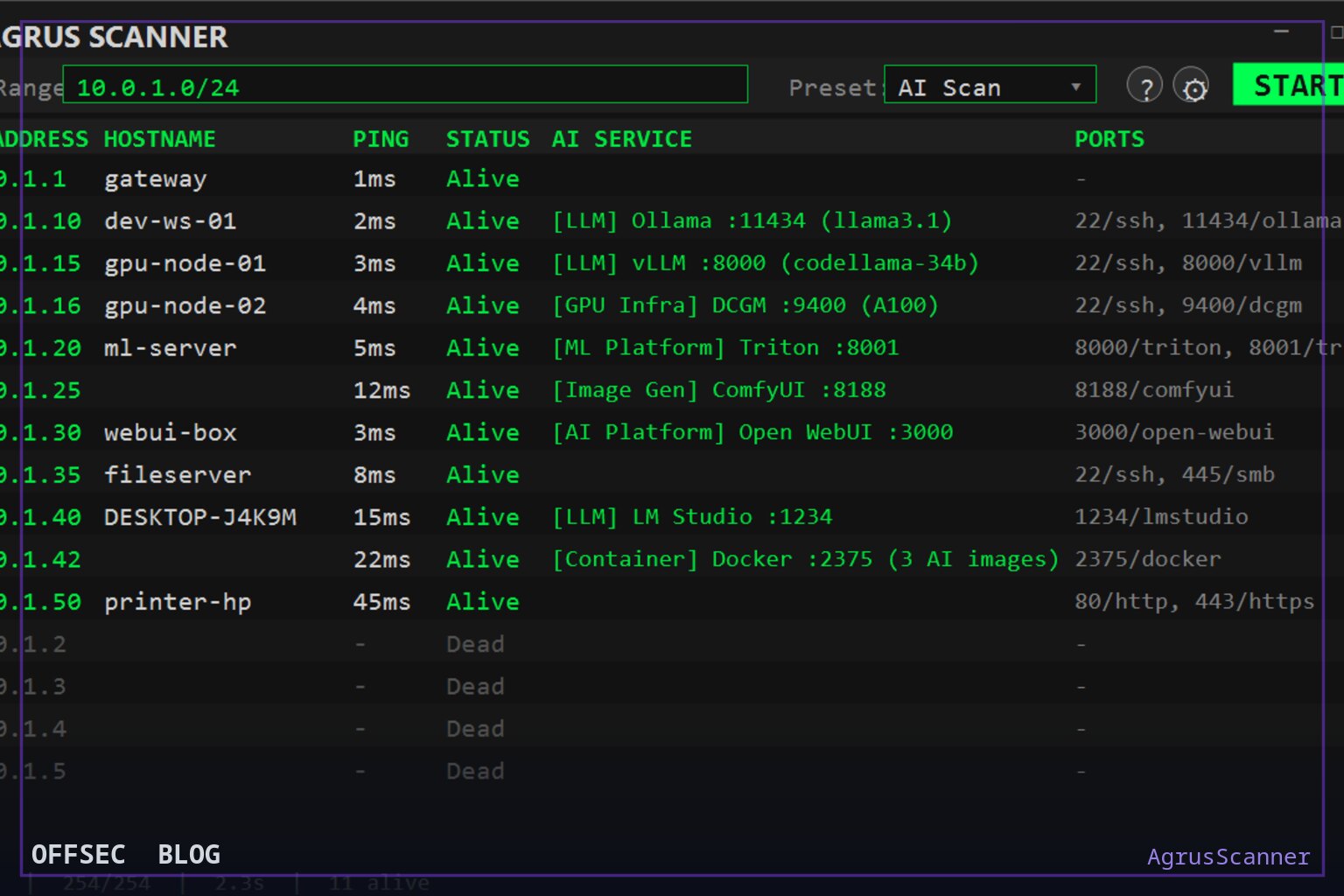
AgrusScanner is a Windows network reconnaissance tool that pairs ping sweeps and TCP port scans with 111 AI-specific probes, built for authorized teams mapping shadow AI and rogue LLM deployments.
| Tool | NYBaywatch/AgrusScanner — native C#/.NET WPF Windows scanner with deep AI/ML service and MCP server detection |
| Category | Network reconnaissance / AI service discovery (Windows desktop, C#/.NET, WPF) |
| Primary Use | Inventorying authorized networks for shadow AI: sweeping subnets, scanning TCP ports, then probing discovered services with AI-specific API calls to extract model names, versions, GPU, and container details |
| Safe Use | Intended for security teams, IT administrators, and researchers auditing networks they own or are explicitly authorized to assess; the prober only issues fixed, read-only discovery requests and never invokes tools on detected MCP servers |
| Telemetry Note | Detection traffic is deliberately observable: ICMP sweeps at up to 256 concurrent hosts, TCP connect scans against preset port profiles, unauthenticated GET probes like /.well-known/serviceinfo, and POST limited to MCP initialize/server/discover/ping — defenders can correlate these signatures, and sessions opened during MCP detection are closed immediately |
Most port scanners stop at telling you that something is listening. AgrusScanner, from NYBaywatch, takes the extra step that matters in 2026: after host discovery and port scanning, it actively probes discovered services with AI-specific API calls and pulls back model names, GPU details, container information, and version data. The README frames the mission plainly — visibility into shadow AI, rogue LLM deployments, and GPU infrastructure — for security teams, IT admins, and researchers working on networks they are authorized to assess. It is a native Windows application written in C#/.NET with WPF, deliberately avoiding Electron and embedded browsers so it launches fast and stays light on resources.
The origin story in the README is refreshingly candid. The author was frustrated that typical Windows scanning tools are slow, have poorly written interfaces, and render badly on 4K-plus monitors, and when a friend or client needed a way to scan for shadow AI with no Windows-native option available, the two problems converged. The result is a tool that works as a straightforward network scanner — ping sweeps, port scanning, and hostname resolution are all built in — but differentiates itself through the detection layer layered on top. You do not need a separate utility for basic recon, which lowers the friction of running it during an authorized internal audit.
Architecturally, the core capability is the probe catalog: 111 probe definitions across 13 categories, identifying more than 70 AI/ML services and MCP servers. The categories read like a field guide to self-hosted AI. LLM servers include Ollama, vLLM, HF TGI, llama.cpp, KoboldCpp, LM Studio, LiteLLM, Xinference, SGLang, NVIDIA NIM, exo, TabbyAPI, and LMDeploy fingerprinted via its distinctive default port 23333. Image generation covers Stable Diffusion (A1111), ComfyUI, and InvokeAI; voice includes whisper.cpp, GPT-SoVITS, and Kokoro-FastAPI; ML platforms cover NVIDIA Triton, TorchServe, MLflow, Ray Serve, and BentoML; and the vector-database category catches Qdrant, ChromaDB, Weaviate, and Milvus.,Agent platforms such as Langflow, AutoGen Studio, Letta, and OpenClaw, plus RAG stacks like RAGFlow, Onyx, and khoj`, round out coverage of the softer end of self-hosted AI infrastructure.
What makes this interesting from a design perspective is the fingerprinting technique. Detection goes well beyond port matching — the prober queries service-specific API endpoints. TabbyAPI, for example, is identified through its unauthenticated /.well-known/serviceinfo route, the only unauthenticated endpoint it exposes by default, while exo is caught via its dashboard/API on port 52415. Preset port profiles (Quick, Common, Extended, AI, Deep AI) front-load the ports where AI services actually live, and Docker container enumeration detects AI containers through an exposed Docker API using 70+ image pattern matches. GPU infrastructure discovery flags NVIDIA DCGM exporters and inference metrics endpoints — often the earliest signal that someone has quietly stood up inference hardware on a corporate VLAN.
The MCP detection deserves particular attention because Model Context Protocol servers are the newest shadow-IT surface. AgrusScanner detects MCP servers across all three transport generations: Streamable HTTP via initialize, the 2026-07-28 stateless server/discover method, and legacy HTTP+SSE. It reports the server's self-reported name, version, protocol version, and capability set (tools/resources/prompts). Version 1.0.2 added opt-in tool-name enumeration: after a successful handshake it issues a read-only tools/list on the same session and displays exposed tool names. The README is explicit about the safety posture here — sessions are closed immediately, and the scanner never invokes a tool. Seeing tools: read_file, write_file, query on a rogue listener is exactly the evidence an auditor needs to grade the risk.
The signature system mirrors how mature antivirus products separate engine from definitions. Every probe, AI port preset entry, and Docker image pattern lives in signatures/catalog.json, compiled into each release as an offline baseline. New signatures publish to a dedicated feed, typically weekly, fetched through downloads.jpftech.com; the app checks a few seconds after launch and daily thereafter, and settings offer Auto-install (default), Notify only, or Off. This means new AI services land as data updates without reinstalling, and dated versions like 2026.09.22.1 appear in the status bar.
The trust model around that feed is unusually well documented. Each package is signed in CI with a private key existing only as a GitHub Actions secret; the app carries the matching public key and refuses anything failing verification, older than the active set, requiring a newer app version, or failing structural checks such as duplicates, shrinkage, or invalid categories. The README states a hard constraint worth quoting in spirit: a signature package can only add or refine detection — it cannot add code, expand scanned ports beyond the AI preset, or make the scanner send anything beyond the fixed set of read-only discovery requests, with POST limited to MCP initialize, server/discover, and ping. Tampered, corrupted, or wrong-host files are discarded with the last good set remaining active. This is a thoughtful answer to the obvious supply-chain question a self-updating scanner raises.
Supply-chain hygiene extends to distribution. The MSI installer, AgrusScanner.exe, and AgrusScanner.dll are Authenticode-signed via Azure Trusted Signing (publisher Joseph Fago), and the README claims the release process aborts if any artifact is unsigned. The changelog also mentions 46 automated tests including tamper, wrong-key, downgrade, and live MCP-server fixtures — a level of engineering discipline that suggests the project is being maintained as a product rather than a weekend script. The license field shows NOASSERTION, so commercial-use terms should be verified before wide deployment in an enterprise.
Beyond the desktop UI, AgrusScanner can run as an MCP server itself (--mcp-only mode, disableable in settings), exposing its scanning tools to agents like Claude Code, OpenClaw, and Cursor through the same protocol it detects. This creates a slightly meta situation — an AI agent autonomously scanning for other AI services — and it also makes the tool scriptable inside agent-driven audit workflows. Results export to CSV or TXT from the toolbar, and the UI updates live as a scan progresses, which matters when sweeping a /24 at the stated 256 concurrent ICMP workers.
For defenders, the telemetry note cuts both ways, and that is a feature. Because the probe set is fixed, read-only, and documented, a blue team can write detections for exactly this pattern: ICMP sweeps followed by targeted TCP connects on AI-preset ports like 8811, 8931, 6274, or 8123, followed by unauthenticated GETs to well-known metadata routes. Running it against your own ranges before an attacker (or a rogue employee) does, and watching what lights up in your SIEM, is precisely the authorized use case this tool is built for.
At 22 stars and a v1.0.2 release dated September 2026, AgrusScanner is young but clearly actively maintained, with a coherent roadmap separating engine changes from signature delivery. For anyone responsible for inventorying unsanctioned AI on a Windows-managed estate, it compresses what would otherwise be a scattered nmap plus manual curl effort into one signed, self-updating package — with the restraint of never calling the tools it finds.
NYBaywatch/AgrusScanner.Educational analysis for authorized security professionals. Use only in controlled, authorized environments.


0 comentários:
Post a Comment
Note: Only a member of this blog may post a comment.