SECURITY EDUCATION, PRIVACY GUIDANCE, THREAT AWARENESS, OPEN SOURCE TOOLS, RESEARCH NOTES, AND RESPONSIBLE TECHNOLOGY CONTENT

  • Penetration Testing Distribution - BackBox

    BackBox is a penetration test and security assessment oriented Ubuntu-based Linux distribution providing a network and informatic systems analysis toolkit. It includes a complete set of tools required for ethical hacking and security testing...
  • Pentest Distro Linux - Weakerth4n

    Weakerth4n is a penetration testing distribution which is built from Debian Squeeze.For the desktop environment it uses Fluxbox...
  • The Amnesic Incognito Live System - Tails

    Tails is a live system that aims to preserve your privacy and anonymity. It helps you to use the Internet anonymously and circumvent censorship...
  • Penetration Testing Distribution - BlackArch

    BlackArch is a penetration testing distribution based on Arch Linux that provides a large amount of cyber security tools. It is an open-source distro created specially for penetration testers and security researchers...
  • The Best Penetration Testing Distribution - Kali Linux

    Kali Linux is a Debian-based distribution for digital forensics and penetration testing, developed and maintained by Offensive Security. Mati Aharoni and Devon Kearns rewrote BackTrack...
  • Friendly OS designed for Pentesting - ParrotOS

    Parrot Security OS is a cloud friendly operating system designed for Pentesting, Computer Forensic, Reverse engineering, Hacking, Cloud pentesting...

Saturday, September 10, 2016

The Best Penetration Testing Distribution - Kali Linux 2016.2


This release brings a whole bunch of interesting news and updates into the world of Kali.

New KDE, MATE, LXDE, e17, and Xfce Builds

Although users are able to build and customize their Kali Linux ISOs however they wish, we often hear people comment about how they would love to see Kali with $desktop_environment instead of GNOME. We then engage with those people passionately, about how they can use live-build to customize not only their desktop environment but pretty much every aspect of their ISO, together with the ability to run scripted hooks at every stage of the ISO creation process – but more often than not, our argument is quickly lost in random conversation. As such, we’ve decided to expand our “full” 64bit releases with additional Desktop Environment flavored ISOs, specifically KDE, Mate, LXDE and Enlightenment. These can now be downloaded via our Kali Download page. For those curious to see what the various Desktop Environments look like, we’ve taken some screenshots for you:

Gnome

E17

KDE

LXDE

Mate

Xfce

Kali Linux Weekly ISOs

Constantly keeping Kali on the bleeding edge means frequent updates to packages on an ongoing basis. Since our last release several months ago, there’s a few hundred new or updated packages which have been pushed to the Kali repos. This means that anyone downloading an ISO even 3 months old has somewhat of a long “apt-get dist-upgrade” ahead of them. To help avoid this situation, from this release onwards, we’ll be publishing updated weekly builds of Kali that will be available to download via our mirrors. Speaking of mirrors, we are always in need of support in this area – if you’re capable of running a high-bandwidth mirror and would like to support our project, please check out our Kali Mirrors page.

Bug Fixes and OS Improvements

During these past few months, we’ve been busy adding new relevant tools to Kali as well as fixing various bugs and implementing OS enhancements. For example, something as simple as adding HTTPS support in busybox now allows us to preseed Kali installations securely over SSL. This is a quick and cool feature to speed up your installations and make them (almost) unattended, even if you don’t have a custom built ISO.


To set a preseed file during an install process, choose the “install” option, then hit “tab” and enter the preseed directive, together with a URL pointing to your actual preseed file.
preseed/url=https://www.kali.org/dojo/preseed.cfg

Read more here.


Share:

Wednesday, September 7, 2016

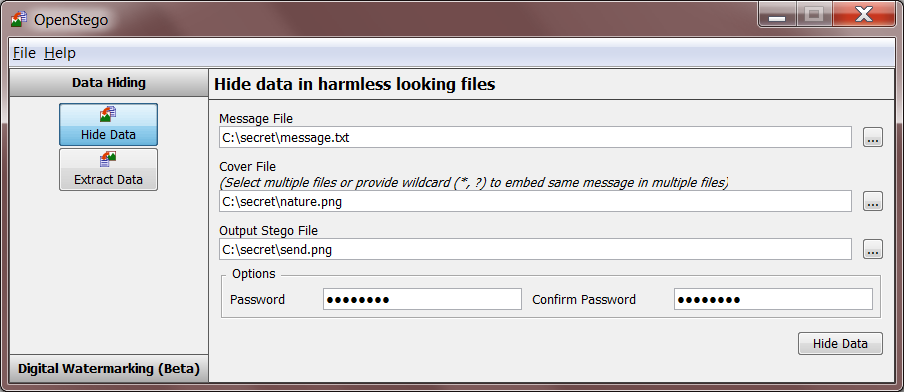
Steganography Application (Data Hiding and Watermarking) - OpenStego


OpenStego is a steganography application that provides two functionalities:
  1. Data Hiding: It can hide any data within a cover file (e.g. images).
  2. Watermarking: Watermarking files (e.g. images) with an invisible signature. It can be used to detect unauthorized file copying. 

Usage
  • For GUI:
     java -jar lib\openstego.jar    

OR
Use the bundled batch file or shell script to launch the GUI.
  • For command line interface:
Refer to online documentation .

Plugins help
Please use the following command to get plugin specific help:
   java -jar lib\openstego.jar -help -a <algorithm_name>   


Developing new plugin
To add a new plugin, the following abstract class must be implemented:
net.sourceforge.openstego.OpenStegoPlugin
Read the API documentation for the details of the methods to be implemented. In addition, the following utility class can be used to handle multilingual string labels for the plugin:
net.sourceforge.openstego.util.LabelUtil
A new namespace should be added to LabelUtil class for each new plugin. Same namespace can also be used for exception messages while throwing OpenStegoException .
After implementing the plugin classes, create new file named OpenStegoPlugins.external and put the fully qualified name of the class which implements OpenStegoPlugin in the file. Make sure that this file is put directly under the CLASSPATH while invoking the application.
Please refer to the net.sourceforge.openstego.plugin.lsb package sources for sample plugin implementation.

Author
Samir Vaidya (syvaidya [at] gmail)
Copyright (c) 2007-2015

See Also
Project homepage: http://www.openstego.com
Blog: http://syvaidya.blogspot.com


Share:

Sunday, September 4, 2016

Top List Password - Word List 10 Million Passwords


In cryptography, a brute-force attack consists of an attacker trying many passwords or passphrases with the hope of eventually guessing correctly. The attacker systematically checks all possible passwords and passphrases until the correct one is found. Alternatively, the attacker can attempt to guess the key which is typically created from the password using a key derivation function. This is known as an exhaustive key search.

A brute-force attack is a cryptanalytic attack that can, in theory, be used to attempt to decrypt any encrypted data (except for data encrypted in an information-theoretically secure manner). Such an attack might be used when it is not possible to take advantage of other weaknesses in an encryption system (if any exist) that would make the task easier.

When password guessing, this method is very fast when used to check all short passwords, but for longer passwords other methods such as the dictionary attack are used because a brute-force search takes too long. Longer passwords, passphrases and keys have more possible values, making them exponentially more difficult to crack than shorter ones.

Brute-force attacks can be made less effective by obfuscating the data to be encoded making it more difficult for an attacker to recognize when the code has been cracked or by making the attacker do more work to test each guess. One of the measures of the strength of an encryption system is how long it would theoretically take an attacker to mount a successful brute-force attack against it.

Brute-force attacks are an application of brute-force search, the general problem-solving technique of enumerating all candidates and checking each one.

Source: Wikipedia 

VirusTotal

Pass: offsec

By: OffSec


Share:

Anti-forensic Kill-switch - usbkill


usbkill  is an anti-forensic kill-switch that waits for a change on your USB ports and then immediately shuts down your computer.

To run:


sudo python usbkill.py
or


sudo python3 usbkill.py
Related project; same idea, but implemented as a Linux driver: https://github.com/NateBrune/silk-guardian

Why?

Some reasons to use this tool:

º In case the police or other thugs come busting in (or steal your laptop from you when you are at a public library, as happened to Ross). The police commonly uses a  mouse jiggler  to keep the screensaver and sleep mode from activating.
º You don’t want someone to add or copy documents to or from your computer via USB.
º You want to improve the security of your (encrypted) home or corporate server (e.g. Your Raspberry).

[!] Important: Make sure to use disk encryption for all folders that contain information you want to be private. Otherwise they will get it anyway. Full disk encryption is the easiest and surest option if available

Tip: Additionally, you may use a cord to attach a USB key to your wrist. Then insert the key into your computer and start usbkill. If they steal your computer, the USB will be removed and the computer shuts down immediately.


Feature List

(version 1.0-rc.4)

º Compatible with Linux, *BSD and OS X.
º Shutdown the computer when there is USB activity.
º Customizable. Define which commands should be executed just before shut down.
º Ability to whitelist a USB device.
º Ability to change the check interval (default: 250ms).
º Ability to melt the program on shut down.
º RAM and swap wiping.
º Works with sleep mode (OS X).
º No dependency except secure-delete iff you want usbkill to delete files/folders for you or if you want to wipe RAM or swap. sudo apt-get install secure-delete
º Sensible defaults

Supported command line arguments (partially for devs):

º -h or --help: show help message, exit.
º --version: show version of the program, exit.
º --no-shut-down: if a malicious change on the USB ports is detected, execute all the (destructive) commands you defined in settings.ini, but don’t turn off the computer.
º --cs: Copy program folder settings.ini to /etc/usbkill/settings.ini

Contact

hephaestos@riseup.net - PGP/GPG Fingerprint: 8764 EF6F D5C1 7838 8D10 E061 CF84 9CE5 42D0 B12B


Share:
Established in 2015. Offensive Sec Blog has been sharing security research, hacking tools, threat intelligence, and offensive security content since 2015.
Copyright © OffSec Blog | Powered by OffensiveSec
Design by OffSec | Built for the security community