SECURITY EDUCATION, PRIVACY GUIDANCE, THREAT AWARENESS, OPEN SOURCE TOOLS, RESEARCH NOTES, AND RESPONSIBLE TECHNOLOGY CONTENT

  • Penetration Testing Distribution - BackBox

    BackBox is a penetration test and security assessment oriented Ubuntu-based Linux distribution providing a network and informatic systems analysis toolkit. It includes a complete set of tools required for ethical hacking and security testing...
  • Pentest Distro Linux - Weakerth4n

    Weakerth4n is a penetration testing distribution which is built from Debian Squeeze.For the desktop environment it uses Fluxbox...
  • The Amnesic Incognito Live System - Tails

    Tails is a live system that aims to preserve your privacy and anonymity. It helps you to use the Internet anonymously and circumvent censorship...
  • Penetration Testing Distribution - BlackArch

    BlackArch is a penetration testing distribution based on Arch Linux that provides a large amount of cyber security tools. It is an open-source distro created specially for penetration testers and security researchers...
  • The Best Penetration Testing Distribution - Kali Linux

    Kali Linux is a Debian-based distribution for digital forensics and penetration testing, developed and maintained by Offensive Security. Mati Aharoni and Devon Kearns rewrote BackTrack...
  • Friendly OS designed for Pentesting - ParrotOS

    Parrot Security OS is a cloud friendly operating system designed for Pentesting, Computer Forensic, Reverse engineering, Hacking, Cloud pentesting...

Friday, February 4, 2022

Hashdb-Ida - HashDB API Hash Lookup Plugin For IDA Pro


HashDB IDA Plugin

Malware string hash lookup plugin for IDA Pro. This plugin connects to the OALABS HashDB Lookup Service.


Adding New Hash Algorithms

The hash algorithm database is open source and new algorithms can be added on GitHub here. Pull requests are mostly automated and as long as our automated tests pass the new algorithm will be usable on HashDB within minutes.


Using HashDB

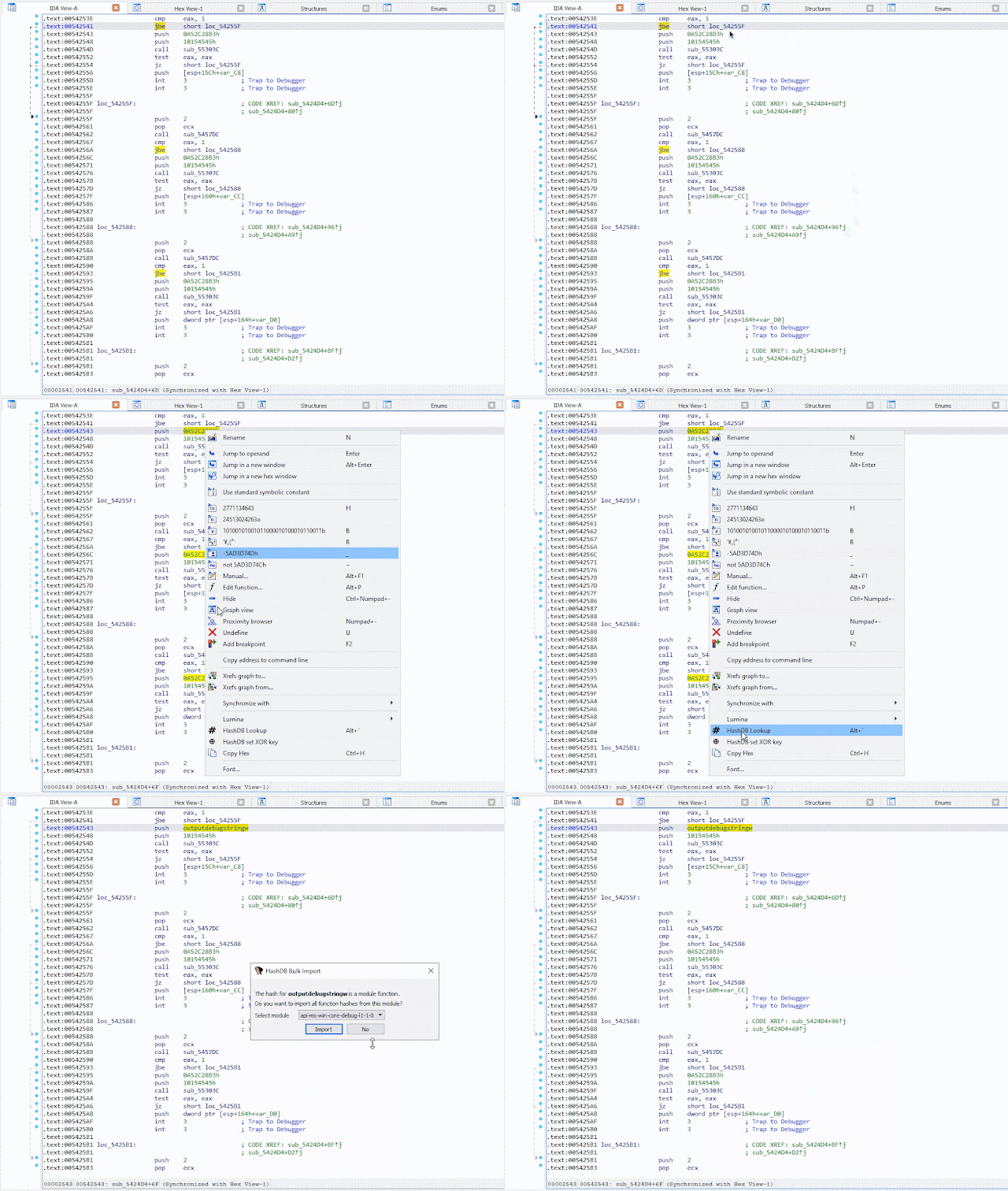
HashDB can be used to look up strings that have been hashed in malware by right-clicking on the hash constant in the IDA disassembly view and launching the HashDB Lookup client.


Settings

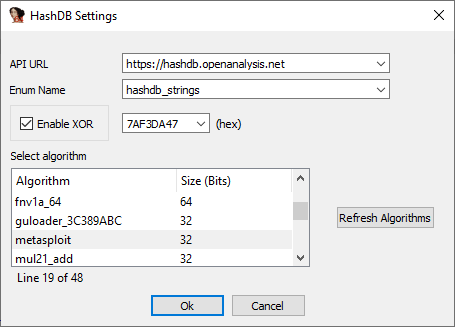
Before the plugin can be used to look up hashes the HashDB settings must be configured. The settings window can be launched from the plugins menu Edit->Plugins->HashDB.


Hash Algorithms

Click Refresh Algorithms to pull a list of supported hash algorithms from the HashDB API, then select the algorithm used in the malware you are analyzing.


Optional XOR

There is also an option to enable XOR with each hash value as this is a common technique used by malware authors to further obfuscate hashes.


API URL

The default API URL for the HashDB Lookup Service is https://hashdb.openanalysis.net/. If you are using your own internal server this URL can be changed to point to your server.


Enum Name

When a new hash is identified by HashDB the hash and its associated string are added to an enum in IDA. This enum can then be used to convert hash constants in IDA to their corresponding enum name. The enum name is configurable from the settings in the event that there is a conflict with an existing enum.


Hash Lookup

Once the plugin settings have been configured you can right-click on any constant in the IDA disassembly window and look up the constant as a hash. The right-click also provides a quick way to set the XOR value if needed.



Bulk Import

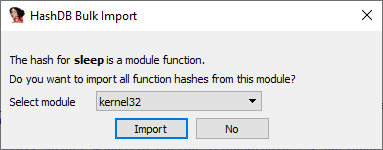
If a hash is part of a module a prompt will ask if you want to import all the hashes from that module. This is a quick way to pull hashes in bulk. For example, if one of the hashes identified is Sleep from the kernel32 module, HashDB can then pull all the hashed exports from kernel32.


Algorithm Search

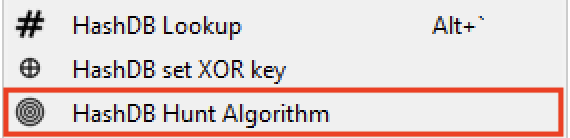
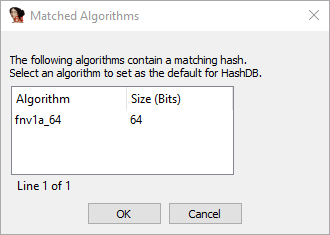
HashDB also includes a basic algorithm search that will attempt to identify the hash algorithm based on a hash value. The search will return all algorithms that contain the hash value, it is up to the analyst to decide which (if any) algorithm is correct. To use this functionality right-click on the hash constant and select HashDB Hunt Algorithm.


All algorithms that contain this hash will be displayed in a chooser box. The chooser box can be used to directly select the algorithm for HashDB to use. If Cancel is selected no algorithm will be selected.


Dynamic Import Address Table Hash Scanning

Instead of resolving API hashes individually (inline in code) some malware developers will create a block of import hashes in memory. These hashes are then all resolved within a single function creating a dynamic import address table which is later referenced in the code. In these scenarios the HashDB Scan IAT function can be used.


Simply select the import hash block, right-click and choose HashDB Scan IAT. HashDB will attempt to resolve each individual integer type (DWORD/QWORD) in the selected range.


Installing HashDB

Before using the plugin you must install the python requests module in your IDA environment. The simplest way to do this is to use pip from a shell outside of IDA.
pip install requests

Once you have the requests module installed simply copy the latest release of hashdb.py into your IDA plugins directory and you are ready to start looking up hashes!


Compatibility Issues

The HashDB plugin has been developed for use with the IDA 7+ and Python 3 it is not backwards compatible.




Share:

Smuggler - An HTTP Request Smuggling / Desync Testing Tool


An HTTP Request Smuggling / Desync testing tool written in Python 3


IMPORTANT

This tool does not guarantee no false-positives or false-negatives. Just because a mutation may report OK does not mean there isn't a desync issue, but more importantly just because the tool indicates a potential desync issue does not mean there definitely exists one. The script may encounter request processors from large entities (i.e. Google/AWS/Yahoo/Akamai/etc..) that may show false positive results.


Installation

  1. git clone https://github.com/defparam/smuggler.git
  2. cd smuggler
  3. python3 smuggler.py -h

Example Usage

Single Host:

python3 smuggler.py -u <URL>

List of hosts:

cat list_of_hosts.txt | python3 smuggler.py

Options

usage: smuggler.py [-h] [-u URL] [-v VHOST] [-x] [-m METHOD] [-l LOG] [-q]
[-t TIMEOUT] [--no-color] [-c CONFIGFILE]

optional arguments:
-h, --help show this help message and exit
-u URL, --url URL Target URL with Endpoint
-v VHOST, --vhost VHOST
Specify a virtual host
-x, --exit_early Exit scan on first finding
-m METHOD, --method METHOD
HTTP method to use (e.g GET, POST) Default: POST
-l LOG, --log LOG Specify a log file
-q, --quiet Quiet mode will only log issues found
-t TIMEOUT, --timeout TIMEOUT
Socket timeout value Default: 5
--no-color Suppress color codes
-c CONFIGFILE, --configfile CONFIGFILE
Filepath to the configuration file of payloads

Smuggler at a minimum requires either a URL via the -u/--url argument or a list of URLs piped into the script via stdin. If the URL specifies https:// then Smuggler will connect to the host:port using SSL/TLS. If the URL specifies http:// then no SSL/TLS will be used at all. If only the host is specified, then the script will default to https://

Use -v/--vhost <host> to specify a different host header from the server address

Use -x/--exit_early to exit the scan of a given server when a potential issue is found. In piped mode smuggler will just continue to the next host on the list

Use -m/--method <method> to specify a different HTTP verb from POST (i.e GET/PUT/PATCH/OPTIONS/CONNECT/TRACE/DELETE/HEAD/etc...)

Use -l/--log <file> to write output to file as well as stdout

Use -q/--quiet reduce verbosity and only log issues found

Use -t/--timeout <value> to specify the socket timeout. The value should be high enough to conclude that the socket is hanging, but low enough to speed up testing (default: 5)

Use --no-color to suppress the output color codes printed to stdout (logs by default don't include color codes)

Use -c/--configfile <configfile> to specify your smuggler mutation configuration file (default: default.py)


Config Files

Configuration files are python files that exist in the ./config directory of smuggler. These files describe the content of the HTTP requests and the transfer-encoding mutations to test.

Here is example content of default.py:

def render_template(gadget):
RN = "\r\n"
p = Payload()
p.header = "__METHOD__ __ENDPOINT__?cb=__RANDOM__ HTTP/1.1" + RN
# p.header += "Transfer-Encoding: chunked" +RN
p.header += gadget + RN
p.header += "Host: __HOST__" + RN
p.header += "User-Agent: Mozilla/5.0 (Windows NT 10.0; Win64; x64) AppleWebKit/537.36 (KHTML, like Gecko) Chrome/78.0.3904.87 Safari/537.36" + RN
p.header += "Content-type: application/x-www-form-urlencoded; charset=UTF-8" + RN
p.header += "Content-Length: __REPLACE_CL__" + RN
return p


mutations["nameprefix1"] = render_template(" Transfer-Encoding: chunked")
mutations["tabprefix1"] = render_template("Transfer-Encoding:\tchunked")
mutations["tabprefix2"] = render_template("Transfer-Encoding\t:\tchunked")
mutations["space1"] = render_template("Transfer-Encoding : chunked")

for i in [0x1,0x4,0x8,0x9,0xa,0xb,0xc,0xd,0x1F,0x20,0x7f,0xA0,0xFF]:
mutations["midspace-% 02x"%i] = render_template("Transfer-Encoding:%cchunked"%(i))
mutations["postspace-%02x"%i] = render_template("Transfer-Encoding%c: chunked"%(i))
mutations["prespace-%02x"%i] = render_template("%cTransfer-Encoding: chunked"%(i))
mutations["endspace-%02x"%i] = render_template("Transfer-Encoding: chunked%c"%(i))
mutations["xprespace-%02x"%i] = render_template("X: X%cTransfer-Encoding: chunked"%(i))
mutations["endspacex-%02x"%i] = render_template("Transfer-Encoding: chunked%cX: X"%(i))
mutations["rxprespace-%02x"%i] = render_template("X: X\r%cTransfer-Encoding: chunked"%(i))
mutations["xnprespace-%02x"%i] = render_template("X: X%c\nTransfer-Encoding: chunked"%(i))
mutations["endspacerx-%02x"%i] = render_template("Transfer-Encoding: chunked\r%cX: X"%(i))
mutations["endspacexn-%02x"%i] = render_template("Transfer-Encoding: chunked%c\nX: X"%(i))

There are no input arguments yet on specifying your own customer headers and user-agents. It is recommended to create your own configuration file based on default.py and modify it to your liking.

Smuggler comes with 3 configuration files: default.py (fast), doubles.py (niche, slow), exhaustive.py (very slow) default.py is the fastest because it contains less mutations.

specify configuration files using the -c/--configfile <configfile> command line option


Payloads Directory

Inside the Smuggler directory is the payloads directory. When Smuggler finds a potential CLTE or TECL desync issue, it will automatically dump a binary txt file of the problematic payload in the payloads directory. All payload filenames are annotated with the hostname, desync type and mutation type. Use these payloads to netcat directly to the server or to import into other analysis tools.


Helper Scripts

After you find a desync issue feel free to use my Turbo Intruder desync scripts found Here: https://github.com/defparam/tiscripts DesyncAttack_CLTE.py and DesyncAttack_TECL.py are great scripts to help stage a desync attack


License

These scripts are released under the MIT license. See LICENSE.


Share:
Established in 2015. Offensive Sec Blog has been sharing security research, hacking tools, threat intelligence, and offensive security content since 2015.
Copyright © OffSec Blog | Powered by OffensiveSec
Design by OffSec | Built for the security community