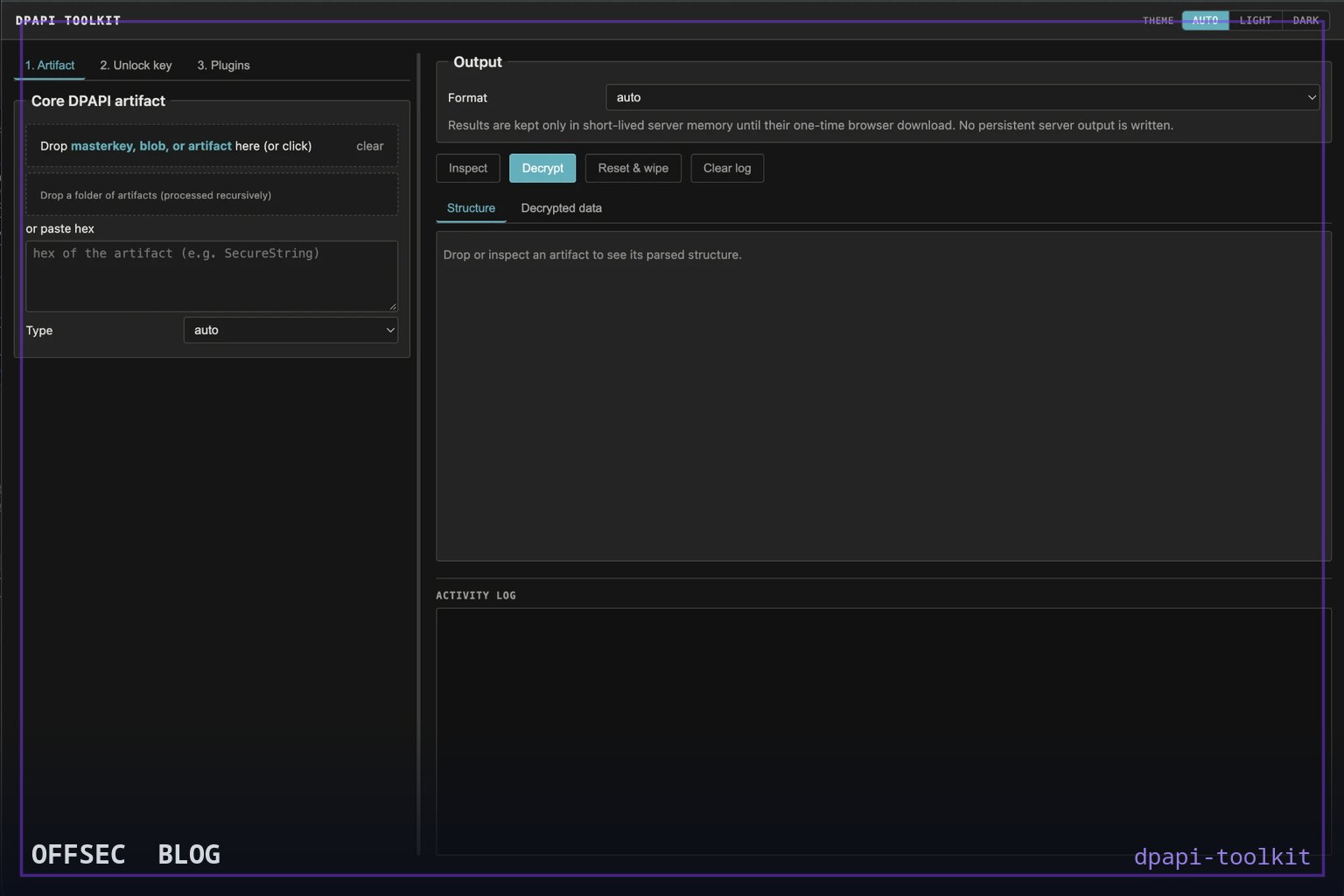
A purely offline Python toolkit that identifies any collected Windows DPAPI artifact, names the exact master key it needs, and decrypts it once you supply key material — built for authorized red team, DFIR, and research workflows.
| Tool | crypt0p3g/dpapi-toolkit — offline identification and decryption of Windows DPAPI artifacts from collected files, CLI plus local web UI |
| Category | Offline credential-artifact analysis / DFIR tooling (Python, MIT) |
| Primary Use | Examining already-collected DPAPI evidence — Credential Manager files, Vault .vpol/.vcrd, master keys, Wi-Fi profiles, RDCMan .rdg, CAPI/CNG keys, Chromium os_crypt — during authorized assessments and incident response |
| Safe Use | Authorized penetration tests, DFIR engagements, and lab research on systems and evidence you own or are explicitly authorized to examine; the tool is deliberately offline and performs no live-host access or brute-forcing |
| Telemetry Note | Effectively silent by design: no network activity, no RPC, no LSASS access, no persistent decrypted output — defenders observing its use would see only analyst-side execution on a workstation processing collected files |
dpapi-toolkit attacks a real workflow gap in Windows evidence analysis: most DPAPI tooling is either a one-off script per artifact format or a feature buried inside a much larger offensive framework. This project, written in Python and MIT-licensed, takes the opposite approach — a single tool covering the whole artifact range, driven entirely from files you have already collected. You point it at an artifact, it recognizes the format, tells you exactly which master key GUID it needs, and decrypts as soon as you supply the matching key material. There is no live-host interaction anywhere in the design, which is precisely what makes it useful as much for DFIR as for red-team reporting.
The supported format list is unusually broad. Beyond classic DPAPI blobs and user/SYSTEM master keys, the README enumerates Credential Manager entries, Windows Vault .vpol/.vcrd files, CREDHIST password history, Wi-Fi personal and enterprise/PEAP profiles, RDP .rdp files and RDCMan .rdg/.settings files, CAPI/CNG private keys and certificates with optional PKCS#12/PFX bundling, PowerShell ConvertFrom-SecureString and Export-Clixml SecureStrings, KeePass ProtectedUserKey.bin, SCCM policy secrets, Outlook IMAP material, software-backed Windows Hello/NGC keys, and Chromium os_crypt keys. An optional plugin extends coverage to DPAPI-NG offline SID-descriptor blobs when a matching KDS root key is supplied. That breadth in one coherent tool is the core pitch.
Architecturally the project is clean and easy to audit. dpapi_toolkit.py contains the core parsing and decryption logic plus the CLI, and is importable as a module. dpapi_web.py is a thin, dependency-free web front end built on the standard-library HTTP server, running over the same core so results match the command line exactly. dpapi_plugins.py handles manifest discovery and lazy loading for the optional plugins, which live in plugins/certificate_pfx/, plugins/cachedata/, plugins/dpapi_ng/, and plugins/windows_hives/. The only hard dependency is the cryptography library; python-registry, dpapi-ng, and impacket are opt-in for specific features.
The workflow the README demonstrates is inspect-first, decrypt-second — a sensible forensic pattern. Running the tool against a Credential Manager file with no key material at all prints the embedded DPAPI blob and the master-key GUID it requires. Only then do you supply the Protect directory, the SID, and the password via flags like --masterkey-dir and --password to unlock the master key and decrypt. Appending --structure to any artifact prints its parsed fields without decrypting, which is useful for documentation and triage. This two-phase flow applies uniformly across every supported format, which flattens the learning curve considerably.
The key-material model is one of the README's strongest sections: a lookup table mapping what you already possess to the exact CLI option. Master-key files need --masterkey FILE plus an unlocking method; already-decrypted 64-byte keys go to --real-masterkey; a DPAPI_SYSTEM secret (40-byte MachineKey || UserKey, or 44 bytes with version) goes to --dpapi-system; NT hashes, SHA1(UTF-16LE password) hashes, SID-bound prekeys, credential keys, and AD domain backup material in PEM/DER/PVK/CAPI forms each have their own flag. The README is explicit that the DPAPI_SYSTEM value is not itself a master key — you use it to decrypt a GUID-named SYSTEM master key first, then chain the resulting 64-byte key. That kind of precision saves analysts real time.
Installation is minimal and the invocation examples in the README are documentation of the tool's own interface rather than an attack chain: python3 -m pip install cryptography for the core, and python3 dpapi_toolkit.py CREDENTIAL_FILE for inspection. The web UI launches with python3 dpapi_web.py and binds to 127.0.0.1:8765 only — there is deliberately no LAN or public bind option. According to docs/web-ui.md, decrypted results are held in bounded memory for a single one-time download and never written to persistent output, which is a thoughtful hygiene property for a tool handling recovered secrets.
The offline posture is enforced, not just claimed. The scope section states there is no outbound HTTP, RPC, domain-controller, BKRP, LSASS, or live-registry access, and no password or PIN brute-forcing — you must supply artifacts and key material explicitly. The limitations are documented with equal candor: only the primary encrypted section of a master-key file is tried (the local secondary BackupKey fallback is not yet used), TPM-bound Windows Hello material cannot be recovered offline from copied files, the NGC/PIN node chain is unimplemented (only software CNG PIN keys work), and CNG DSA V2 keys over 1024 bits are preserved as raw decrypted bytes rather than converted to PEM.
A notable feature for authorized engagements is the crackable-hash export in docs/hashes.md. The tool emits $DPAPImk$ hashes targeting Hashcat modes 15300/15310/15900/15910, $MSONLINEACCOUNT$ CacheData verifiers for mode 33700, and local SAM NT hashes — but, consistent with its no-brute-force stance, the toolkit itself tests no candidates; it only produces the verifiers for external, separately controlled recovery tooling. The cachedata plugin similarly decrypts Entra ID/CloudAP CacheData with a single supplied known password or exports the mode-33700 verifier.
From a defensive research perspective, dpapi-toolkit is as valuable as a teaching artifact as it is a utility. The acknowledgements section maps the entire public lineage of offline DPAPI analysis: mimikatz as the reference for master-key, blob, CREDHIST, Vault, and credential formats; impacket for its dpapi.py/secretsdump logic and hive classes; SharpDPAPI as a cross-check for the credential, Vault, CAPI, and CNG paths; and dpapi-ng behind the optional plugin. Reading the code alongside those references is a compact education in how DPAPI key derivation actually works.
For blue teams, the tool's existence is a useful reminder of the threat model: any adversary who collects a user's Protect folder plus the account password, or a domain backup key, can decrypt that user's DPAPI-protected secrets entirely offline — invisible to host telemetry because nothing ever touches the victim machine again. That argues for protecting domain backup keys aggressively, monitoring for bulk copies of Protect directories and registry hives, and treating Credential Manager and RDCMan stores as credential caches requiring the same hygiene as password managers. As an educational analysis: the tool documents the boundary; the mitigation work is yours.
The project is young but coherent — 22 stars on GitHub, MIT-licensed, Python 3.10+, with a genuinely deep documentation set spanning docs/cli-reference.md, docs/artifacts.md, docs/web-ui.md, docs/plugins.md, and docs/hashes.md, plus built-in help via -h, -hh, and the --structure flag. For professionals with authorized access to Windows evidence who want one consistent interface instead of a folder of per-format scripts, dpapi-toolkit is a credible addition to the toolkit, and its strict offline design makes it one of the easier DPAPI tools to justify in a client-facing report.
crypt0p3g/dpapi-toolkit.Educational analysis for authorized security professionals. Use only in controlled, authorized environments.


0 comentários:
Post a Comment
Note: Only a member of this blog may post a comment.