SECURITY EDUCATION, PRIVACY GUIDANCE, THREAT AWARENESS, OPEN SOURCE TOOLS, RESEARCH NOTES, AND RESPONSIBLE TECHNOLOGY CONTENT

  • Penetration Testing Distribution - BackBox

    BackBox is a penetration test and security assessment oriented Ubuntu-based Linux distribution providing a network and informatic systems analysis toolkit. It includes a complete set of tools required for ethical hacking and security testing...
  • Pentest Distro Linux - Weakerth4n

    Weakerth4n is a penetration testing distribution which is built from Debian Squeeze.For the desktop environment it uses Fluxbox...
  • The Amnesic Incognito Live System - Tails

    Tails is a live system that aims to preserve your privacy and anonymity. It helps you to use the Internet anonymously and circumvent censorship...
  • Penetration Testing Distribution - BlackArch

    BlackArch is a penetration testing distribution based on Arch Linux that provides a large amount of cyber security tools. It is an open-source distro created specially for penetration testers and security researchers...
  • The Best Penetration Testing Distribution - Kali Linux

    Kali Linux is a Debian-based distribution for digital forensics and penetration testing, developed and maintained by Offensive Security. Mati Aharoni and Devon Kearns rewrote BackTrack...
  • Friendly OS designed for Pentesting - ParrotOS

    Parrot Security OS is a cloud friendly operating system designed for Pentesting, Computer Forensic, Reverse engineering, Hacking, Cloud pentesting...

Wednesday, January 6, 2016

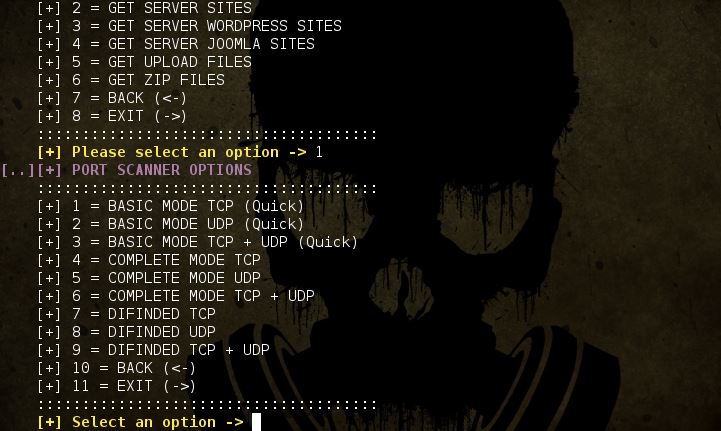
ATSCAN - Server, Site and Dork Scanner


Description:

  • ATSCAN Version 2 
  • Dork scanner. 
  • XSS scanner. 
  • Sqlmap. 
  • LFI scanner.
  • Filter wordpress and Joomla sites in the server. 
  • Find Admin page.
  • Decode / Encode MD5 + Base64. 

Libreries to install:

ap-get install libxml-simple-perl
NOTE: Works in linux platforms.

Permissions & Executution:

$chmod +x atscan.pl 
perl ./atscan.pl

Screenshots: 


Share:

Pyersinia - Network Attack Tool


Pyersinia is a similar tool to Yersinia, but Pyersinia is implemented in Python using Scapy. The main objective is the realization of network attacks such as spoofing ARP, DHCP DoS , STP DoS among others. The community can add new attacks on the tool in a simple way, using plugins. This is because Pyersinia uses the STB (Security Tools Builder) framework.

What's new?

Adding new attacks on the tool is a simple task because we use the framework STB (Security Tool Builder). The new attacks are added by plugins.

Installation

Install pyersinia is so easy:
$ python -m pip install pyersinia
Or install from Pypi:
# pip install pyersinia

Quick start

You can display inline help writing:

positional arguments:
arp_spoof_TARGET
arp_spoof_VICTIM

optional arguments:
-h, --help show this help message and exit
-v, --verbosity verbosity level
-a ATTACK_TYPE choose supported attack type
-i IFACE choose network interface

supported attacks:
arp_spoof, dhcp_discover_dos, stp_tcn, stp_conf, stp_root

examples:
python pyersinia.py -a arp_spoof 127.0.0.1 127.0.0.1
python pyersinia.py -a stp_root -i eth0


Share:

Collection Of Awesome Honeypots


A curated list of awesome honeypots, tools, components and much more. The list is divided into categories such as web, services, and others, focusing on open source projects.

Honeypots

  • Database Honeypots
  • Web honeypots
  • Service Honeypots
    • Kippo - Medium interaction SSH honeypot
    • honeyntp - NTP logger/honeypot
    • honeypot-camera - observation camera honeypot
    • troje - a honeypot built around lxc containers. It will run each connection with the service within a seperate lxc container.
    • slipm-honeypot - A simple low-interaction port monitoring honeypot
    • HoneyPy - A low interaction honeypot
    • Ensnare - Easy to deploy Ruby honeypot
    • RDPy - A Microsoft Remote Desktop Protocol (RDP) honeypot in python
  • Anti-honeypot stuff
    • kippo_detect - This is not a honeypot, but it detects kippo. (This guy has lots of more interesting stuff)
  • ICS/SCADA honeypots
    • Conpot - ICS/SCADA honeypot
    • scada-honeynet - mimics many of the services from a popular PLC and better helps SCADA researchers understand potential risks of exposed control system devices
    • SCADA honeynet - Building Honeypots for Industrial Networks
  • Deployment
  • Data Analysis
    • Kippo-Graph - a full featured script to visualize statistics from a Kippo SSH honeypot
    • Kippo stats - Mojolicious app to display statistics for your kippo SSH honeypot
  • Other/random
    • NOVA uses honeypots as detectors, looks like a complete system.
    • Open Canary - A low interaction honeypot intended to be run on internal networks.
    • libemu - Shellcode emulation library, useful for shellcode detection.
  • Open Relay Spam Honeypot
  • Botnet C2 monitor
    • Hale - Botnet command & control monitor
  • IPv6 attack detection tool
    • ipv6-attack-detector - Google Summer of Code 2012 project, supported by The Honeynet Project organization
  • Research Paper
    • vEYE - behavioral footprinting for self-propagating worm detection and profiling
  • Honeynet statistics
    • HoneyStats - A statistical view of the recorded activity on a Honeynet
  • Dynamic code instrumentation toolkit
    • Frida - Inject JavaScript to explore native apps on Windows, Mac, Linux, iOS and Android
  • Front-end for dionaea
    • DionaeaFR - Front Web to Dionaea low-interaction honeypot
  • Tool to convert website to server honeypots
    • HIHAT - ransform arbitrary PHP applications into web-based high-interaction Honeypots
  • Malware collector
    • Kippo-Malware - Python script that will download all malicious files stored as URLs in a Kippo SSH honeypot database
  • Sebek in QEMU
    • Qebek - QEMU based Sebek. As Sebek, it is data capture tool for high interaction honeypot
  • Malware Simulator
    • imalse - Integrated MALware Simulator and Emulator
  • Distributed sensor deployment
    • Smarthoneypot - custom honeypot intelligence system that is simple to deploy and easy to manage
    • Modern Honey Network - Multi-snort and honeypot sensor management, uses a network of VMs, small footprint SNORT installations, stealthy dionaeas, and a centralized server for management
    • ADHD - Active Defense Harbinger Distribution (ADHD) is a Linux distro based on Ubuntu LTS. It comes with many tools aimed at active defense preinstalled and configured
  • Network Analysis Tool
  • Log anonymizer
    • LogAnon - log anonymization library that helps having anonymous logs consistent between logs and network captures
  • server
    • Honeysink - open source network sinkhole that provides a mechanism for detection and prevention of malicious traffic on a given network
  • Botnet traffic detection
    • dnsMole - analyse dns traffic, and to potentionaly detect botnet C&C server and infected hosts
  • Low interaction honeypot (router back door)
  • honeynet farm traffic redirector
    • Honeymole - eploy multiple sensors that redirect traffic to a centralized collection of honeypots
  • HTTPS Proxy
    • mitmproxy - allows traffic flows to be intercepted, inspected, modified and replayed
  • spamtrap
  • System instrumentation
    • Sysdig - open source, system-level exploration: capture system state and activity from a running Linux instance, then save, filter and analyze
  • Honeypot for USB-spreading malware
    • Ghost-usb - honeypot for malware that propagates via USB storage devices
  • Data Collection
    • Kippo2MySQL - extracts some very basic stats from Kippo’s text-based log files (a mess to analyze!) and inserts them in a MySQL database
    • Kippo2ElasticSearch - Python script to transfer data from a Kippo SSH honeypot MySQL database to an ElasticSearch instance (server or cluster)
  • Passive network audit framework parser
    • pnaf - Passive Network Audit Framework
  • VM Introspection
    • VIX virtual machine introspection toolkit - VMI toolkit for Xen, called Virtual Introspection for Xen (VIX)
    • vmscope - Monitoring of VM-based High-Interaction Honeypots
    • vmitools - C library with Python bindings that makes it easy to monitor the low-level details of a running virtual machine
  • Binary debugger
  • Mobile Analysis Tool
    • APKinspector - APKinspector is a powerful GUI tool for analysts to analyze the Android applications
    • Androguard - Reverse engineering, Malware and goodware analysis of Android applications ... and more
  • Low interaction honeypot
    • Honeypoint - platform of distributed honeypot technologies
    • Honeyperl - Honeypot software based in Perl with plugins developed for many functions like : wingates, telnet, squid, smtp, etc
  • Honeynet data fusion
    • HFlow2 - data coalesing tool for honeynet/network analysis
  • Server
    • LaBrea - takes over unused IP addresses, and creates virtual servers that are attractive to worms, hackers, and other denizens of the Internet.
    • Kippo - SSH honeypot
    • KFSensor - Windows based honeypot Intrusion Detection System (IDS)
    • Honeyd Also see more honeyd tools
    • Glastopf - Honeypot which emulates thousands of vulnerabilities to gather data from attacks targeting web applications
    • DNS Honeypot - Simple UDP honeypot scripts
    • Conpot - ow interactive server side Industrial Control Systems honeypot
    • Bifrozt - High interaction honeypot solution for Linux based systems
    • Beeswarm - Honeypot deployment made easy
    • Bait and Switch - redirects all hostile traffic to a honeypot that is partially mirroring your production system
    • Artillery - open-source blue team tool designed to protect Linux and Windows operating systems through multiple methods
    • Amun - vulnerability emulation honeypot
  • VM cloaking script
    • Antivmdetect - Script to create templates to use with VirtualBox to make vm detection harder
  • IDS signature generation
  • lookup service for AS-numbers and prefixes
  • Web interface (for Thug)
    • Rumal - Thug's Rumāl: a Thug's dress & weapon
  • Data Collection / Data Sharing
    • HPfriends - data-sharing platform
    • HPFeeds - lightweight authenticated publish-subscribe protocol
  • Distributed spam tracking
  • Python bindings for libemu
  • Controlled-relay spam honeypot
  • Visualization Tool
  • central management tool
  • Network connection analyzer
  • Virtual Machine Cloaking
  • Honeypot deployment
  • Automated malware analysis system
  • Low interaction
  • Low interaction honeypot on USB stick
  • Honeypot extensions to Wireshark
  • Data Analysis Tool
  • Telephony honeypot
  • Client
  • Visual analysis for network traffic
  • Binary Management and Analysis Framework
  • Honeypot
  • PDF document inspector
  • Distribution system
  • HoneyClient Management
  • Network Analysis
  • Hybrid low/high interaction honeypot
  • Sebek on Xen
  • SSH Honeypot
  • Glastopf data analysis
  • Distributed sensor project
  • a pcap analyzer
  • Client Web crawler
  • network traffic redirector
  • Honeypot Distribution with mixed content
  • Honeypot sensor
  • File carving
  • File and Network Threat Intelligence
  • data capture
  • SSH proxy
  • Anti-Cheat
  • behavioral analysis tool for win32
  • Live CD
  • Spamtrap
  • Commercial honeynet
  • Server (Bluetooth)
  • Dynamic analysis of Android apps
  • Dockerized Low Interaction packaging
  • Network analysis
  • Sebek data visualization
  • SIP Server
  • Botnet C2 monitoring
  • low interaction
  • Malware collection

Honeyd Tools

Network and Artifact Analysis

  • Sandbox
  • Sandbox-as-a-Service
    • malwr.com - free malware analysis service and community
    • detux.org - Multiplatform Linux Sandbox
    • Joebox Cloud - analyzes the behavior of malicious files including PEs, PDFs, DOCs, PPTs, XLSs, APKs, URLs and MachOs on Windows, Android and Mac OS X for suspicious activities

Data Tools

  • Front Ends
    • Tango - Honeypot Intelligence with Splunk
    • Django-kippo - Django App for kippo SSH Honeypot
    • Wordpot-Frontend - a full featured script to visualize statistics from a Wordpot honeypot -Shockpot-Frontend - a full featured script to visualize statistics from a Shockpot honeypot
  • Visualization
    • HoneyMap - Real-time websocket stream of GPS events on a fancy SVG world map
    • HoneyMalt - Maltego tranforms for mapping Honeypot systems

Share:

Flashlight - Automated Information Gathering Tool for Penetration Testers


Pentesters spend too much time during information gathering phase. Flashlight (Fener) provides services to scan network/ports and gather information rapidly on target networks. So Flashlight should be the choice to automate discovery step during a penetration test. In this article, usage of Flashligh application will be explained.

For more information about using Flashlight, "-h" or "-help" option can be used.

Parameters for the usage of this application can be listed below

  • -h, --help: It shows the information about using the Flashlight application.
  • -p <ProjectName> or --project < ProjectName>: It sets project name with the name given. This paramater can be used to save different projects in different workspaces.
  • -s <ScanType> or –scan_type < ScanType >: It sets the type of scans. There are four types of scans: Active Scan , Passive Scan, Screenshot Scan and Filtering. These types of scans will be examined later in detail.
  • -d < DestinationNetwork>, --destination < DestinationNetwork >: It sets the network or IP where the scan will be executed against.
  • -c <FileName>, --config <FileName>: It specifies the configuration file. The scanning is realized according to the information in the configuration file.
  • -u <NetworkInterface>, --interface < NetworkInterface>: It sets the network interface used during passive scanning.
  • -f <PcapFile>, --pcap_file < PcapFile >: It sets cap File that will be filtered.
  • -r <RasterizeFile>, --rasterize < RasterizeFile>: It sets the specific location of Rasterize JavaScript file which will be used for taking screenshots.
  • -t <ThreadNumber>, --thread <Threadnember>: It sets the number of Threads. This parameter is valid only on screenshot scanning (screen scan) mode.
  • -o <OutputDiectory>, --output < OutputDiectory >: It sets the directory in which the scan results can be saved. The scan results are saved in 3 sub-directories : For Nmap scanning results, "nmap" subdirectory, for PCAP files "pcap" subdirectory and for screenshots "screen" subdirectories are used. Scan results are saved in directory, shown under the output directories by this parameter. If this option is not set, scan results are saved in the directory that Flashlight applications are running.
  • -a, --alive: It performs ping scan to
  • “-I” parameter is chosen.
  • -l <LogFile>, --log < LogFile >: It specifies the log file to save the scan results. If not set, logs are saved in “flashlight.log” file in working directory.
  • -k <PassiveTimeout>, --passive_timeout <PassiveTimeout>: It specifies the timeout for sniffing in passive mode. Default value is 15 seconds. This parameter is used for passive scan.
  • -m, --mim: It is used to perform MITM attack.
  • -n, --nmap-optimize: It is used to optimize nmap scan.
  • -v, --verbose: It is used to list detailed information.
  • -V, --version: It specifies version of the program. 
  •  discover up IP addresses before the actual vulnerability scan. It is used for active scan.
  • -g <DefaultGateway>, --gateway < DefaultGateway >: It identifies the IP address of the gateway. If not set, interface with “-I” parameter is chosen.
  • -l <LogFile>, --log < LogFile >: It specifies the log file to save the scan results. If not set, logs are saved in “flashlight.log” file in working directory.
  • -k <PassiveTimeout>, --passive_timeout <PassiveTimeout>: It specifies the timeout for sniffing in passive mode. Default value is 15 seconds. This parameter is used for passive scan.
  • -m, --mim: It is used to perform MITM attack.
  • -n, --nmap-optimize: It is used to optimize nmap scan.
  • -v, --verbose: It is used to list detailed information.
  • -V, --version: It specifies version of the program. 

Installation

apt-get install nmap tshark tcpdump dsniff
In order to install phantomjs easily, you can download and extract it from https://bitbucket.org/ariya/phantomjs/downloads.
Flashlight application can perform 3 basic scan types and 1 analysis type. Each of them are listed below.

1) Passive Scan

In passive scan, no packets are sent into wire. This type of scan is used for listening network and analyzing packets.
To launch a passive scan by using Flashlight; a project name should be specified like “passive-pro-01”. In the following command, packets that are captured by eth0 are saved into “/root/Desktop/flashlight/output/passive-project-01/pcap" directory, whereas, Pcap files and all logs are saved into "/root/Desktop/log" directory.

./flashlight.py -s passive -p passive-pro-01 -i eth0 -o /root/Desktop/flashlight_test -l /root/Desktop/log –v

2) Active Scan

During an active scan, NMAP scripts are used by reading the configuration file. An example configuration file (flashlight.yaml) is stored in “config” directory under the working directory.
tcp_ports:
   - 21, 22, 23, 25, 80, 443, 445, 3128, 8080
udp_ports:
   - 53, 161
scripts:
   - http-enum

According to "flashlight.yaml" configuration file, the scan executes against "21, 22, 23, 25, 80, 443, 445, 3128, 8080" TCP ports, "53, 161" UDP ports, "http-enum" script by using NMAP.

Note: During active scan “screen_ports” option is useless. This option just works with screen scan.
“-a” option is useful to discover up hosts by sending ICMP packets. Beside this, incrementing thread number by using “-t” parameter increases scan speed.

./flashlight.py -p active-project -s active -d 192.168.74.0/24 –t 30 -a -v

By running this command; output files in three different formats (Normal, XML and Grepable) are emitted for four different scan types (Operating system scan, Ping scan, Port scan and Script Scan).

The example commands that Flashlight Application runs can be given like so:

  • Operating System Scan: /usr/bin/nmap -n -Pn -O -T5 -iL /tmp/"IPListFile" -oA /root/Desktop/flashlight/output/active-project/nmap/OsScan-"Date"
  • Ping Scan: /usr/bin/nmap -n -sn -T5 -iL /tmp/"IPListFile" -oA /root/Desktop/flashlight/output/active-project/nmap/PingScan-"Date"
  • Port Scan: /usr/bin/nmap -n -Pn -T5 --open -iL /tmp/"IPListFile" -sS -p T:21,22,23,25,80,443,445,3128,8080,U:53,161 -sU -oA /root/Desktop/flashlight/output/active-project/nmap/PortScan-"Date"
  • Script Scan: /usr/bin/nmap -n -Pn -T5 -iL /tmp/"IPListFile" -sS -p T:21,22,23,25,80,443,445,3128,8080,U:53,161 -sU --script=default,http-enum -oA /root/Desktop/flashlight/output/active-project/nmap/ScriptScan-"Date" 

 3) Screen Scan

Screen Scan is used to get screenshots of web sites/applications by using directives in config file (flashlight.yaml). Directives in this file provide screen scan for four ports ("80, 443, 8080, 8443") screen_ports: - 80, 443, 8080, 8443 Sample screen scan can be performed like this: ``` ./flashlight.py -p project -s screen -d 192.168.74.0/24 -r /usr/local/rasterize.js -t 10 -v ```

4) Filtering

Filtering option is used to analyse pcap files. An example for this option is shown below: ``` ./flashlight.py -p filter-project -s filter -f /root/Desktop/flashlight/output/passive-project-02/pcap/20150815072543.pcap -v ``` By running this command some files are created on “filter” sub-folder. This option analyzes PCAP packets according to below properties:
  • Windows hosts
  • Top 10 DNS requests

Share:

Mosca - Static Analysis Tool To Find Bugs


Just another Simple static analysis tool to find bugs like a grep unix command, at mosca have a modules, that was call egg, each egg is a simple config to find bug at especific language like PHP,Ruby,ASP etc... Example of egg config at directory "egg", If Mosca read a line with vunerability of egg in source code, then, mosca have alert about vulnerability and save at logs.


Share:

Joomlavs - A Black Box, Joomla Vulnerability Scanner


JoomlaVS is a Ruby application that can help automate assessing how vulnerable a Joomla installation is to exploitation. It supports basic finger printing and can scan for vulnerabilities in components, modules and templates as well as vulnerabilities that exist within Joomla itself.

How to install
JoomlaVS has so far only been tested on Debian, but the installation process should be similar across most operating systems.
  1. Ensure Ruby [2.0 or above] is installed on your system
  2. Clone the source code using git clone https://github.com/rastating/joomlavs.git
  3. Install bundler and required gems using sudo gem install bundler && bundle install

How to use
The only required option is the -u / --url option, which specifies the address to target. To do a full scan, however, the --scan-all option should also be specified, e.g. ruby joomlavs.rb -u yourjoomlatarget.com --scan-all .
A full list of options can be found below:
usage: joomlavs.rb [options]
Basic options
-u, --url The Joomla URL/domain to scan.
--basic-auth <username:password> The basic HTTP authentication credentials
-v, --verbose Enable verbose mode
Enumeration options
-a, --scan-all Scan for all vulnerable extensions
-c, --scan-components Scan for vulnerable components
-m, --scan-modules Scan for vulnerable modules
-t, --scan-templates Scan for vulnerable templates
-q, --quiet Scan using only passive methods
Advanced options
--follow-redirection Automatically follow redirections
--no-colour Disable colours in output
--proxy <[protocol://]host:port> HTTP, SOCKS4 SOCKS4A and SOCKS5 are supported. If no protocol is given, HTTP will be used
--proxy-auth <username:password> The proxy authentication credentials
--threads The number of threads to use when multi-threading requests
--user-agent The user agent string to send with all requests


Share:

MassBleed - Mass SSL Vulnerability Scanner


USAGE
 sh massbleed.sh [CIDR|IP] [single|port|subnet] [port] [proxy]

ABOUT
This script has four main functions with the ability to proxy all connections:
  1. To mass scan any CIDR range for OpenSSL vulnerabilities via port 443/tcp (https) (example: sh massbleed.sh 192.168.0.0/16)
  2. To scan any CIDR range for OpenSSL vulnerabilities via any custom port specified (example: sh massbleed.sh 192.168.0.0/16 port 8443)
  3. To individual scan every port (1-10000) on a single system for vulnerable versions of OpenSSL (example: sh massbleed.sh 127.0.0.1 single)
  4. To scan every open port on every host in a single class C subnet for OpenSSL vulnerabilities (example: sh massbleed.sh 192.168.0. subnet)

PROXY: A proxy option has been added to scan via proxychains. You'll need to configure /etc/proxychains.conf for this to work.

PROXY USAGE EXAMPLES: (example: sh massbleed.sh 192.168.0.0/16 0 0 proxy) (example: sh massbleed.sh 192.168.0.0/16 port 8443 proxy) (example: sh massbleed.sh 127.0.0.1 single 0 proxy) (example: sh massbleed.sh 192.168.0. subnet 0 proxy)

VULNERABILITIES:
  1. OpenSSL HeartBleed Vulnerability (CVE-2014-0160)
  2. OpenSSL CCS (MITM) Vulnerability (CVE-2014-0224)
  3. Poodle SSLv3 vulnerability (CVE-2014-3566)

Share:

Tor Messenger - Chat over Tor, Easily

Tor Messenger is a cross-platform chat program that aims to be secure by default and sends all of its traffic over Tor. It supports a wide variety of transport networks, including Jabber (XMPP), IRC, Google Talk, Facebook Chat, Twitter, Yahoo, and others; enables Off-the-Record (OTR) Messaging automatically; and has an easy-to-use graphical user interface localized into multiple languages.

What it isn't...

Tor Messenger builds on the networks you are familiar with, so that you can continue communicating in a way your contacts are willing and able to do. This has traditionally been in a client-server model, meaning that your metadata (specifically the relationships between contacts) can be logged by the server. However, your route to the server will be hidden because you are communicating over Tor.
We are also excited about systems like Pond and Ricochet, which try to solve this problem, and would encourage you to look at their designs and use them too.

Why Instantbird?

We considered a number of messaging clients: Pidgin, Adam Langley's xmpp-client, and Instantbird. Instantbird was the pragmatic choice -- its transport protocols are written in a memory-safe language (JavaScript); it has a graphical user interface and already supports many natural languages; and it's a XUL application, which means we can leverage both the code (Tor Launcher) and in-house expertise that the Tor Project has developed working on Tor Browser with Firefox. It also has an active and vibrant software developer community that has been very responsive and understanding of our needs. The main feature it lacked was OTR support, which we have implemented and hope to upstream to the main Instantbird repository for the benefit of all Instantbird (and Thunderbird) users.

Instructions

  • On Linux, extract the bundle(s) and then run: ./start-tor-messenger.desktop
  • On OS X, copy the Tor Messenger application from the disk image to your local disk before running it.
  • On all platforms, Tor Messenger sets the profile folder for Firefox/Instantbird to the installation directory.
  • Note that as a policy, unencrypted one-to-one conversations are not allowed and your messages will not be transmitted if the person you are talking with does not have an OTR-enabled client. You can disable this option in the preferences to allow unencrypted communication but doing so is not recommended.

Share:

Xiaopan OS - Pentesting Distribution for Wireless Security Enthusiasts


Xiaopan OS is an easy to use software package for beginners and experts that includes a number of advanced tools to penetrate wireless networks. Based on the Tiny Core Linux (TCL) operating system (OS), it has a slick graphical user interface (GUI) requiring no need for typing Linux commands. Xiaopan OS is Windows, Mac and Linux compatible and users can simply install and boot this ~70mb OS through a USB pen drive or in a virtual machine (VM) environment.

Alternatives

There are a number of professional operating systems that have been developed specifically for pentesting and security auditing which all are based on Linux. These include Kali, BackTrack and WiFiway. What sets Xiaopan OS apart from its competitors is that it Xiaopan OS is simple to use and just works, depending on a number of variables and providing you have all the right hardware of course.

Tools

Xiaopan OS includes a number of tools to hack WiFi Protected Setup (WPS), WiFI Protected Access (WPA) and Wireless Equivalent Privacy (WEP) encrypted networks:

  • Reaver: newly developed application with the ability to brute force crack WPS (WPA / WPA2) pins.
  • Inflator: this is the GUI version of command line reaver.
  • Aircrack-ng: the major backbone of many other Xiaopan tools including FeedingBottle (FB) and Minidwep with the ability to attack WPA networks through a dictionary attack and WEP networks through collecting and injecting packets.
  • FeedingBottle: so easy a baby could use it! FB is essentially the Aircrack-ng GUI and was created by Beini.
  • Minidwep: is similar to FB but has a better and similar GUI that is even easier to use than FB. The added advantage of Minidwep is that you can also run Reaver and Inflator from here as well.
  • Xfe: this is a simple file manager similar to say windows explorer

Share:
Established in 2015. Offensive Sec Blog has been sharing security research, hacking tools, threat intelligence, and offensive security content since 2015.
Copyright © OffSec Blog | Powered by OffensiveSec
Design by OffSec | Built for the security community