SECURITY EDUCATION, PRIVACY GUIDANCE, THREAT AWARENESS, OPEN SOURCE TOOLS, RESEARCH NOTES, AND RESPONSIBLE TECHNOLOGY CONTENT

  • Penetration Testing Distribution - BackBox

    BackBox is a penetration test and security assessment oriented Ubuntu-based Linux distribution providing a network and informatic systems analysis toolkit. It includes a complete set of tools required for ethical hacking and security testing...
  • Pentest Distro Linux - Weakerth4n

    Weakerth4n is a penetration testing distribution which is built from Debian Squeeze.For the desktop environment it uses Fluxbox...
  • The Amnesic Incognito Live System - Tails

    Tails is a live system that aims to preserve your privacy and anonymity. It helps you to use the Internet anonymously and circumvent censorship...
  • Penetration Testing Distribution - BlackArch

    BlackArch is a penetration testing distribution based on Arch Linux that provides a large amount of cyber security tools. It is an open-source distro created specially for penetration testers and security researchers...
  • The Best Penetration Testing Distribution - Kali Linux

    Kali Linux is a Debian-based distribution for digital forensics and penetration testing, developed and maintained by Offensive Security. Mati Aharoni and Devon Kearns rewrote BackTrack...
  • Friendly OS designed for Pentesting - ParrotOS

    Parrot Security OS is a cloud friendly operating system designed for Pentesting, Computer Forensic, Reverse engineering, Hacking, Cloud pentesting...

Sunday, February 7, 2016

PE editing - CFF Explorer


The CFF Explorer was designed to make PE editing as easy as possible, but without losing sight on the portable executable's internal structure. This application includes a series of tools which might help not only reverse engineers but also programmers. It offers a multi-file environment and a switchable interface. 


Also, it's the first PE editor with full support for the .NET file format. With this tool you can easily edit metadata's fields and flags. If you're programming something that has to do with .NET metadata, you will need this tool. The resource viewer supports .NET image formats like icons, bitmaps, pngs. You'll be able to analyze .NET files without having to install the .NET framework, this tool has its own functions to access the .NET format. 


Useful links:

- How to write a CFF Explorer Extension 
- CFF Explorer Scripting Language Documentation (v2)
- CFF Explorer Scripting Language Documentation (v1) 
- CFF Explorer Extensions Repository 


Features: 

ºProcess Viewer
ºDrivers Viewer
ºWindows Viewer
ºPE and Memory Dumper
ºFull support for PE32/64
ºSpecial fields description and modification (.NET supported)
ºPE Utilities
ºPE Rebuilder (with Realigner, IT Binder, Reloc Remover, Strong Name Signature Remover, Image Base Changer)
ºView and modification of .NET internal structures
ºResource Editor (full support for Windows Vista icons)
ºSupport in the Resource Editor for .NET resources (dumpable as well)
ºHex Editor
ºImport Adder
ºPE integrity checks
ºExtension support
ºVisual Studio Extensions Wizard
ºPowerful scripting language
ºDependency Walker
ºQuick Disassembler (x86, x64, MSIL)
ºName Unmangler
ºExtension support
ºFile Scanner
ºDirectory Scanner
ºDeep Scan method
ºRecursive Scan method
ºMultiple results
ºReport generation
ºSignatures Manager
ºSignatures Updater
ºSignatures Collisions Checker
ºSignatures Retriever


Share:

API Monitor


Overview

API Monitor is a free software that lets you monitor and control API calls made by applications and services. Its a powerful tool for seeing how applications and services work or for tracking down problems that you have in your own applications.


Features

º 64-bit Support
API Monitor supports monitoring of 64-bit applications and services. The 64-bit version can only be used to monitor 64-bit applications and the 32-bit version can be only be used to monitor 32-bit applications. To monitor a 32-bit application on 64-bit Windows, you must use the 32-bit version. Note that the 64-bit installer for API Monitor includes both 64-bit and 32-bit versions.


ºSummary View with Syntax Highlighting

The Summary window displays information about the API call. This includes the Thread ID and the name of the DLL that made the API call, the syntax-highlighted API call with all parameters and the return value. If the API call fails, information about the error is also displayed.


º13,000+ API Definitions, 1,300+ COM Interfaces

API Monitor comes with API Definitions for over 13,000 API’s from almost 200 DLL’s and over 17,000 methods from 1,300+ COM Interfaces (Shell, Web Browser, DirectShow, DirectSound, DirectX, Direct2D, DirectWrite, Windows Imaging Component, Debugger Engine, MAPI etc). API’s are organized into categories and sub-categories (as specified in MSDN). The API Capture filter enables you to to select API’s for monitoring.


ºStructures, Unions, Enums and Flags

API Monitor can decode and display 2000 different structures and unions, 1000+ Enumerated data types, 800+ flags. Buffers and arrays within structures can also be viewed.


ºBuffer View

API Monitor can display both input and output buffers. The amount of data displayed is automatically calculated from other arguments to the API or from the API return value. The maximum amount of data to be captured is configurable. The following screenshot shows the buffer after a ReadFile API call. The length lpBuffer is calculated by looking at the value of lpNumberOfBytesRead after the API call has executed. In this case, the value returned was 174 and that is the length of the buffer displayed.


ºCall Tree

API Monitor displays a call tree which shows the hierarchy of API calls. The following screenshot displays a call tree for a CoGetClassObject call made by a Visual Basic application that loads the Microsoft Winsock ActiveX control. The ActiveX control MSWINSCK.OCX makes calls to WSAStartup and CreateWindowExA from DllMain.


ºDecode Parameters and Return Values

Both parameters and return values can be displayed in a user-friendly format. The first screenshot below shows the normal view with the parameter values displayed as-is. The second screenshot displays the decoded parameter values. For dwShareMode, API Monitor displays FILE_SHARE_DELETE | FILE_SHARE_READ instead of 5, when the Decode Parameter Values option is enabled. This option is available both in the parameters pane and the summary pane.


ºBreakpoints

API Monitor lets you control the target application by setting breakpoints on API calls. Breakpoints can be triggered before an API call, after an API call, on API failure or if the API generates an exception. Pre-call Breakpoints allow you to modify parameters before they are passed to the API, or to skip the API call and specify the return value and last error code. Post-call and Error Breakpoints allow you to modify parameters, return value and last error code before they are passed back to the caller. Exception Breakpoints allow you to catch the exception to prevent the target application from a possible crash. Global breakpoints can also be triggered on API errors and exceptions. Full Auto-complete support is available for all supported enumerated data types and flags.


ºMonitoring without creating definitions

API Monitor now allows monitoring of any API from any DLL without requiring XML definitions to created. The newly added External DLL Filter allows DLL’s to be added and removed on an as-needed basis. Once a DLL has been added, the filter works exactly the same as the capture filter; individual API’s can be selected for monitoring and breakpoints can be set. In addition, the number of parameters that are captured from these API’s can be specified. The External DLL filter can also be saved to a file allowing multiple set’s of DLL’s to be loaded based on the target application.


ºProcess Memory Editor

API Monitor includes a memory editor that lets you view, edit and allocate memory in any process. The memory editor also allows you to change the protection of memory regions. During a breakpoint, the memory editor can be used to view and modify buffers in the target process. Right-click on any process or service in the Running Process window to launch the memory editor.


ºCall Filtering

API Monitor includes dynamic call filtering capabilities which allows you to hide or show API calls based on a certain criteria. Over 25 different fields can be filtered upon. Filtering can be used, for e.g., to find calls that take more than 50 ms to execute, or to view Unicode API calls that failed and returned error code 2.


ºCOM Monitoring

API Monitor supports monitoring of COM Interfaces. The following screenshot displays COM method calls made by DirectShow GraphEdit.


API Monitor also decodes GUID’s, IID’s and REFIID’s and displays them in a human readable format


ºDecode Error Codes

When an API call fails, API Monitor can call an appropriate error function to retrieve additional information about the error. GetLastError, CommDlgExtendedError, WSAGetLastError functions are supported. In addition, NTSTATUS and HRESULT error codes can be displayed in a friendly format. In the following screenshot, the API connect failed. API Monitor determined the error code by calling WSAGetLastError and displayed both the error code and the error message in red.


ºCall Stack

API Monitor lets you capture and view the call stack for each API call. The following screenshot displays the call stack for a NtCreateFile API.


ºMultiple Layout Options
The GUI in this version has been completely written and provides a number of useful features. A number of pre-defined layout options are available, however, you may choose to create your own custom layout. The GUI is divided into dockable windows for “API Capture Filter”, “Running Processes”, “Output”, “Parameters”, “Hex Buffer”, “Call Stack” and “Hooked Processes”. Each of these windows can be set to “Docking”, “Floating”, “Hide” or “Auto-Hide”.


ºProcess View

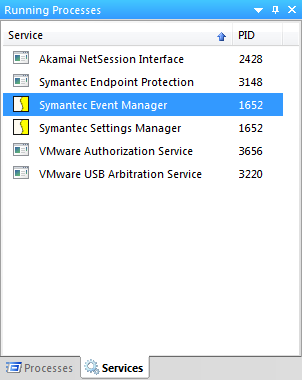
The Running Processes window displays a list of running processes and services that can be hooked. You can also right click on any process to launch the memory editor.


ºMonitoring of Services
Monitoring of Windows Services is supported. The following screenshot displays calls made by the Print Spooler service when a document was printed to Microsoft XPS Document Writer. Please note that to enable monitoring of services, your user account must have sufficient privileges (Administrator mode in Vista).


ºCustom DLL Monitoring

API Monitor supports creating definitions for any DLL. Definitions are created in XML format


ºThreads

The Hooked Processes window displays processes that were previously hooked or are currently being monitored. Expanding the process displays all threads for the process. The thread marked with “M” is the main thread of the process. Threads marked with “W” are worker threads. Inactive threads are grayed out and are also marked with a red square in their icon. Each thread displays the Thread ID and start address for the thread.


Share:

Source code editor - Notepad++


What is Notepad++ ?

Notepad++ is a free (free as in both "free speech" and "free beer") source code editor and Notepad replacement that supports several programming languages and natural languages. Running in the MS Windows environment, its use is governed by GPL License.

Features

ºSyntax Highlighting and Syntax Folding
ºPCRE (Perl Compatible Regular Expression) Search/Replace
ºGUI entirely customizable: minimalist, tab with close button, multi-line tab, vertical tab and vertical document list
ºDocument Map
ºAuto-completion: Word completion, Function completion and  Function parameters hint
ºMulti-Document (Tab interface)
ºMulti-View
ºWYSIWYG (Printing)
ºZoom in and zoom out
ºMulti-Language environment supported
ºBookmark
ºMacro recording and playback
ºLaunch with different arguments


Share:

Saturday, February 6, 2016

Advanced Win32 executable file compressor - ASPack (Full)


Obs, Create a virtual machine laboratory to test the software, I am not responsible for damages


ASPack is an advanced Win32 executable file compressor, capable of reducing the file size of 32-bit Windows programs by as much as 70%. (ASPack's compression ratio improves upon the industry-standard zip file format by as much as 10-20%.) ASPack makes Windows 2000/XP/Vista/7/8/10 and Windows Server 2003/2008/2012 programs and libraries smaller, and decrease load times across networks, and download times from the internet; it also protects programs against reverse engineering by non-professional hackers. Programs compressed with ASPack are self-contained and run exactly as before, with no runtime performance penalties.


Share:

Ultimate Packet for Executables - UPX


Overview

UPX achieves an excellent compression ratio and offers very fast decompression. Your executables suffer no memory overhead or other drawbacks for most of the formats supported, because of in-place decompression. 

UPX strengths in a nutshell:

ºexcellent compression ratio: typically compresses better than WinZip/zip/gzip, use UPX to decrease the size of your distribution!
ºvery fast decompression: ~10 MB/sec on an ancient Pentium 133, ~200 MB/sec on an Athlon XP 2000+.
ºno memory overhead for your compressed executables because of in-place decompression.
ºsafe: you can list, test and unpack your executables. Also, a checksum of both the compressed and uncompressed file is maintained internally.
ºuniversal: UPX can pack a number of executable formats.
ºportable: UPX is written in portable endian-neutral C++.
ºextendable: because of the class layout it's very easy to add new executable formats or new compression algorithms.
ºfree: UPX is distributed with full source code under the GNU General Public License v2+, with special exceptions granting the free usage for commercial programs as stated in the UPX License Agreement.

You probably understand now why we call UPX the "Ultimate Packer for eXecutables". UPX aims to be commercial quality free software, based on experience with our previous packers (DJP, lzop, and the NRV library).


Share:

GlassFish Security


Book Description:

Security is driven by requirement and design and we implement security on the basis of the requirements provided by analysts. In this book, we take a programmatic approach to understand Java EE and GlassFish security.You will find plenty of code samples in this book. It is easy to secure your application when you have a demonstration of a complete and working application explained in the book, isn’t it? Each chapter starts with the importance and relevance of the topic by introducing some Java EE applications requirement, which will encourage you to read it further.This book is for application designers, developers and administrators who work with GlassFish and are keen to understand Java EE and GlassFish security.To take full advantage of this book, you need to be familiar with Java EE and GlassFish application servers. You will love this book if you are looking for a book that covers Java EE security and using GlassFish features to create secure Java EE applications, or to secure the GlassFish installation and operating environment and using OpenSSO.


alt : GlassFish Security.pdf


Source: allitebooks

By Offensive Sec
Share:

Spring Security 3


Book Description:

Security is of critical importance to all web applications. Vulnerable applications are easy prey for hackers. This book is the perfect tool for Java developers looking to repel attacks against their web applications using the proven Spring Security library to achieve this.

A comprehensive guide to Spring Security 3. You will learn through real world business scenarios how to guard against the latest threats. You will also learn to combine Spring Security 3 with external security providers such as LDAP, OpenID, CAS, Kerberos, and Active Directory.

The book starts by giving an overview of security concepts and techniques, as well as setup and configuration. The book then gets you working with a JSP based web application that implements a simple e-commerce website. At this point you will progressively enhance the application giving you hands on experience implementing features of Spring Security 3 in real world business scenarios.

The second half of the book is devoted to common integration scenarios that you will come accross every day. At this stage you will be in a position to solve specific, complex integration problems. The book will end by showing migration from Spring Security 2 to 3.

This practical guide will show you how to implement Spring Security 3 and protect your applications from being breached using a combination of real world, straightforward examples.


alt : Spring Security 3.pdf


Source: allitebooks

By Offensive Sec
Share:

Protect Your Privacy


Book Description:

Have you ever thought about your security online? Do you ever wonder how you can stay safe on the web? If your answers to these questions were both “yes” then you need to get this book today. James Eldredge, a thirteen year computer veteran, has put together a book filled with the most essential tips, tricks and “How-To’s” that every Internet user must know. Based on his personal experience in working with clients of all skill levels, James put together this book to help novice and moderately skilled computer users tackle some of the most common issues that he has seen in his work. Here’s a sampling of what you’ll learn from “Protect Your Privacy!”: – Common Ways Attackers Steal Your Data – Easy Ways to Secure Your Web Browser – How to Secure Your Passwords Against ANY Attack – How to Stay Anonymous When Browsing the Web – Essential Habits You Need to Stay Safe Online – How to Protect Against Dangerous Software Vulnerabilities – Advanced Data Protection Methods – And much more! Keeping to his philosophy of making things as simple as possible, James stripped out all unnecessary content from this book, reducing it down to the absolute essential tips and tricks and making sure that they’re all in plain english, with step-by-step instructions for each one. If you’re looking for a gigantic manual filled with computer jargon and hundreds of pages of instructions that you’ll never read or use, don’t buy this book. If you’re looking for a book that covers some of the most essential information you NEED to have to stay safe online, give “Protect Your Privacy!” a try. James Eldredge is a thirteen year computer technology veteran and has worked with all types of clients, from stay-at-home moms to multi-million dollar law firms. James focuses on a simple approach to troubleshooting, focusing on the smart way of troubleshooting instead of beating his head against the wall. This unique angle has gained him hundreds of happy clients and helped him build a successful consulting business that helps teach users as much as it fixes their problems.


alt : Protect Your Privacy.pdf


Source: allitebooks

By Offensive Sec
Share:

Hacking - Basic Security, Penetration Testing and How to Hack


Book Description:

Do You Want To Learn How to Hack? Have you always wanted to hack? Do you want to learn more about hacking? Are you interested in the basics of hacking and successful at it? This easy guide will help transform and increase your hacking skill set. You’ll be excited to see your skills improve drastically and effectively whenever your hacking. Hurry! Scroll to the top and “BUY” your copy today!


alt : Hacking - Basic Security, Penetration Testing and How to Hack.pdf


Source: allitebooks

By Offensive Sec
Share:
Established in 2015. Offensive Sec Blog has been sharing security research, hacking tools, threat intelligence, and offensive security content since 2015.
Copyright © OffSec Blog | Powered by OffensiveSec
Design by OffSec | Built for the security community