SECURITY EDUCATION, PRIVACY GUIDANCE, THREAT AWARENESS, OPEN SOURCE TOOLS, RESEARCH NOTES, AND RESPONSIBLE TECHNOLOGY CONTENT

  • Penetration Testing Distribution - BackBox

    BackBox is a penetration test and security assessment oriented Ubuntu-based Linux distribution providing a network and informatic systems analysis toolkit. It includes a complete set of tools required for ethical hacking and security testing...
  • Pentest Distro Linux - Weakerth4n

    Weakerth4n is a penetration testing distribution which is built from Debian Squeeze.For the desktop environment it uses Fluxbox...
  • The Amnesic Incognito Live System - Tails

    Tails is a live system that aims to preserve your privacy and anonymity. It helps you to use the Internet anonymously and circumvent censorship...
  • Penetration Testing Distribution - BlackArch

    BlackArch is a penetration testing distribution based on Arch Linux that provides a large amount of cyber security tools. It is an open-source distro created specially for penetration testers and security researchers...
  • The Best Penetration Testing Distribution - Kali Linux

    Kali Linux is a Debian-based distribution for digital forensics and penetration testing, developed and maintained by Offensive Security. Mati Aharoni and Devon Kearns rewrote BackTrack...
  • Friendly OS designed for Pentesting - ParrotOS

    Parrot Security OS is a cloud friendly operating system designed for Pentesting, Computer Forensic, Reverse engineering, Hacking, Cloud pentesting...

Thursday, September 21, 2017

Microsoft PowerShell Module to Find HoneyPots and HoneyTokens in the Network - HoneypotBuster


Microsoft PowerShell module designed for red teams that can be used to find honeypots and honeytokens in the network or at the host.

CodeExecution
Execute code on a target machine using Import-Module.

Invoke-HoneypotBuster
HoneypotBuster is a tool designed to spot Honey Tokens, Honey Bread Crumbs, and Honey Pots used by common Distributed Deception vendors. This tool will help spot the following deception techniques:

1. Kerberoasting Service Accounts Honey Tokens

Just like the one described in the ADSecurity article by Sean Metcalf, this tricks attackers to scan for Domain Users with assigned SPN (Service Principal Name) and {adminCount = 1} LDAP Attribute flag. So when you try to request TGS for that user, you’ll be exposed as Kerberoasting attempt. TGS definition: A ticket granting server (TGS) is a logical key distribution center (KDC) component that is used by the Kerberos protocol as a trusted third party.

2. Fake Computer Accounts Honey Pots

Creating many domain computer objects with no actual devices associated to them will result in confusion to any attacker trying to study the network. Any attempt to perform lateral movement into these fake objects will lead to exposure of the attacker.

3. Fake Credentials Manager Credentials Breadcrumbs

Many deception vendors are injecting fake credentials into the “Credentials Manager”. These credentials will also be revealed using tools such as Mimikatz. Although they aren’t real, attackers might confuse them as authentic credentials and use them.

4. Fake Domain Admins Accounts Honey Tokens

Creating several domain admins and their credentials who have never been active is bad policy. These Honey Tokens lure attackers to try brute-forcing domain admin credentials. Once someone tries to authenticate to this user, an alarm will be triggered, and the attacker will be revealed. Microsoft ATA uses this method.

5. Fake Mapped Drives Breadcrumbs

Many malicious automated scripts and worms are spreading via SMB Shares, especially if they’re mapped as Network Drive Share. This tool will try to correlate some of the data collected before to identify any mapped drive related to a specific Honey Pot server.

6. DNS Records Manipulation HoneyPots

One of the methods deception vendors use to detect fake endpoints is registering their DNS records towards the Honey Pot Server. They will then be able to point the attacker directly to their honey pot instead of actual endpoints.


Usage

To install any of these modules, drop the PowerShell scripts into a directory and type
Import-Module PathTo\scriptName.ps1

Then run the Module from the Powershell.
Refer to the comment-based help in each individual script for detailed usage information.


Share:

Sunday, September 10, 2017

Simple HS256 JWT Token Brute Force Cracker - jwt-cracker


Simple HS256 JWT token brute force cracker.
Effective only to crack JWT tokens with weak secrets.
Recommendation: Use strong long secrets or RS256 tokens.

Install

With npm:
npm install --global jwt-cracker

Usage

From command line:
jwt-cracker <token> [<alphabet>] [<maxLength>]
Where:
  • token: the full HS256 JWT token string to crack
  • alphabet: the alphabet to use for the brute force (default: "abcdefghijklmnopqrstuwxyzABCDEFGHIJKLMNOPQRSTUWXYZ0123456789")
  • maxLength: the max length of the string generated during the brute force (default: 12)

Requirements

This script requires Node.js version 6.0.0 or higher

Example

Cracking the default jwt.io example:
jwt-cracker "eyJhbGciOiJIUzI1NiIsInR5cCI6IkpXVCJ9.eyJzdWIiOiIxMjM0NTY3ODkwIiwibmFtZSI6IkpvaG4gRG9lIiwiYWRtaW4iOnRydWV9.TJVA95OrM7E2cBab30RMHrHDcEfxjoYZgeFONFh7HgQ" "abcdefghijklmnopqrstuwxyz" 6
It takes about 2 hours in a Macbook Pro (2.5GHz quad-core Intel Core i7).


Share:

The Cyber Swiss Army Knife [A Web App For Encryption, Encoding, Compression And Data Analysis] - CyberChef


The Cyber Swiss Army Knife

CyberChef is a simple, intuitive web app for carrying out all manner of "cyber" operations within a web browser. These operations include simple encoding like XOR or Base64, more complex encryption like AES, DES and Blowfish, creating binary and hexdumps, compression and decompression of data, calculating hashes and checksums, IPv6 and X.509 parsing, changing character encodings, and much more.
The tool is designed to enable both technical and non-technical analysts to manipulate data in complex ways without having to deal with complex tools or algorithms. It was conceived, designed, built and incrementally improved by an analyst in their 10% innovation time over several years. Every effort has been made to structure the code in a readable and extendable format, however it should be noted that the analyst is not a professional developer.

Live demo

CyberChef is still under active development. As a result, it shouldn't be considered a finished product. There is still testing and bug fixing to do, new features to be added and additional documentation to write. Please contribute!
Cryptographic operations in CyberChef should not be relied upon to provide security in any situation. No guarantee is offered for their correctness.


How it works

There are four main areas in CyberChef:
  1. The input box in the top right, where you can paste, type or drag the data you want to operate on.
  2. The output box in the bottom right, where the outcome of your processing will be displayed.
  3. The operations list on the far left, where you can find all the operations that CyberChef is capable of in categorised lists, or by searching.
  4. The recipe area in the middle, where you can drag the operations that you want to use and specify arguments and options.
You can use as many operations as you like in simple or complex ways. Some examples are as follows:

Features
  • Drag and drop
    • Operations can be dragged in and out of the recipe list, or reorganised.
    • Files can be dragged over the input box to load them directly.
  • Auto Bake
    • Whenever you modify the input or the recipe, CyberChef will automatically “bake” for you and produce the output immediately.
    • This can be turned off and operated manually if it is affecting performance (if the input is very large, for instance).
    • If any bake takes longer than 200 milliseconds, auto bake will be switched off automatically to prevent further performance issues.
  • Breakpoints
    • You can set breakpoints on any operation in your recipe to pause execution before running it.
    • You can also step through the recipe one operation at a time to see what the data looks like at each stage.
  • Save and load recipes
    • If you come up with an awesome recipe that you know you’ll want to use again, just click save and add it to your local storage. It'll be waiting for you next time you visit CyberChef.
    • You can also copy a URL which includes your recipe and input which can be shared with others.
  • Search
    • If you know the name of the operation you want or a word associated with it, start typing it into the search field and any matching operations will immediately be shown.
  • Highlighting
  • Save to file and load from file
    • You can save the output to a file at any time or load a file by dragging and dropping it into the input field (note that files larger than about 500kb may cause your browser to hang or even crash due to the way that browsers handle large amounts of textual data).
  • CyberChef is entirely client-side
    • It should be noted that none of your input or recipe configuration is ever sent to the CyberChef web server - all processing is carried out within your browser, on your own computer.
    • Due to this feature, CyberChef can be compiled into a single HTML file. You can download this file and drop it into a virtual machine, share it with other people, or use it independently on your desktop.

Browser support

CyberChef is built to support
  • Google Chrome 40+
  • Mozilla Firefox 35+
  • Microsoft Edge 14+

Share:

Saturday, September 9, 2017

This script will make your life easier, and of course faster - lscript


This is a script that automates many procedures about wifi penetration and hacking.

Features

Enabling-Disabling interfaces faster Changing Mac faster Anonymizing yourself faster View your public IP faster View your MAC faster

TOOLS
You can install whichever tool(s) you want from within lscript! 
Fluxion    by Deltaxflux
WifiTe    by derv82
Wifiphisher   by Dan McInerney
Zatacker   by LawrenceThePentester
Morpheus   by Pedro ubuntu  [ r00t-3xp10it ]
Osrframework   by i3visio
Hakku    by 4shadoww
Trity    by Toxic-ig
Cupp    by Muris Kurgas
Dracnmap   by Edo -maland-
Fern Wifi Cracker  by Savio-code
Kichthemout   by Nikolaos Kamarinakis & David SchĂźtz
BeeLogger   by Alisson Moretto - 4w4k3
Ghost-Phisher   by Savio-code
Mdk3-master                     by Musket Developer
Anonsurf                        by Und3rf10w
The Eye                         by EgeBalci
Airgeddon                       by v1s1t0r1sh3r3
Xerxes                          by zanyarjamal
Ezsploit                        by rand0m1ze
Katana framework                by PowerScript
4nonimizer                      by Hackplayers
Sslstrip2                       by LeonardoNve
Dns2proxy                       by LeonardoNve
Pupy                            by n1nj4sec
Zirikatu                        by pasahitz
TheFatRat                       by Sceetsec
Angry IP Scanner                by Anton Keks
Sniper                          by 1N3
ReconDog                        by UltimateHackers
RED HAWK                        by Tuhinshubhra
Routersploit                    by Reverse shell
CHAOS                           by Tiagorlampert
Winpayloads                     by Ncc group 
Wifi password scripts
Handshake       (WPA-WPA2)
Find WPS pin    (WPA-WPA2)
WEP hacking     (WEP)    
Others
Email spoofing
Metasploit automation (create payloads,listeners,save listeners for later etc...)
Auto eternalblue exploiting (check on ks) -> hidden shortcuts

How to install
(make sure you are a root user)
Be carefull.If you download it as a .zip file, it will not run.Make sure to follow these simple instructions.
cd
git clone https://github.com/arismelachroinos/lscript.git
cd lscript
chmod +x install.sh
./install.sh

How to run it
(make sure you are a root user)
open terminal
type  "l"
press enter
(Not even "lazy"!! Just "l"! The less you type , the better!)

How to uninstall
cd /root/lscript
./uninstall.sh
rmdir -r /root/lscript 

How to update
Run the script
Type "update"

Things to keep in mind
1)you should be a root user to run the script
2)you should contact me if something doesnt work (Write it on the "issues" tab at the top)
3)you should contact me if you want a feature to be added (Write it on the "issues" tab at the top)

Video


Screenshots


Share:

Android application to brute force WiFi passwords (No Root Required) - WiFi Bruteforcer


WARNING: This project is still under development and by installing the app may misconfigure the Wi-Fi settings of your Android OS, a system restore may be necessary to fix it.

Android application to brute force WiFi passwords without requiring a rooted device.


Share:

Tuesday, August 29, 2017

Investigate Wireless Protocols Like A Boss - Universal Radio Hacker


The Universal Radio Hacker is a software for investigating unknown wireless protocols. Features include
  • hardware interfaces for common Software Defined Radios
  • easy demodulation of signals
  • assigning participants to keep overview of your data
  • customizable decodings to crack even sophisticated encodings like CC1101 data whitening
  • assign labels to reveal the logic of the protocol
  • fuzzing component to find security leaks
  • modulation support to inject the data back into the system
Check out the wiki for more information and supported devices.

Video


Installation
Universal Radio Hacker can be installed via pip or using the package manager of your distribution (if included). Furthermore, you can install urh from source or run it without installation directly from source.

Dependencies
  • Python 3.4+
  • numpy / psutil / zmq
  • PyQt5
  • C++ Compiler
Optional
  • librtlsdr (for native RTL-SDR device backend)
  • libhackrf (for native HackRF device backend)
  • libairspy (for native AirSPy device backend)
  • liblimesdr (for native LimeSDR device backend)
  • libuhd (for native USRP device backend)
  • rfcat (for RfCat plugin to send e.g. with YardStick One)
  • gnuradio / gnuradio-osmosdr (for GNU Radio device backends)

Installation examples

Arch Linux
yaourt -S urh

Ubuntu/Debian
If you want to use native device backends, make sure you install the -dev package for your desired SDRs, that is:
  • AirSpy: libairspy-dev
  • HackRF: libhackrf-dev
  • RTL-SDR: librtlsdr-dev
  • USRP: libuhd-dev
If your device does not have a -dev package, e.g. LimeSDR, you need to manually create a symlink to the .so, like this:
sudo ln -s /usr/lib/x86_64-linux-gnu/libLimeSuite.so.17.02.2 /usr/lib/x86_64-linux-gnu/libLimeSuite.so
before installing URH, using:
sudo apt-get update
sudo apt-get install python3-numpy python3-psutil python3-zmq python3-pyqt5 g++ libpython3-dev python3-pip
sudo pip3 install urh

Gentoo/Pentoo
emerge -av urh

Fedora 25+
dnf install urh

Windows
If you run Python 3.4 on Windows you need to install Visual C++ Build Tools 2015 first.
It is recommended to use Python 3.5 or later on Windows, so no C++ compiler needs to be installed.
  1. Install Python 3 for Windows.
  • Make sure you tick the Add Python to PATH checkbox on first page in Python installer.
  • Choose a 64 Bit Python version for native device support.
  1. In a terminal, type: pip install urh.
  2. Type urh in a terminal or search for urh in search bar to start the application.

Mac OS X
  1. Install Python 3 for Mac OS X. If you experience issues with preinstalled Python, make sure you update to a recent version using the given link.
  2. (Optional) Install desired native libs e.g. brew install librtlsdr for corresponding native device support.
  3. In a terminal, type: pip3 install urh.
  4. Type urh in a terminal to get it started.

Update your installation
If you installed URH via pip you can keep it up to date with
pip3 install --upgrade urh
If this shouldn't work you can try:
python3 -m pip install --upgrade urh

Running from source
If you like to live on bleeding edge, you can run URH from source.

Without installation
To execute the Universal Radio Hacker without installation, just run:
git clone https://github.com/jopohl/urh/
cd urh/src/urh
./main.py
Note, before first usage the C++ extensions will be built.

Installing from source
To install from source you need to have python-setuptools installed. You can get it e.g. with pip install setuptools. Once the setuptools are installed use:
git clone https://github.com/jopohl/urh/
cd urh
python setup.py install
And start the application by typing urh in a terminal.

External decodings
See wiki for a list of external decodings provided by our community! Thanks for that!

Screenshots

Get the data out of raw signals

Keep an overview even on complex protocols

Record and send signals


Share:

A Tool For Security Managers Who Want To Train Their Colleague To Phishing - Mercure


Mercure is a tool for security managers who want to teach their colleagues about phishing.

What Mercure can do:
  • Create email templates
  • Create target lists
  • Create landing pages
  • Handle attachments
  • Let you keep track in the Campaign dashboard
  • Track email reads, landing page visits and attachment execution.
  • Harvest credentials

What Mercure will do:
  • Display more graphs (we like graphs!)
  • Provide a REST API
  • Allow for multi-message campaigns (aka scenarios)
  • Check browser plugins
  • User training

Docker Quickstart

Requirements
  • docker

Available configuration
Environment variable name Status Description Value example
SECRET_KEY Required Django secret key Random string
URL Required Mercure URL https://mercure.example.com
EMAIL_HOST Required SMTP server mail.example.com
EMAIL_PORT Optional SMTP port 587
EMAIL_HOST_USER Optional SMTP user phishing@example.com
EMAIL_HOST_PASSWORD Optional SMTP password P@SSWORD
DEBUG Optional Run on debug mode True
SENTRY_DSN Optional Send debug info to sentry.io https://23xxx:38xxx@sentry.io/1234
AXES_LOCK_OUT_AT_FAILURE Optional Ban on forcebrute login True
AXES_COOLOFF_TIME Optional Ban duration on forcebrute login (in hours) 0.8333
DONT_SERVES_STATIC_FILE Optional Don't serve static files with django True

Sample deployment
# create container
docker run \
    -d \
    --name=mercure \
    -e SECRET_KEY=$(cat /dev/urandom | tr -dc 'a-zA-Z0-9' | fold -w 200 | head -n 1) \
    -e URL=https://mercure.example.com \
    -e EMAIL_HOST=mail.example.com \
    -e EMAIL_PORT=587 \
    -e EMAIL_HOST_USER=phishing@example.com \
    -e EMAIL_HOST_PASSWORD=P@SSWORD \
    synhackfr/mercure

# create super user
docker exec -it mercure python manage.py createsuperuser

Git Quickstart

Requirements
  • python3
  • pip

Deployment
git clone git@bitbucket.org:synhack/mercure.git && cd mercure
pip install -r requirements.txt
./manage.py makemigrations
./manage.py migrate
./manage.py collectstatic
./manage.py createsuperuser
./manage.py runserver

How to use mercure
We can consider mercure is divide between 4 categories :
  • Targets
  • Email Templates
  • Attachments and landing page
  • Campaigns
Targets, Email Templates and Campaign are the minimum required to run a basic phishing campaign.
  1. First, add your targets
    You need to fill mercure name, the target email.Target first and last name are optional, but can be usefull to the landing page
  2. Then, fill the email template.
    You need to fill the mercure name, the subject, the send and the email content. To improve the email quality, you have to fill the email content HTML and the text content. To get information about opened email, check "Add open email tracker" You can be helped with "Variables" category.
    Attachments and landing page are optionnal, we will see it after.
  3. Finally, launch the campaign
    You need to fill the mercure name, select the email template and the target group. You can select the SMTP credentials, SSL using or URL minimazing
  4. Optional, add landing page
    You need to fill the mercure name, the domain to use You can use "Import from URL" to copy an existing website.
    You have to fill the page content with text and HTML content by clicking to "Source"
  5. Optional, add Attachment
    You need to fill the mercure name, the file name which appears in the email and the file You also have to check if the the file is buildable or not, if you need to compute a file for example.
    To execute the build , you need to create a zip archive which contain a build script (named 'generator.sh' and a buildable file

Share:

Blind Attacking Framework - BAF


What is BAF ?
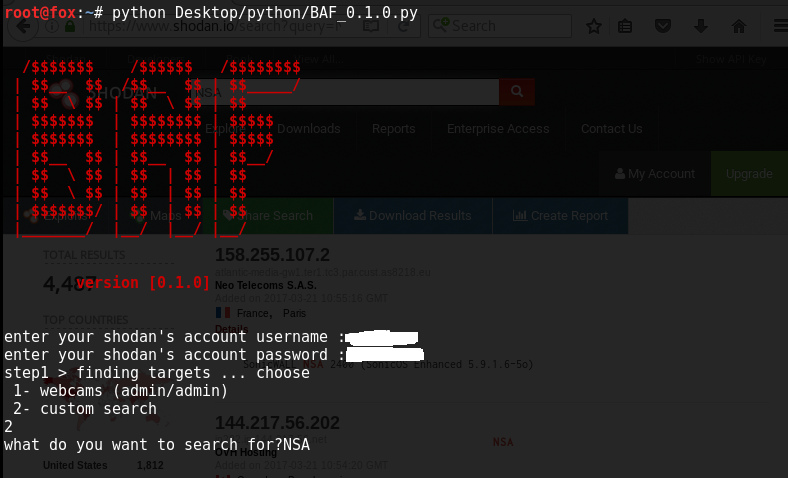
  • it's a framework written in python [2.7] that is being made specially for blind attacking , ie : attacking random targets with common security issues , targets are generated by the hackers search engine "shodan" and vulnerable hosts are hacked in an automated way .
  • this framework is completely "neutral" ie: it's not based on shodan API and it has total dependence on web scraping , ie: the only limit on what you can do with it is your immagination as a tester & our programming skills as contributers/owners .

how to use BAF ?
  • fire up a terminal and sudo apt-get update && apt-get upgrade && apt-get dist-upgrade
  • install [ requests , httplib , urllib , time , bs4 "BeautifulSoup" , colored , selenium , sys ] python modules
  • python BAF_0.1.0.py
  • enter your shodan's account username and pass
  • choose 1 , let it do it's job , press y , close the previous tab , press y ,close the previous tabs ...etc till u have the vulnerable cams only
  • choose 2 , enter what do u want to search for (ie: NSA) , when it's done , refer to the targets text file , it will contain the targets ip:port
  • that's all , till now :)
  • DON'T close a loading webpage
  • beta versions will make automated browser open for better understanding ,but you can close the webcam tabs freely

Screenshots


Share:

Nmap 7.60 - Free Security Scanner For Network Exploration & Security Audits


Nmap ("Network Mapper") is a free and open source utility for network discovery and security auditing. Many systems and network administrators also find it useful for tasks such as network inventory, managing service upgrade schedules, and monitoring host or service uptime. Nmap uses raw IP packets in novel ways to determine what hosts are available on the network, what services (application name and version) those hosts are offering, what operating systems (and OS versions) they are running, what type of packet filters/firewalls are in use, and dozens of other characteristics. It was designed to rapidly scan large networks, but works fine against single hosts. Nmap runs on all major computer operating systems, and official binary packages are available for Linux, Windows, and Mac OS X. In addition to the classic command-line Nmap executable, the Nmap suite includes an advanced GUI and results viewer (Zenmap), a flexible data transfer, redirection, and debugging tool (Ncat), a utility for comparing scan results (Ndiff), and a packet generation and response analysis tool (Nping).

Nmap was named “Security Product of the Year” by Linux Journal, Info World, LinuxQuestions.Org, and Codetalker Digest. It was even featured in twelve movies, including The Matrix ReloadedDie Hard 4Girl With the Dragon Tattoo, and The Bourne Ultimatum.

Features
  • Flexible: Supports dozens of advanced techniques for mapping out networks filled with IP filters, firewalls, routers, and other obstacles. This includes many port scanning mechanisms (both TCP & UDP), OS detectionversion detection, ping sweeps, and more. See the documentation page.
  • Powerful: Nmap has been used to scan huge networks of literally hundreds of thousands of machines.
  • Portable: Most operating systems are supported, including LinuxMicrosoft WindowsFreeBSDOpenBSDSolarisIRIXMac OS XHP-UXNetBSDSun OSAmiga, and more.
  • Easy: While Nmap offers a rich set of advanced features for power users, you can start out as simply as "nmap -v -A targethost". Both traditional command line and graphical (GUI) versions are available to suit your preference. Binaries are available for those who do not wish to compile Nmap from source.
  • Free: The primary goals of the Nmap Project is to help make the Internet a little more secure and to provide administrators/auditors/hackers with an advanced tool for exploring their networks. Nmap is available for free download, and also comes with full source code that you may modify and redistribute under the terms of the license.
  • Well Documented: Significant effort has been put into comprehensive and up-to-date man pages, whitepapers, tutorials, and even a whole book! Find them in multiple languages here.
  • Supported: While Nmap comes with no warranty, it is well supported by a vibrant community of developers and users. Most of this interaction occurs on the Nmap mailing lists. Most bug reports and questions should be sent to the nmap-dev list, but only after you read the guidelines. We recommend that all users subscribe to the low-traffic nmap-hackers announcement list. You can also find Nmap on Facebook and Twitter. For real-time chat, join the #nmap channel on Freenode or EFNet.
  • Acclaimed: Nmap has won numerous awards, including "Information Security Product of the Year" by Linux Journal, Info World and Codetalker Digest. It has been featured in hundreds of magazine articles, several movies, dozens of books, and one comic book series. Visit the press page for further details.
  • Popular: Thousands of people download Nmap every day, and it is included with many operating systems (Redhat Linux, Debian Linux, Gentoo, FreeBSD, OpenBSD, etc). It is among the top ten (out of 30,000) programs at the Freshmeat.Net repository. This is important because it lends Nmap its vibrant development and user support communities.

Changelog

• [Windows] Updated the bundled Npcap from 0.91 to 0.93, fixing several
issues with installation and compatibility with the Windows 10 Creators
Update.

• [NSE][GH#910] NSE scripts now have complete SSH support via libssh2,
including password brute-forcing and running remote commands, thanks to the
combined efforts of three Summer of Code students: [Devin Bjelland, Sergey
Khegay, Evangelos Deirmentzoglou]

• [NSE] Added 14 NSE scripts from 6 authors, bringing the total up to 579!
They are all listed at https://nmap.org/nsedoc/, and the summaries are
below:

   - ftp-syst sends SYST and STAT commands to FTP servers to get system
   version and connection information. [Daniel Miller]
   - [GH#916] http-vuln-cve2017-8917 checks for an SQL injection
   vulnerability affecting Joomla! 3.7.x before 3.7.1. [Wong Wai Tuck]
   - iec-identify probes for the IEC 60870-5-104 SCADA protocol. [Aleksandr
   Timorin, Daniel Miller]
   - [GH#915] openwebnet-discovery retrieves device identifying information
   and number of connected devices running on openwebnet protocol. [Rewanth
   Cool]
   - puppet-naivesigning checks for a misconfiguration in the Puppet CA
   where naive signing is enabled, allowing for any CSR to be automatically
   signed. [Wong Wai Tuck]
   - [GH#943] smb-protocols discovers if a server supports dialects NT LM
   0.12 (SMBv1), 2.02, 2.10, 3.00, 3.02 and 3.11. This replaces the old
   smbv2-enabled script. [Paulino Calderon]
   - [GH#943] smb2-capabilities lists the supported capabilities of
   SMB2/SMB3 servers. [Paulino Calderon]
   - [GH#943] smb2-time determines the current date and boot date of SMB2
   servers. [Paulino Calderon]
   - [GH#943] smb2-security-mode determines the message signing
   configuration of SMB2/SMB3 servers. [Paulino Calderon]
   - [GH#943] smb2-vuln-uptime attempts to discover missing critical
   patches in Microsoft Windows systems based on the SMB2 server uptime.
   [Paulino Calderon]
   - ssh-auth-methods lists the authentication methods offered by an SSH
   server. [Devin Bjelland]
   - ssh-brute performs brute-forcing of SSH password credentials. [Devin
   Bjelland]
   - ssh-publickey-acceptance checks public or private keys to see if they
   could be used to log in to a target. A list of known-compromised key pairs
   is included and checked by default. [Devin Bjelland]
   - ssh-run uses user-provided credentials to run commands on targets via
   SSH. [Devin Bjelland]

• [NSE] Removed smbv2-enabled, which was incompatible with the new SMBv2/3
improvements. It was fully replaced by the smb-protocols script.

• [Ncat][GH#446] Added Datagram TLS (DTLS) support to Ncat in connect
(client) mode with --udp --ssl. Also added Application Layer Protocol
Negotiation (ALPN) support with the --ssl-alpn option. [Denis Andzakovic,
Daniel Miller]

• Updated the default ciphers list for Ncat and the secure ciphers list for
Nsock to use "!aNULL:!eNULL" instead of "!ADH". With the addition of ECDH
ciphersuites, anonymous ECDH suites were being allowed. [Daniel Miller]

• [NSE][GH#930] Fix ndmp-version and ndmp-fs-info when scanning Veritas
Backup Exec Agent 15 or 16. [Andrew Orr]

• [NSE][GH#943] Added new SMB2/3 library and related scripts. [Paulino
Calderon]

• [NSE][GH#950] Added wildcard detection to dns-brute. Only hostnames that
resolve to unique addresses will be listed. [Aaron Heesakkers]

• [NSE] FTP scripts like ftp-anon and ftp-brute now correctly handle
TLS-protected FTP services and use STARTTLS when necessary. [Daniel Miller]

• [NSE][GH#936] Function url.escape no longer encodes so-called
"unreserved" characters, including hyphen, period, underscore, and tilde,
as per RFC 3986. [nnposter]

• [NSE][GH#935] Function http.pipeline_go no longer assumes that persistent
connections are supported on HTTP 1.0 target (unless the target explicitly
declares otherwise), as per RFC 7230. [nnposter]

• [NSE][GH#934] The HTTP response object has a new member, version, which
contains the HTTP protocol version string returned by the server, e.g.
"1.0". [nnposter]

• [NSE][GH#938] Fix handling of the objectSID Active Directory attribute by
ldap.lua. [Tom Sellers]

• [NSE] Fix line endings in the list of Oracle SIDs used by
oracle-sid-brute. Carriage Return characters were being sent in the
connection packets, likely resulting in failure of the script. [Anant
Shrivastava]

• [NSE][GH#141] http-useragent-checker now checks for changes in HTTP
status (usually 403 Forbidden) in addition to redirects to indicate
forbidden User Agents. [Gyanendra Mishra]


Share:
Established in 2015. Offensive Sec Blog has been sharing security research, hacking tools, threat intelligence, and offensive security content since 2015.
Copyright © OffSec Blog | Powered by OffensiveSec
Design by OffSec | Built for the security community